18
GB
HT-CT180
4-559-026-11(1)
F:\HT-CZ1-11_UC\4559026111\4559026111HTCT180UC\01GB-
HTCT180UC\070ADD.fm
masterpage: Left
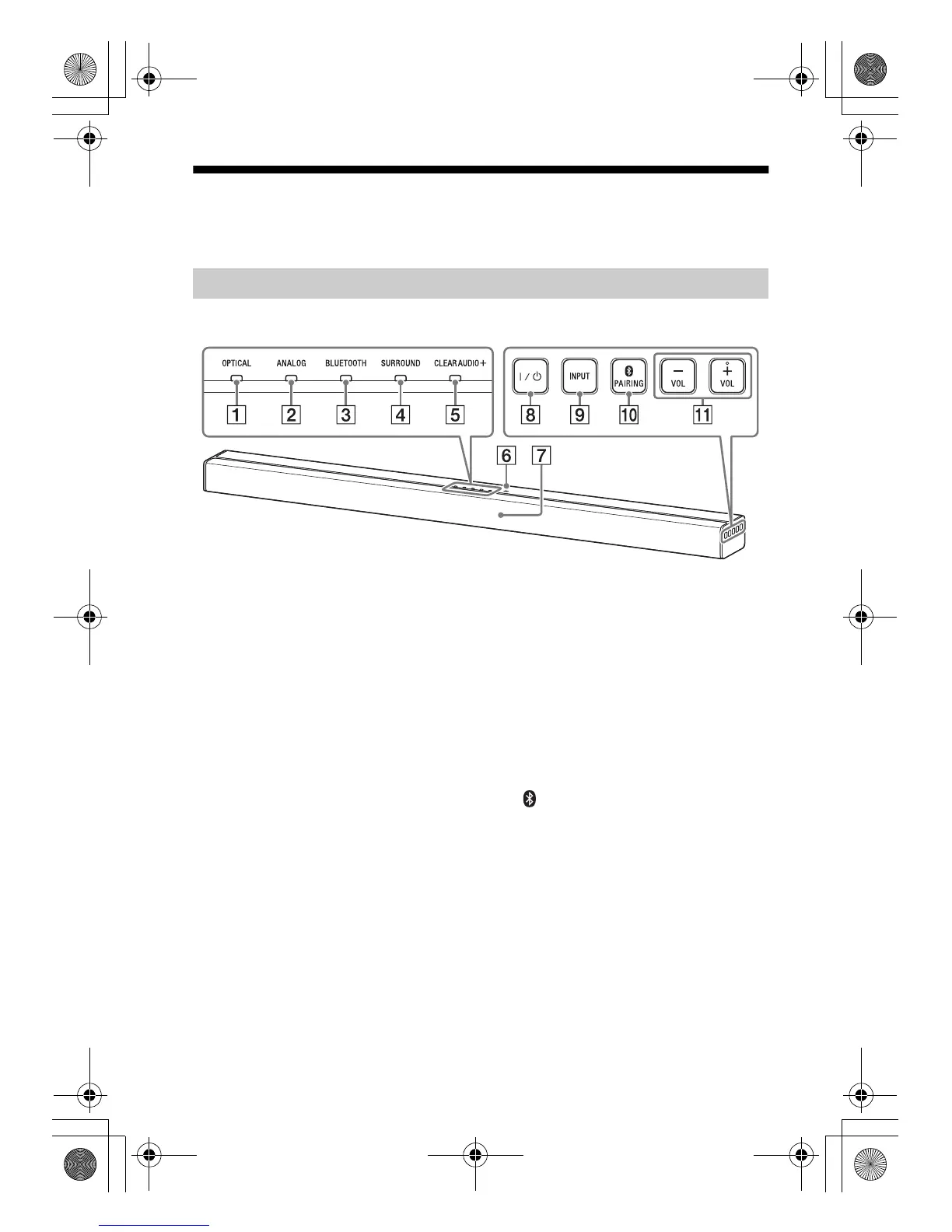
Guide to parts and controls
For more information, refer to the pages indicated in parentheses.
OPTICAL indicator (page 7)
ANALOG indicator (page 7)
BLUETOOTH indicator (blue)
BLUETOOTH status
– During BLUETOOTH pairing:
Flashes quickly
– BLUETOOTH connection is being
attempted: Flashes
– BLUETOOTH connection has been
established: Lit
– BLUETOOTH standby mode (when
the system is off): Unlit
SURROUND indicator (page 8)
CLEARAUDIO+ indicator
(page 8)
N-Mark (page 9)
Position the NFC-compatible device
near this indication to activate the
NFC function.
Remote control sensor
/ (on/standby) button
Turns on the system, or sets it to
standby mode.
INPUT button (page 7)
PAIRING button (page 9, 11)
VOL (volume) +/– buttons
Bar Speaker
010COV.book Page 18 Thursday, September 18, 2014 5:01 PM



 To Next Page