6
GB
Guide to parts and controls
For more information, refer to the pages indicated in parentheses.
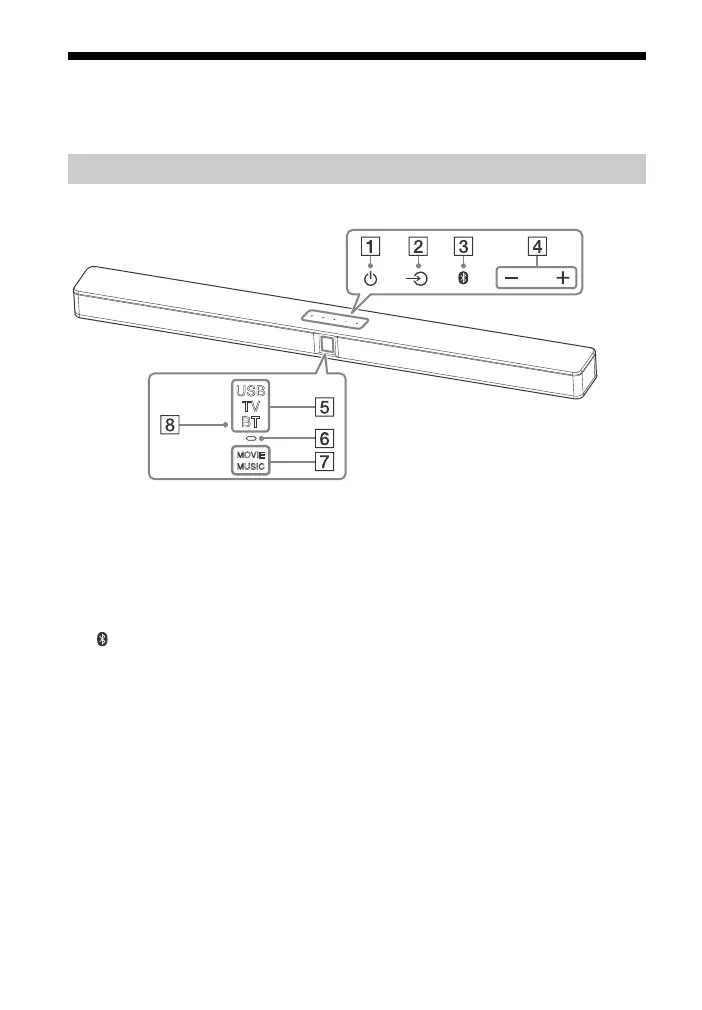
Top and front panel
(power) touch key
Turns on the system or sets it to
standby mode.
(input) touch key (page 12)
Selects the device you want to
use.
(pairing) touch key (page 16)
+/– (volume) touch key
Input indicators* (page 12)
BLUETOOTH indicator (blue)
• Flashes quickly: During
BLUETOOTH pairing
•Flashes: BLUETOOTH
connection is being attempted
• Lights up: BLUETOOTH
connection is established
Sound effect indicators*
(page 14)
Remote control sensor
* LED indicators which light up or flash
depending on the function selected or
system status.
For details on the indications, refer to
“LED Indicators” (page 28).
About touch keys
The touch keys work when you touch
them lightly. Do not press on them with
excessive force.
Bar Speaker



 To Next Page