Using
the
AMP
menu
LSET
I HDMI*
CTRL
----r
00
HDMI
LOFF
VOL
---MAX,49,48,
L1MIT**
...
2,
1,
MIN
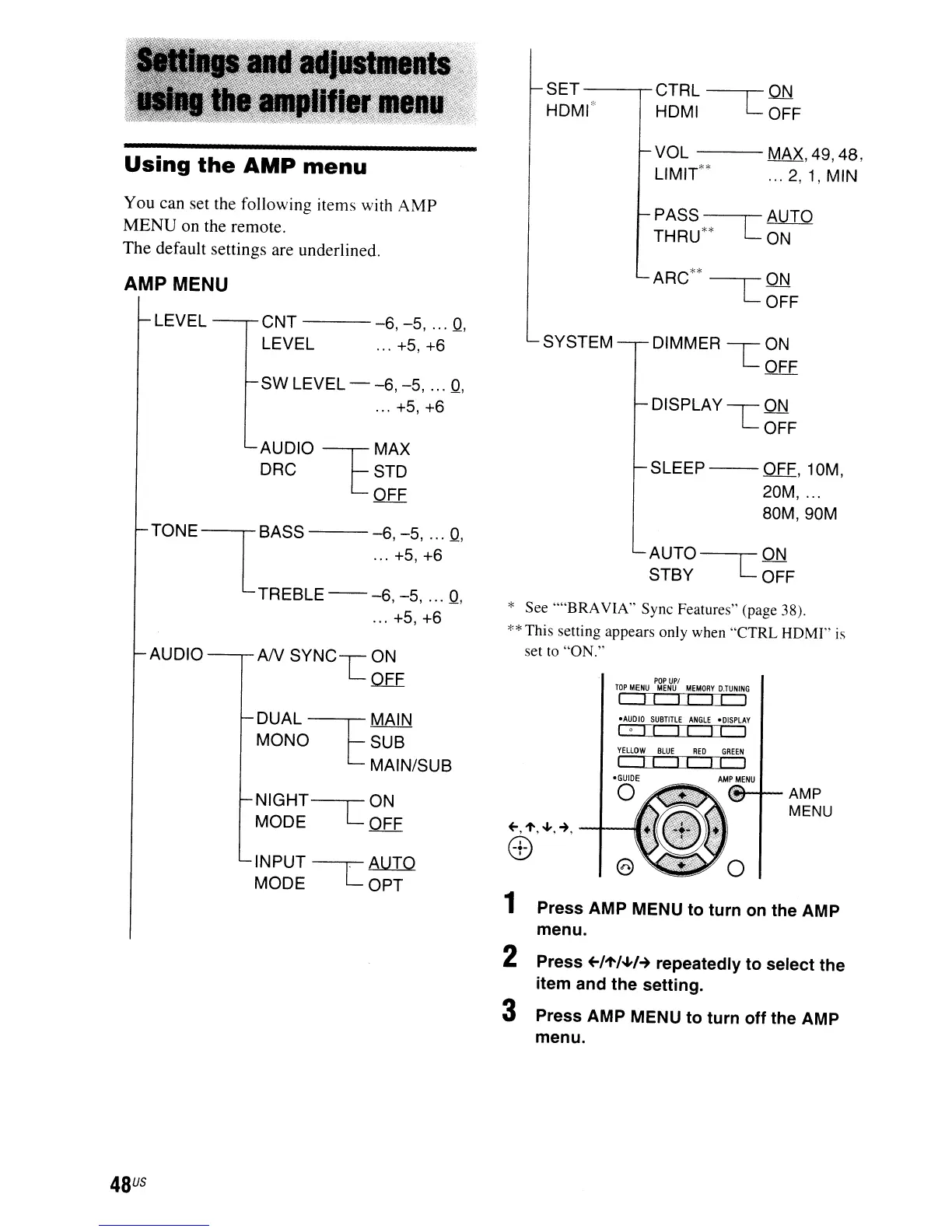
You can set the following items with
AMP
MENU
on the remote.
The
default settings are underlined.
AMP MENU
PASS~AUTO
THRU**
LON
ARC**
ON
--C
OFF
LEVEL
CNT
----6,
-5,
...
Q,
LEVEL ...
+5,+6
SYSTEM DIMMER
-----r
ON
LOFF
SW LEVEL -
-6, -5,
...
Q,
...
+5,+6
AUDIO
--r=
MAX
DRC
[STD
OFF
TONEiBASS
-6,-5,
...
Q,
L
...
+5, +6
TREBLE
--
-6, -5,
...
Q,
... +5, +6
AUDIO-,.-AN
SYNC-r
ON
LQEE
DISPLAY
-r
ON
LOFF
SLEEP--OFF,10M,
20M,
'"
80M, 90M
AUTO
----r
ON
STBY
LOFF
* See ....BRAVIA" Sync Features" (page 38).
**
This setting appears only when "CTRL HDMI" is
set
to
"ON."
POP
UPI
TOP
MENU
MENU
MEMORY
D.TUNING
I
II
II
L:LJ
o
Press AMP MENU to turn off the AMP
-AUDIO
SUBTITLE
ANGLE
-DISPLAY
lol!
I! II
I
YELLOW
BLUE
RED
GREEN
I
I! I!
I I I
-GUIDE
AMP
MENU
o
(v-+--AMP
MENU
Press AMP MENU to turn
on
the AMP
menu.
1
2 Press +-/l'/.J,H repeatedly to select the
item and the setting.
3
DUAL~MAIN
MONO SUB
MAIN/SUB
INPUT
-----r
AUIQ
MODE
LOPT
NIGHT--r0N
MODE
LOFF
menu.
48
US


 To Next Page