11
US
Useful functions
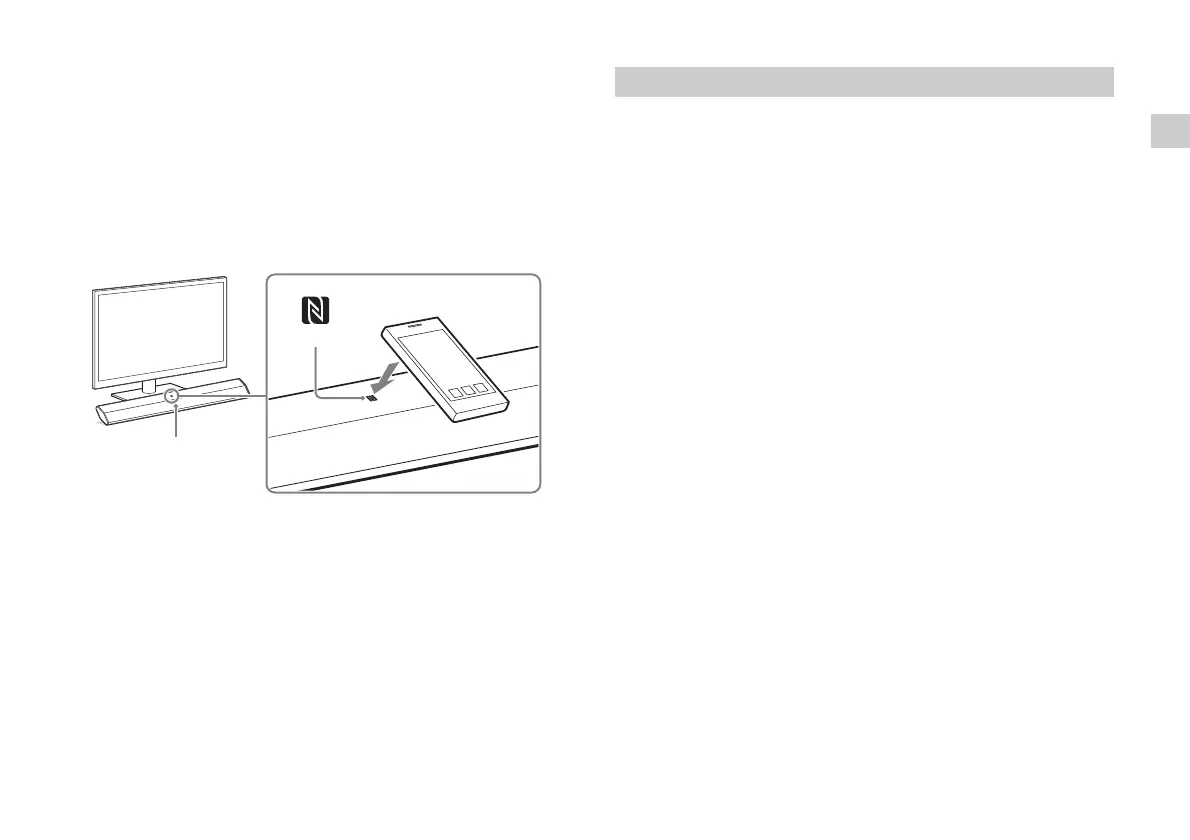
One-Touch connection using the Android device with the
NFC function built-in (NFC)
1 Perform steps 1 to 3 of “When using an Android device.”
2 After the BLUETOOTH connection display appears on the
Android device, touch the Android device with the N mark of
the Bar Speaker.
When the connection has been established, the lamp (blue) of
the Bar Speaker lights.
3 Operate the system with the display of the Android device.
1 Press the (on/standby) button on the remote control.
The display of the Bar Speaker lights.
2 Press the PAIRING button on the remote control.
The lamp (blue) of the Bar Speaker flashes quickly during
BLUETOOTH pairing.
3 Set the iPhone/iPod touch to pairing mode and select
“SONY:HT-CT370” or “SONY:HT-CT770” from the BLUETOOTH
device list on the iPhone/iPod touch.
When the connection has been established, the lamp (blue) of
the Bar Speaker lights.
4 Search for “SongPal” with the connected iPhone/iPod touch
and download that application.
5 Run “SongPal” then operate the system with the display of
the iPhone/iPod touch.
When using an iPhone/iPod touch


 To Next Page