32
GB
Enjoying music on the USB device
You can play music on a device
connected to the (USB) port on the
main unit.
What you can control with SongPal varies
depending on the connected device. The
specification and design of the application
may change without notice.
1 Install the free SongPal app to the
mobile device.
Search for SongPal at Google Play or
the App Store and install it onto
your mobile device.
2 Connect the system and mobile
device with the BLUETOOTH
function (page 25) or network
function (page 16).
3 Start SongPal.
4 Operate by following the SongPal
screen.
• Before using SongPal, be sure to set the
[Bluetooth Mode] to [Receiver] (page 48).
• Use SongPal of the latest version.
Tips
• You can connect the system and mobile
device with the NFC function (page 26).
• When connecting with the network
function, connect the mobile device to
the same network as that of the system.
Using Chromecast built-
in
Chromecast built-in allows you to select
music content from the Chromecast-
enabled app and play back on the
system or group that the system is
included.
1 Press HOME.
The home menu appears on the TV
screen.
2 Select [Music Service List] on the
home menu.
The music service list appears on
the TV screen.
3 Select [Chromecast built-in].
Perform the settings to use
Chromecast built-in on the system
by following the on-screen
message.
After performing the settings,
[Quick Start/Network Standby] is set
to [On] automatically and you can
play music quickly even when the
system is in standby mode
(page 49).
4 Connect the mobile device by Wi-
Fi to the same network as that of
the system.
5 Install the Chromecast-enabled
app to the mobile device.
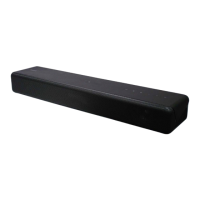
6 Start the Chromecast-enabled
app, tap the cast button, and
select the system or group that
the system is included.
Note
Using SongPal
Notes


 To Next Page