17
GB
Listening to Music on a
USB Device
You can play music files stored on a
connected USB device.
For playable types of files, see “Playable
Types of Files (USB Input)” (page 32).
• To view the USB content list on the TV
screen, make sure you connect the
system to the TV using an HDMI cable.
• Change the input of the TV to the input
which the Bar Speaker is connected.
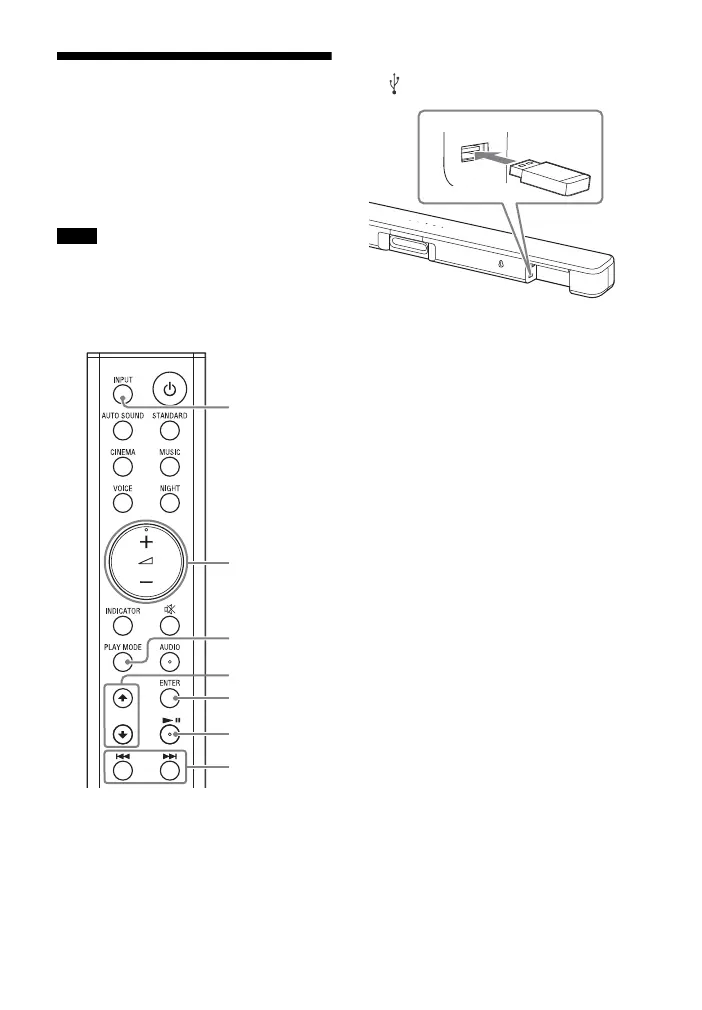
1 Connect the USB device to the
(USB) port.
2 Press INPUT repeatedly to select
the USB input.
The USB indicator lights up and the
USB content list appears on the TV
screen.
3 Press / to select the content
you want, then press ENTER.
The selected content starts playing.
4 Press PLAY MODE repeatedly to
select the play mode you want.
• None: Plays back all tracks.
• [Repeat One]: Repeats one track.
• [Repeat Folder]: Repeats all tracks
in a folder.
• [Shuffle]: Repeats all tracks in a
folder in random order.
The USB indicator flashes twice
each time you press PLAY MODE.
5 Adjust the volume by pressing
+/– on the remote control.
Notes
ENTER
PLAY MODE
+/–
/
INPUT
/



 To Next Page