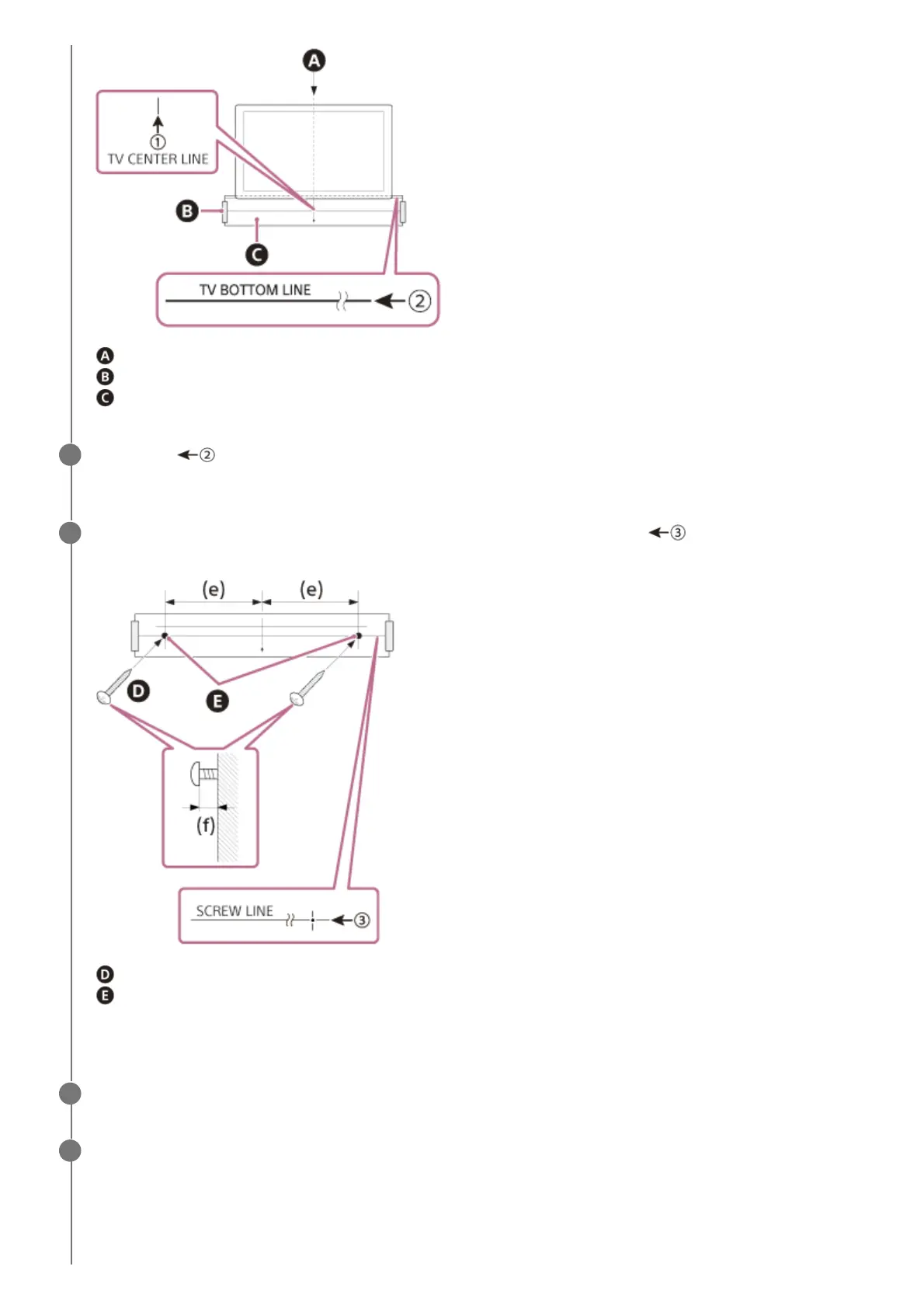
Center of the TV
Adhesive tape, etc.
WALL MOUNT TEMPLATE
Align the “ TV BOTTOM LINE” printed on the WALL MOUNT TEMPLATE with the bottom of your TV,
then adhere the WALL MOUNT TEMPLATE on the wall with a commercially available adhesive tape, etc.
3
Fasten the screws prepared in step 1 securely into the screw marks on the “
SCREW LINE” printed
on the WALL MOUNT TEMPLATE.
Screws
Marks
(e) 254 mm (10 in)
(f) 9.5 mm to 10.5 mm (approx. 13/32 in)
4
Remove the WALL MOUNT TEMPLATE.
5
Connect cables to the bar speaker.
6
Connect the HDMI cable (supplied) to the HDMI OUT (TV (eARC/ARC)) jack on the bar speaker.
1.
Connect the AC adaptor (supplied) to the DC IN terminal on the bar speaker.
2.



 To Next Page