9
GB
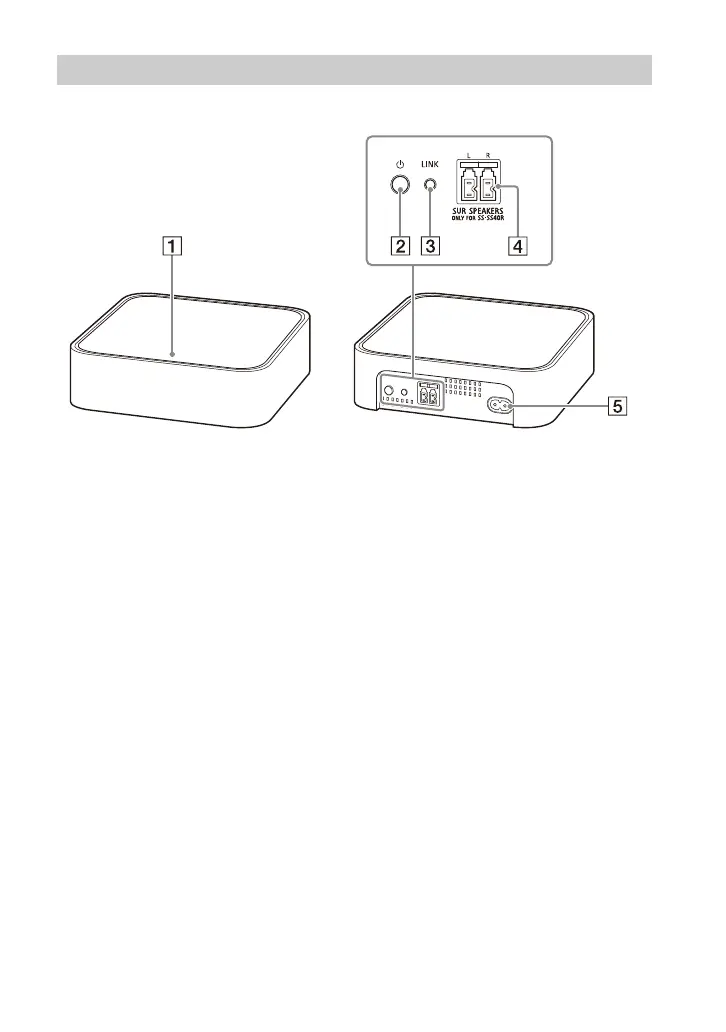
Power indicator
Displays the connecting status
bet
ween the subwoofer and
wireless amplifier, and power
condition of the wireless
amplifier.
Red
– Lights up: The wireless amplifier
is
in standby mode.
Green
– Lights up: The wireless amplifier
is
connected to the subwoofer.
– Flashes slowly: The wireless
ampli
fier is attempting to
connect to the subwoofer.
Amber
– Lights up: The wireless amplifier
is
connected to the subwoofer
via manual connection.
– Flashes slowly: The wireless
ampli
fier is attempting to
connect to the subwoofer via
manual connection.
– Flashes twice repeatedly: The
w
ireless amplifier is in pairing
standby status via manual
connection.
– Flashes quickly: The software is
updat
ing.
Turns off
– The wireless amplifier is turned
of
f.
(p
ower) button
Turns on or off the wireless
ampl
ifier.
LI
NK button (page 15)
SUR SPEAKERS jacks
AC
inlet
Wireless Amplifier


 To Next Page