12
US
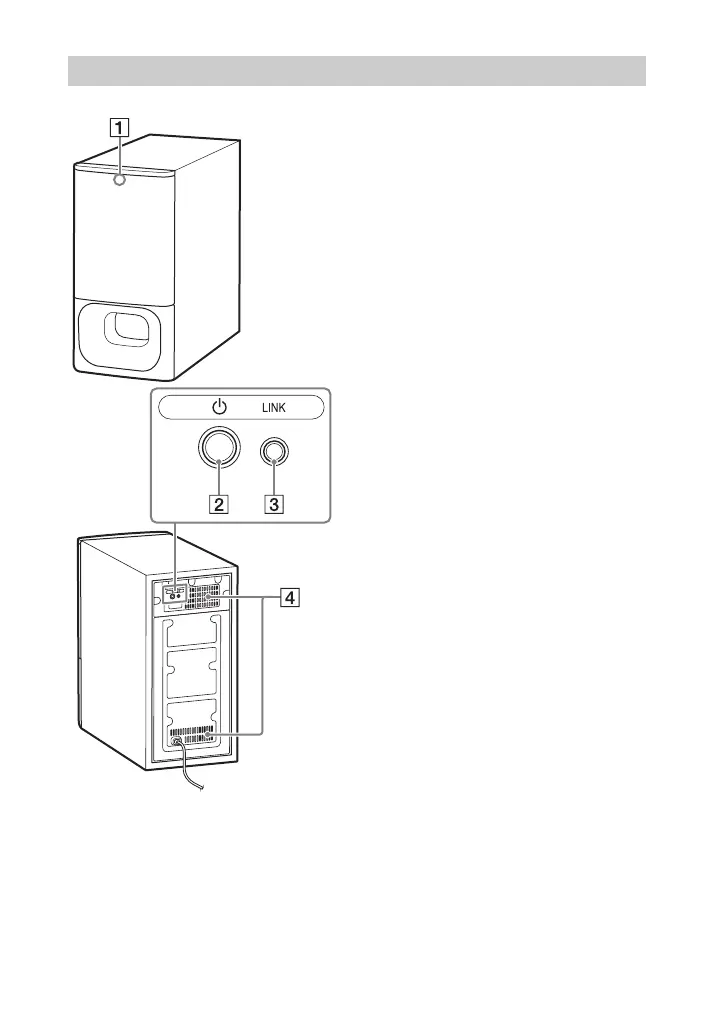
Status indicator
Indicates the status of the
subwoofer power and Bar Speaker
connection.
– Lights in green: The connection
between the subwoofer and Bar
Speaker is established.
– Flashes in green: The connection
between the subwoofer and Bar
Speaker is in progress.
– Lights in orange: The connection
between the subwoofer and Bar
Speaker is established with the
Secure Link function.
– Flashes in orange: The connection
between the subwoofer and Bar
Speaker with the Secure Link
function is in progress.
– Lights in red: The subwoofer is in
standby mode.
– Lights off: The subwoofer is
turned off.
(power) button
Turns on/off the subwoofer.
LINK button (page 23)
Ventilation holes
For safety, do not block the
ventilation holes.
Subwoofer



 To Next Page