21
GB
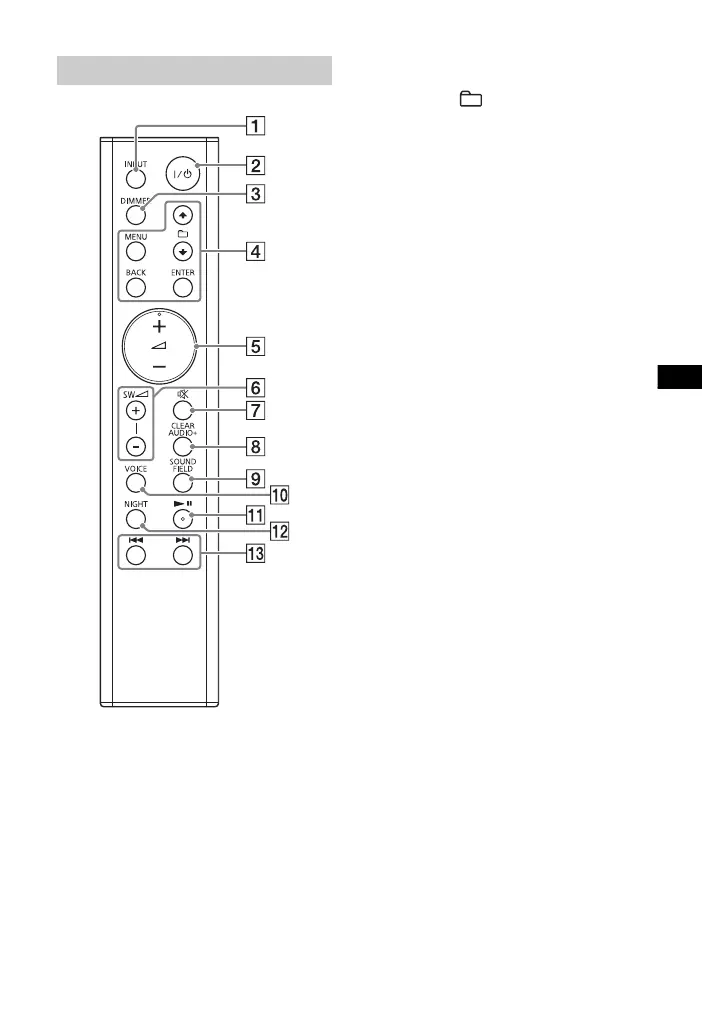
INPUT button
/ (on/standby) button
DIMMER button
The display brightness can be
switched.
Bright Dark Off
• When the display brightness is
set to “Off,” the display is turned
off after the display shows
operation status for several
seconds.
MENU/ (select)/ENTER/
BACK buttons
Press or to select the menu
items. Then press ENTER to enter
the selection.
To return to the previous display,
press BACK.
(volume) +*/– buttons
Adjusts the volume.
SW (subwoofer volume) +/–
buttons
Adjusts the volume of bass
sound.
(muting) button
Turns off the sound temporarily.
CLEARAUDIO+ button
Automatically selects the suitable
sound setting for the sound
source.
SOUND FIELD button (page 7)
Selects a sound mode.
VOICE button (page 8)
* (play/pause) button
Pauses or resumes playback.
NIGHT button (page 8)
/ (previous/next)
buttons
To go to the beginning of the
previous or next file.
*The and + buttons have a tactile
dot. Use it as a guide during operation.
Remote control


 To Next Page