58
<BLACK SHADING>
M03
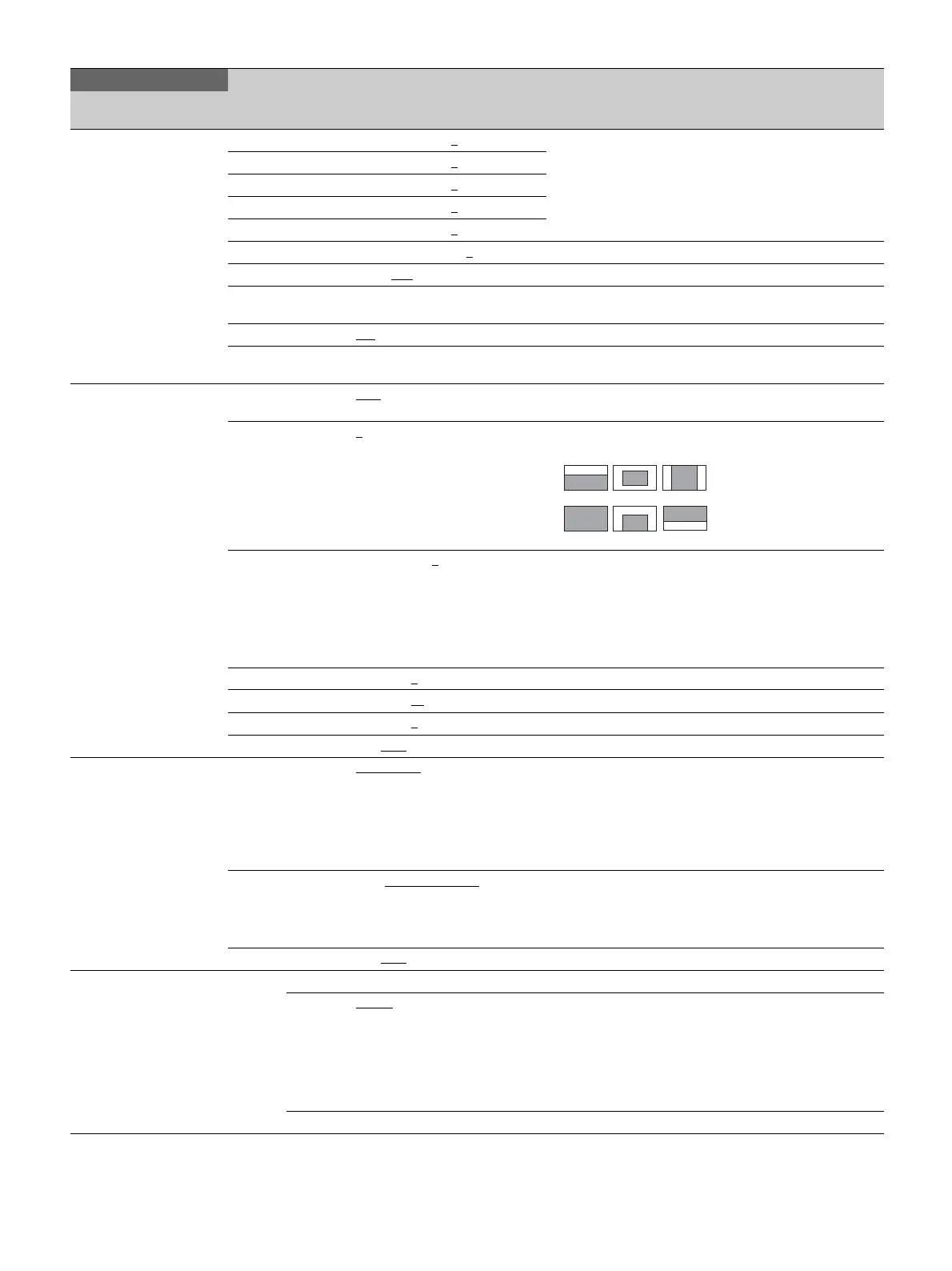
V SAW R/G/B: –99 to 99 0
R, G, and B values can be independently set.
M (master) value can also be set for BLACK.
V PARA R/G/B: –99 to 99 0
H SAW R/G/B: –99 to 99 0
H PARA R/G/B: –99 to 99 0
BLK SET R/G/B: –99 to 99 0
BLACK R/G/B/M: –99 to 99 0
MASTER GAIN −3dB, 0dB, 3dB, 6dB, 9dB, 12dB
AUTO BLACK
SHADING
Execute using ENTER.
2D BLACK SHAD ON
, OFF
BLACK SHADE
CLEAR
Execute using ENTER.
<AUTO IRIS>
M04
AUTO IRIS OFF
, ON (ON): Displayed when in standalone operation mode (not
configurable)
WINDOW 1
, 2, 3, 4, 5, 6 Selects the auto iris detection window.
The shaded parts indicate the area where light detection occurs.
OVERRIDE –99 to 99, - - 0
Sets the override to temporarily change the reference value for
brightness of the automatic iris level in the range of ±2 stops.
–99: Closed by two stops
99: Opened by two stops
- -: Displayed when AUTO IRIS is OFF
The setting returns to 0 when the power is turned off.
IRIS LEVEL –99 to 99 0
±4 stops
APL RATIO –99 to 99 65
IRIS GAIN –99 to 99 0
IRIS CLOSE ON, OFF
<LENS>
M05
F NO. DISP CONTROL, RETURN Switches the iris indicator on the external control device (for
example, RCP or RM) when AUTO IRIS is OFF
CONTROL: Displays the value from the camera.
RETURN: Displays the value returned from the lens.
(When AUTO IRIS is ON, the value returned from the lens is
always displayed.)
ALAC OFF, AUTO(ACTIVE)
,
AUTO(STOP)
With AUTO selected, the status is displayed at the right.
AUTO(ACTIVE): Compensation in progress
AUTO(STOP): Compensation is turned off for a non-applicable
lens
AF DISPLAY ON, OFF
<CIS COMP>
M06
FLICKER REDUCE
MODE AUTO
, ON, OFF, (OFF) (OFF): Displayed for the following settings
• When OUTPUT FORMAT is set to 1080/23.98PsF
• When OUTPUT FORMAT is set to 1080/59.94i,
1080/29.97PsF, 1080/59.94P, or 720/59.94P and FREQ is set
to 60Hz
• When OUTPUT FORMAT is set to 1080/50i, 1080/25PsF,
1080/50P, or 720/50P and FREQ is set to 50Hz
FREQ 60Hz, 50Hz Default setting varies with region of use.
MAINTENANCE
Page name
Page No.
Item Setting Description / Remarks
123
456


 To Next Page
 Loading...