EasyManua.ls Logo

Sony ICF-C103L - Page 5

Sony ICF-C103L
14 pages
Print Icon
To Next Page IconTo Next Page
To Previous Page IconTo Previous Page
Loading...
a
tz(e|(om@)e-lr-ltColam
(atm
[einliele))
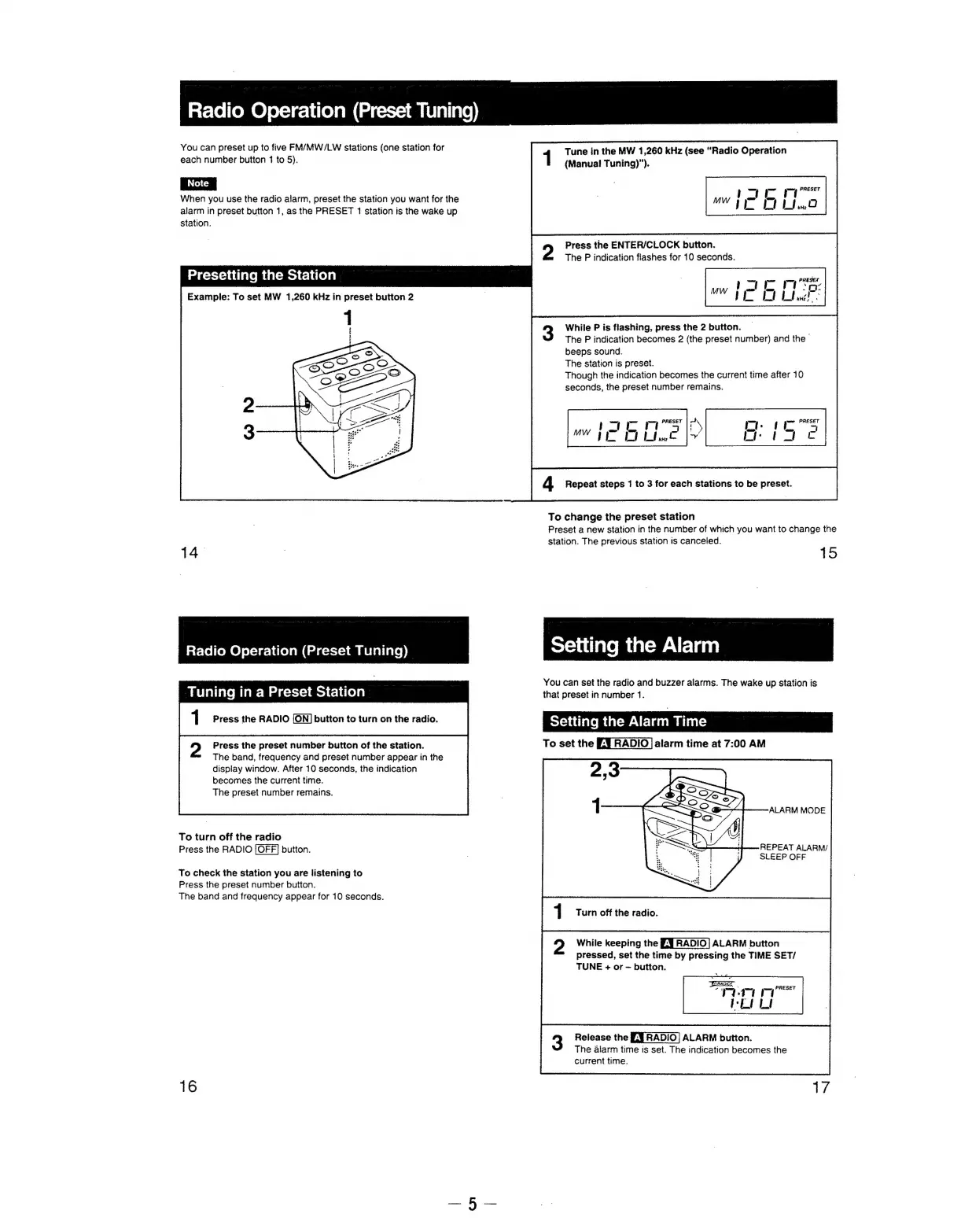
You
can
preset
up
to
five
FM/MW/LW
stations
(one
station
for
each
number
button
1
to
5).
When
you
use
the
radio
alarm,
preset
the
station
you
want
for
the
alarm
in
preset
button
1,
as
the
PRESET
1
station
is
the
wake
up
Station.
Tune
in
the
MW
1,260
kHz
(see
“Radio
Operation
(Manual!
Tuning)”).
1
Press
the
ENTER/CLOCK
button.
The
P
indication
flashes
for
10
seconds.
Presetting
the
Station
Example:
To
set
MW
1,260
kHz
in
preset
button
2
While
P
is
flashing,
press
the
2
button.
The
P
indication
becomes
2
(the
preset
number)
and
the
-
beeps
sound.
The
station
is
preset.
Though
the
indication
becomes
the
current
time
after
10
seconds,
the
preset
number
remains.
!
ay
I
m
PRESET
c%
MY
De
|
4
Repeat
steps
1
to
3
for
each
stations
to
be
preset.
To
change
the
preset
station
Preset
a
new
station
in
the
number
of
which
you
want
to
change
the
station.
The
previous
station
is
canceled.
14.
:
15
Radio
Operation
(Preset
Tuning)
setting
the
Alarm
: 7
:
You
can
set
the
radio
and
buzzer
alarms.
The
wake
up
station
is
Tuning
in
a
Preset
Station
that
preset
in
number
1.
y)
Press
the
preset
number
button
of
the
station.
To
set
the
alarm
time
at
7:00
AM
The
band,
frequency
and
preset
number
appear
in
the
display
window.
After
10
seconds,
the
indication
becomes
the
current
time.
The
preset
number
remains.
To
turn
off
the
radio
=
Press
the
RADIO
[OFF]
button.
i
os
REPEAT
ALARM/
|
4
8
SLEEP
OFF
To
check
the
station
you
are
listening
to
Press
the
preset
number
button.
The
band
and
frequency
appear
for
10
seconds.
Turn
off
the
radio.
While
keeping
the
£:9
RADIO|
ALARM
button
pressed,
set
the
time
by
pressing
the
TIME
SET/
TUNE
+
or
~
button.
Release
the
£-9
RADIO!
ALARM
button.
The
alarm
time
is
set.
The
indication
becomes
the
current
time.
16

Related product manuals