TABLE
OF
CONTENTS
ection
Title
Page
es.
AGE
NE
AE
vaicicipecs
este
osntentiacssanderadesioaerastcatantueeties
2
2.
SERVICING
NOTE
¢
Set
the
Power
Cord
and
ANT.
Lead
.........cceeeccceeeseeeeeeeseee
5
3.
ELECTRICAL
ADJUSTMENTS.
....00....
cece
eeeeeeees
6
4.
DIAGRAMS
4-1.
Semiconductor
Lead
Layout
..........cc
cc
cecsecceseeressseeeeenaeeees
8
4-2;.
Printed
Wiring
Board
sasiiscaisssicisjsesecsssstnevendeivecdecssaccinvesoressse
9
4-3.
Schematle
Diagram
i.sciiisercssssecssspccencercevresncssnseveesatuevoventaesas
11
4-4,
IC
Pin
Function
©
I1C2
(WPD1724GB-648-1P7)
...........cecccsesessscesscsesceeeneseenees
14
5.
“EXPLODED:
VIEW
sictiviiiseiace
ieicecseaqnsebsclanerslioe
15
6.
ELECTRICAL
PARTS
LIST
.........
cece
eeeeseceeeeeeeeees
16
HOW
TO
CHANGED
THE
CERAMIC
FILTERS
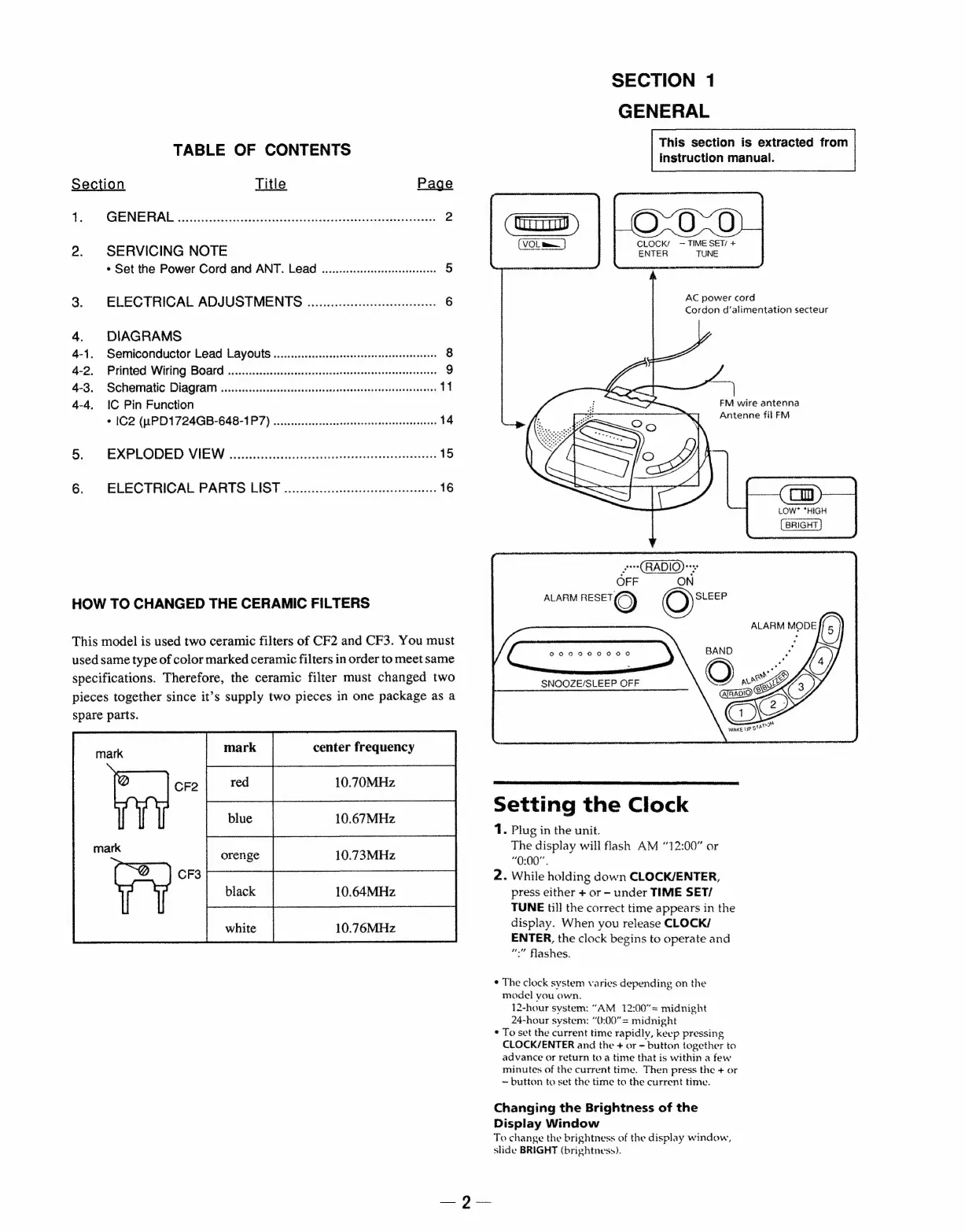
This
model
is
used
two
ceramic
filters
of
CF2
and
CF3.
You
must
used
same
type
of
color
marked
ceramic
filters
in
order
to
meet
same
specifications.
Therefore,
the
ceramic
filter
must
changed
two
pieces
together
since
it’s
supply
two
pieces
in
one
package
as
a
spare
parts.
Pee
[nee
SECTION
1
GENERAL
This
section
is
extracted
from
instruction
manual.
CLOCK’
—
TIME
SET/
+
ENTER
TUNE
AC
power
cord
Cordon
d’alimentation
secteur
|
FM
wire
antenna
Antenne
fil
FM
{BRIGHT}
(RADIO)
OFF
ON
ALARM
RESET)
©)
SLEEP
ALARM
MODE
00090
00000
SNOOZE/SLEEP
OFF
Sy!
Wane
ue
SA
Setting
the
Clock
1.
Plug
in
the
unit.
The
display
will
flash
AM
“12:00”
or
“0:00”.
2.
While
holding
down
CLOCK/ENTER,
press
either
+
or
—-
under
TIME
SET/
TUNE
til]
the
correct
time
appears
in
the
display.
When
you
release
CLOCK/
ENTER,
the
clock
begins
to
operate
and
“
flashes.
¢
The
clock
system
varies
depending
on
the
model
you
own.
12-hour
system:
“AM
12:00”=
midnight
24-hour
system:
“0:00”
=
midnight
*
To
set
the
current
time
rapidly,
keep
pressing
CLOCK/ENTER
and
the
+
or
—
button
together
to
advance
or
return
toa
time
that
is
within
a
few
minutes
of
the
current
time.
Then
press
the
+
or
~
button
to
set
the
time
to
the
current
time.
Changing
the
Brightness
of
the
Display
Window
To
change
the
brightness
of
the
display
window,
slide
BRIGHT
(brightneso).


 To Next Page