EasyManua.ls Logo

Sony ICF-C733 - Page 3

Sony ICF-C733
17 pages
Print Icon
To Next Page IconTo Next Page
To Previous Page IconTo Previous Page
Loading...
Operating
the
Radio
Manual
Tuning
1.
Press
RADIO
ON/SLEEP
to
turn
on
the
radio.
The
band,
frequency
and
preset
number
indications
will
be
displayed
in
the
display
window
after
“On”
and
preset
number
appear
for
about
2
seconds.
They
change
to
the
current
time
indication
after
about
10
seconds.
2.
Adjust
VOL
(Volume).
3.
Press
BAND
to
select
the
band.
Every
push
changes
the
band
as
follows.
(The
last
frequency
selected
in
each
band
appears.)
LW
2AM
(MW)
>
FM
Wants
seo)
FM/AM
=
ICF-C733
only
FM/MW/LW
=
ICF-C733L
only
4,
Tune
ina
station
by
pressing
the
+
or
~
button
of
TIME
SET/TUNE.
The
FM
channel
step
is
set
to
0.05
MHz
or
(The
FM
frequency
indication
changes
every
0.1
MHz.).
The
AM
(MW)
channel
step
is
set
to
9
kHz.
9
kHz
for
models
for
other
countries.
The
LW
channel
step
alternates
between
2
kHz
and
7
kHz.
A
beep
sounds
at
the
band
edge.
*
To
turn
off
the
radio,
press
RADIO
OFF/ALARM
RESET.
*
To
improve
radio
reception
FM:
Extend
the
FM
wire
antenna
fully
to
improve
FM
reception.
AM
(MW)/LW:
Rotate
the
unit
horizontally
for
optimum
reception.
A
ferrite
bar
antenna
is
built
into
the
unit.
¢
To
check
the
station
vou
are
listening
to,
press
RADIO
ON/SLEEP.
The
band
and
frequency
appear
for
10
seconds.
For
the
Customers
Supplied
with
an
FM
Antenna
Coupler
Clamp
the
AC
power
cord
with
the
supplied
coupler
and
connect
it
to
a
wall
FM
antenna
terminal
for
optimum
FM
reception.
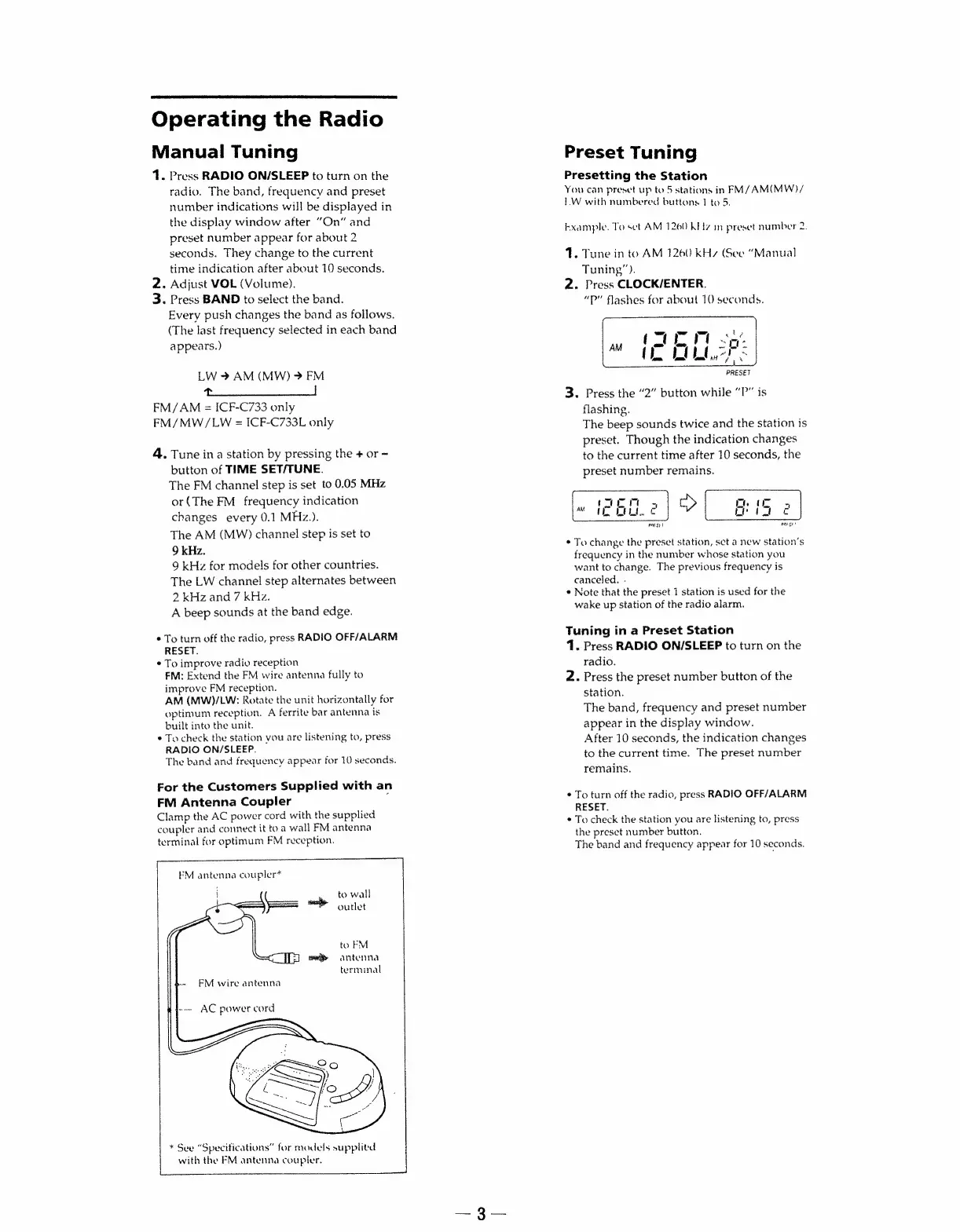
FM
antenna
coupler*
:
to
wall
_
copes
%
oudet
"\..
sony
...
FM
wire
antenna
to
FM
antenna
terminal
-
AC
power
cord
*
See
“Specifications”
for
models
supplitd
with
the
FM
antenna
coupler.
Preset
Tuning
Presetting
the
Station
You
can
preset
up
to
5
stations
in
FM/AM(MW)/
IW
with
numbered
buttons
1
to
5.
kxample.
To
sel
AM
1260
Kitz
in
preset
number
2.
1.
Tune
in
to
AM
1260
kHz
(See
“Manual
Tuning”).
2.
Press
CLOCK/ENTER.
“P”
flashes
for
about
10
seconds.
PRESET
3.
Press
the
“2”
button
while
“P”
is
flashing.
The
beep
sounds
twice
and
the
station
is
preset.
Though
the
indication
changes
to
the
current
time
after
10
seconds,
the
preset
number
remains.
*
To
change
the
preset
station,
set
a
new
station’s
frequency
in
the
number
whose
station
you
want
to
change.
The
previous
frequency
is
canceled.
.
*
Note
that
the
preset
1
station
is
used
for
the
wake
up
station
of
the
radio
alarm.
Tuning
in
a
Preset
Station
1.
Press
RADIO
ON/SLEEP
to
turn
on
the
radio.
2.
Press
the
preset
number
button
of
the
station.
The
band,
frequency
and
preset
number
appear
in
the
display
window.
After
10
seconds,
the
indication
changes
to
the
current
time.
The
preset
number
remains.
*
To
turn
off
the
radio,
press
RADIO
OFF/ALARM
RESET.
*
To
check
the
station
you
are
listening
to,
press
the
preset
number
button.
The
band
and
frequency
appear
for
10
seconds.

Related product manuals