GB
14
• If the charge lamp on the camera flashes when the AC Adaptor is connected to the
wall outlet (wall socket), this indicates that charging is temporarily stopped
because the temperature is outside the recommended range. When the temperature
gets back within the appropriate range, the charging resumes. We recommend
charging the battery pack in an ambient temperature of between 10°C to 30°C
(50ºF to 86ºF).
Charging the battery pack
1
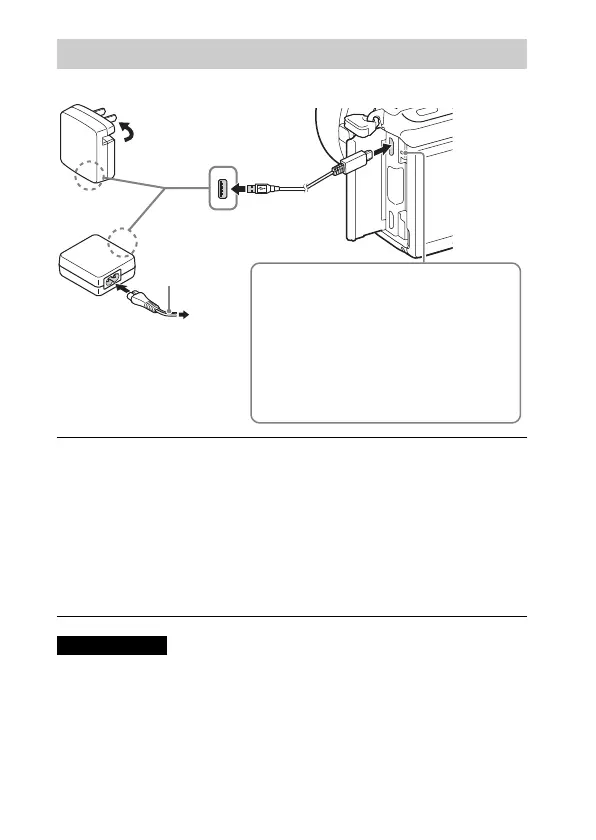
Connect the camera to the AC Adaptor (supplied),
using the micro USB cable (supplied).
2
Connect the AC Adaptor to the wall outlet (wall socket).
The charge lamp lights orange, and charging starts.
• Turn off the camera while charging the battery.
• You can charge the battery pack even when it is partially charged.
• When the charge lamp flashes and charging is not finished, remove and
re-insert the battery pack.
Notes
Power cord
(Mains lead)
For customers in the USA and Canada
For customers in countries/
regions other than the USA
and Canada
Charge lamp
Lit: Charging
Off: Charging finished
Flashing:
Charging error or charging paused
temporarily because the camera is not
within the proper temperature range



 To Next Page