ILCE-7SM2_L2
1-2
1-3. CHECKING THE Wi-Fi FUNCTION
Perform the following procedure to check the Wi-Fi function.
Required equipment: Windows personal computer with Wi-Fi interface
1. Turn on the power of the unit.
2. Perform the following operations for the unit.
MENU→ →[Send to Smartphone]→●
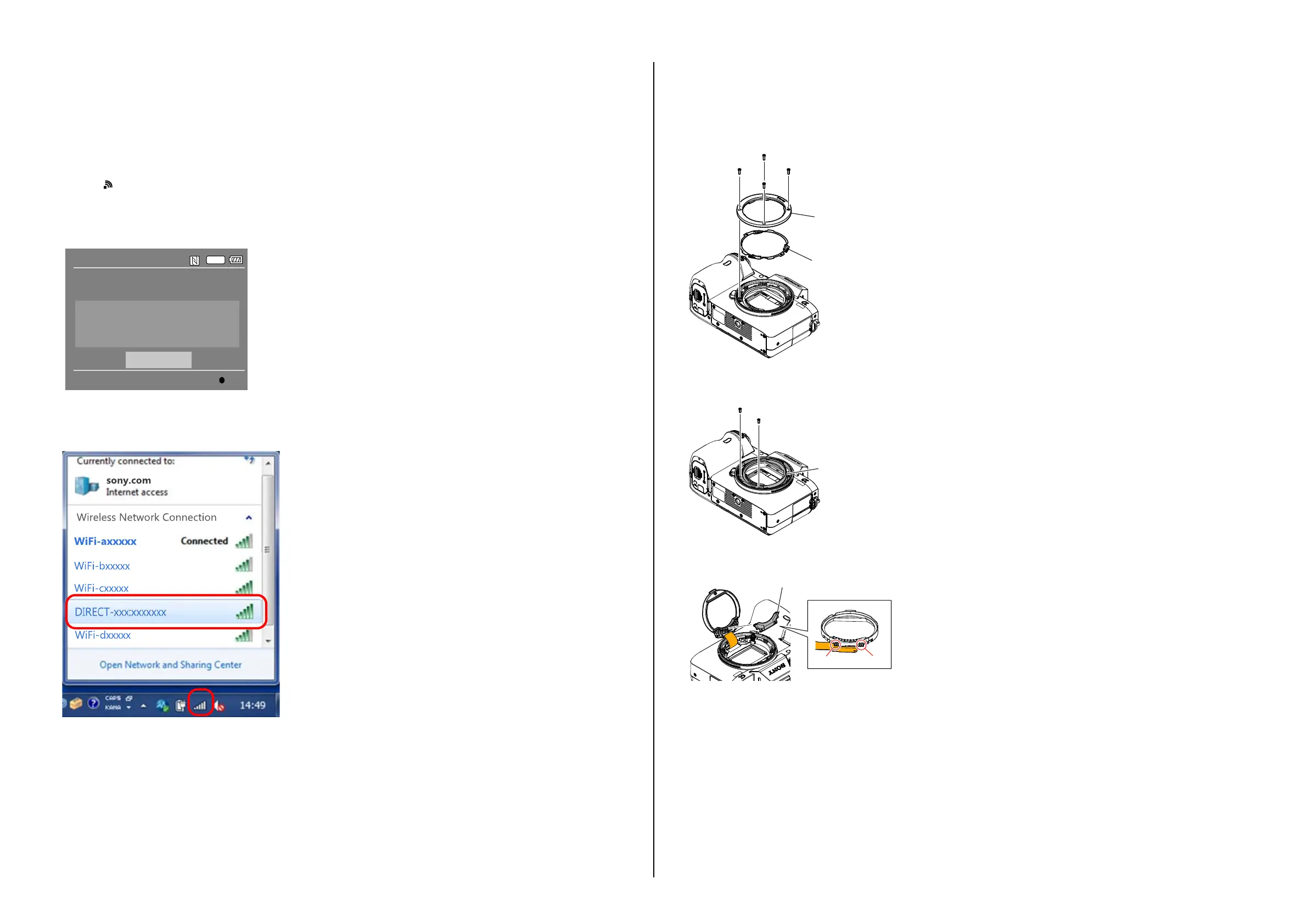
3. The Send to smartphone screen is displayed.
4. The image selected from the camera or smartphone is displayed, select the picture to be used.
5. Select “This image” on the view on smartphone screen and press the ● of the center, the “Wi-Fi Standby…” screen is appeared.
6. When preparation for Wi-Fi has been completed, the “Running as an access point.” screen opens and a password for Wi-Fi connection is displayed.
SSID DIRECT-XXXX:MODEL-NAME
Password XXXXXXXX
DeviceName ILCE-XX
Wi-Fi
Send to Smartphone
Operate smartphone to connect to
this device via Wi-Fi.
Cancel
Enter
7. Confirm on the personal computer that the unit is detected as a connectable wireless network.
8. To further confirm that the unit is connectable, connect the unit to the personal computer and double-click the “current connection” from the icon
displayed on the notice field, make sure that the unit is displayed in the Wireless internet access column.
1-4. MB N SP (755) and MB N PIN (H) REPLACING METHOD
When replacing MB N SP (755) and MB N Pin (H), remove as shown below.
1. Remove MB N Plate A (5000) and MB N Plate SP from the unit.
MB N Plate A (5000)
MB N Plate SP
2. Remove two screws to detach MB N Contact Unit (3000) from the unit.
At this condition, be careful as BL Flexible Cable is still connected to the unit.
MB N Contact Unit (3000)
3. Release the claw of MB N Holder B (456) to detach it from the unit.
MB N Holder B (456)
Claw
Claw
– ENGLISH –



 To Next Page