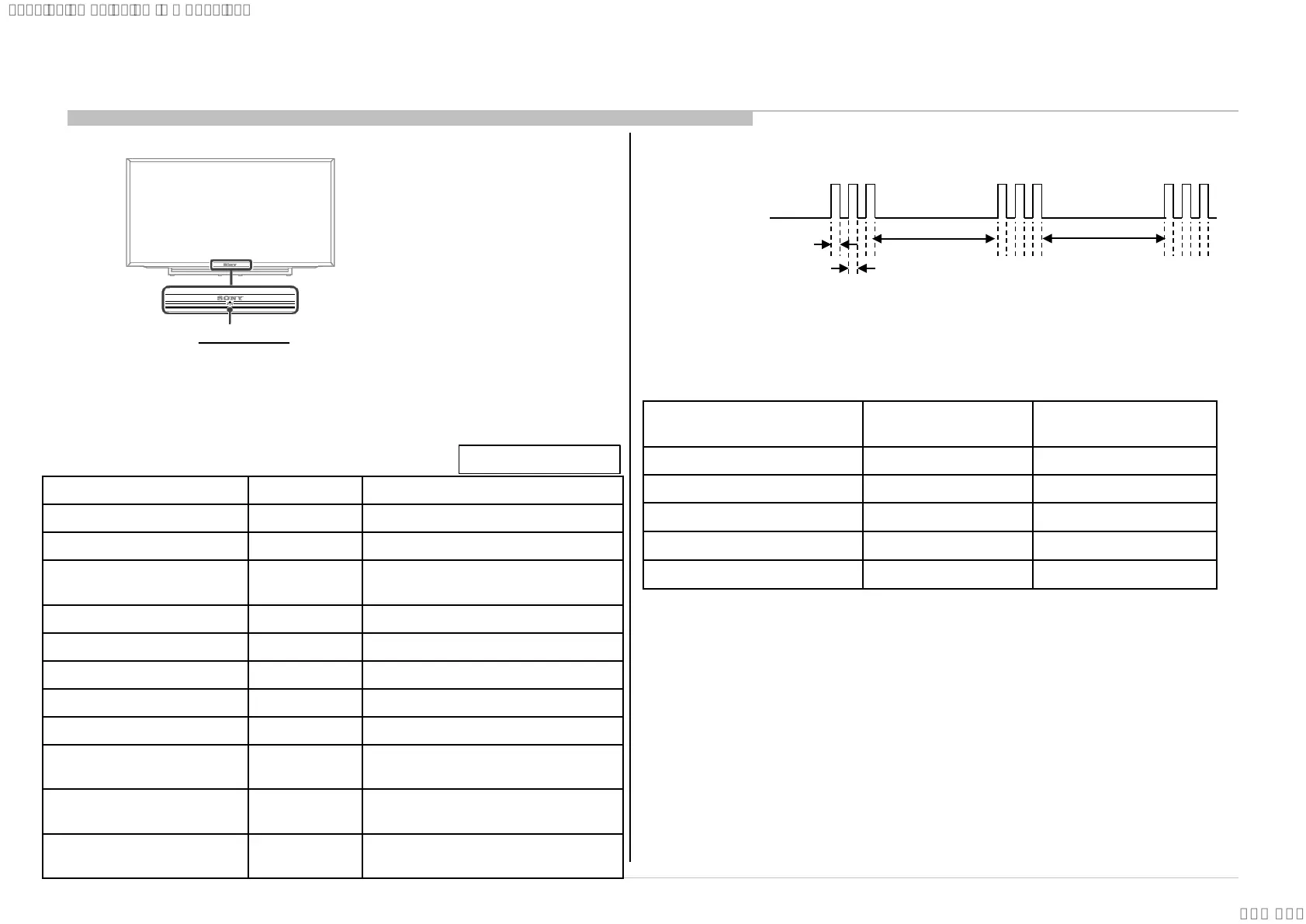
Status LED Colour Remarks
Power Off ( AC Off and *1) OFF *1 power switch off (by touch button)
Power On Green
Standby(by remote control off
and Side Key off)
OFF
Picture Off Green
Set "Sleep Timer" Amber
Set "On Timer” ( Power On ) Amber
Set "On Timer”( Standby ) Amber
Picture Frame Amber
Failure Red Blinking
The number of LED blinking indicates
cause of failure.
Error of panel ID
Amber/Green
Blinking
Blinking:0.5sec Amber/ 0.5sec Green
Software Updating
Amber
Blinking
Blinking: 1sec On / 1sec Off
SECTION 2
SELF DIAGNOSTIC FUNCTION
2-1. Overview of Control Buttons
6
2-2. LED Display Control
When safety shutdown occurs, Standby LED display reports the cause by using the lightning
patterns as indicated below
.
2-3. LED Pattern
3.0sec 3.0sec
0.5sec
0.5sec
Example: The figure above shows LED display when SHUTDOWN is caused by Audio
Error. It repeats flashing for a specified number of times in 0.5sec/cycle and has a 3 seconds interval of lighting
off. Please note that a 3 seconds interval of lighting off is fixed regardless of abnormal state types.
Amber = Red + Green
2-4. Standby LED Error Display
The Number of Standby LED
(RED blinking)
Error Detection Error Location
2 Main Power Error AC adapter Error
3 Audio Error B* board Error
4 Panel Power Error B* board Error
5 Panel I2C COMM Error B* or Source board Error
6 Backlight Error B* board Error
LED Indicator
• Lights up in green when you select “Picture Off”.
• Lights up in amber when you set the timer or
“Photo Frame Mode”.
• Lights up in green when the TV is turned on.
• Flashes while the remote is being operated.
9
SYSSET
2023/11/2813:25:38(GMT+09:00)




 To Next Page