24
GB
KLV-46/40/32V400A
3-300-887-11(2)
Settings adjustment
You are able to change the settings of your TV from “Settings” menu.
1 Press MENU. Press F/f to select “Settings”, then press .
2 Press F/f to select a menu icon, then press .
3 Press F/f/G/g to select an option or adjust a setting, then press .
The following is an overview of the items that can be adjusted.
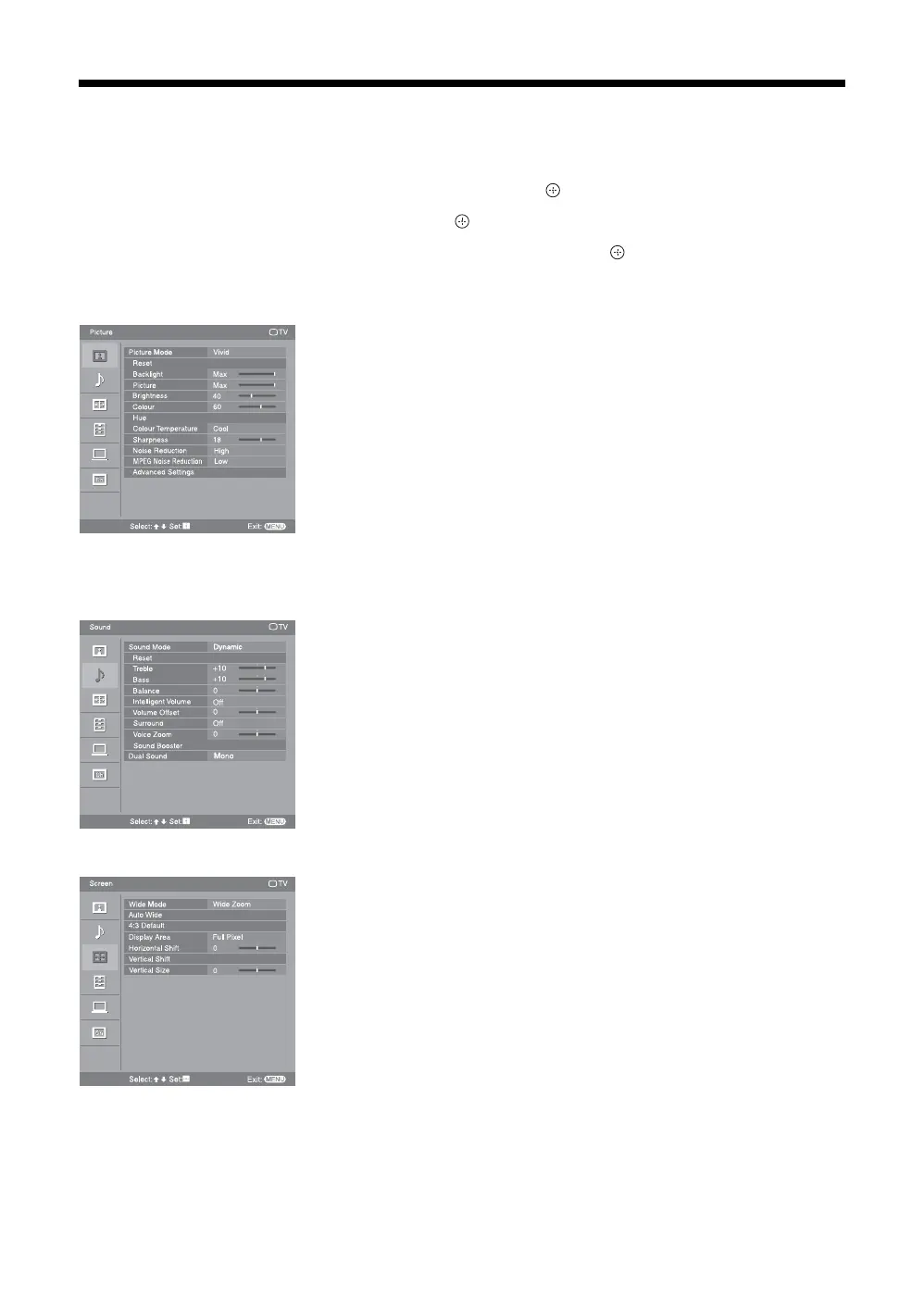
Picture menu (page 26)
“Picture Mode”: “Vivid” t “Standard” t “Cinema” (except PC input mode)
“Display Mode
”: “Video” t “Text” (in PC input mode only)
“Reset
”
“Backlight”
“Picture”
“Brightness”
“Colour”
“Hue”
“Colour Temperature”: “Cool” t “Neutral” t “Warm 1” t “Warm 2”
“Sharpness”
“Noise Reduction”: “High” t “Medium” t “Low” t “Off”
“MPEG Noise Reduction”: “High” t “Medium” t “Low” t “Off”
“Advanced Settings”: “Adv. Contrast Enhancer”, “Live Colour”
Sound menu (page 27)
“Sound Mode”: “Dynamic” t “Standard” t “Clear Voice”
“Reset”
“Treble”
“Bass”
“Balance”
“Intelligent Volume”: “On” t “Off”
“Volume Offset”
“Surround”: “S-FORCE Front Surround” t “Simulated Stereo” t “Off”
“Voice Zoom”
“Sound Booster”: “High” t “Low” t “Off”
“Dual Sound”
Screen menu (page 28)
“Wide Mode”: “Wide Zoom” t “Normal” t “Full” t “Zoom”
“Auto Wide”: “On” t “Off”
“4:3 Default”: “Wide Zoom” t “Normal” t “Off”
“Display Area”: “Full Pixel” t “Normal” (KLV-46V400A/KLV-40V400A
only)
“Horizontal Shift”
“Vertical Shift”
“Vertical Size”
Picture TV
MENU
Select:
Set: Exit:
Picture Mode
Vivid
Reset
Sharpness
Noise Reduction
Advanced Settings
Backlight
Picture
Brightness
Colour
Hue
Colour Temperature
MPEG Noise Reduction
Low
18
High
Cool
60
40
Max
Max
MENU
TV
Sound
Select:
Set: Exit:
Sound Mode
Tr eble
Reset
Bass
Balance
Intelligent Volume
Volume Offset
Surround
Sound Booster
Dual Sound
Voice Zoom
Dual Sound
Mono
Dynamic
0
0
0
Off
Off
+10
+10
Select:
Set:
Exit:
MENU
TV
Screen
Wide Mode
Auto Wide
4:3 Default
Display Area
Horizontal Shift
Vertical Shift
Vertical Size
Full Pixel
Wide Zoom
0
0





 To Next Page