Getting Started
4
-EN
Connections
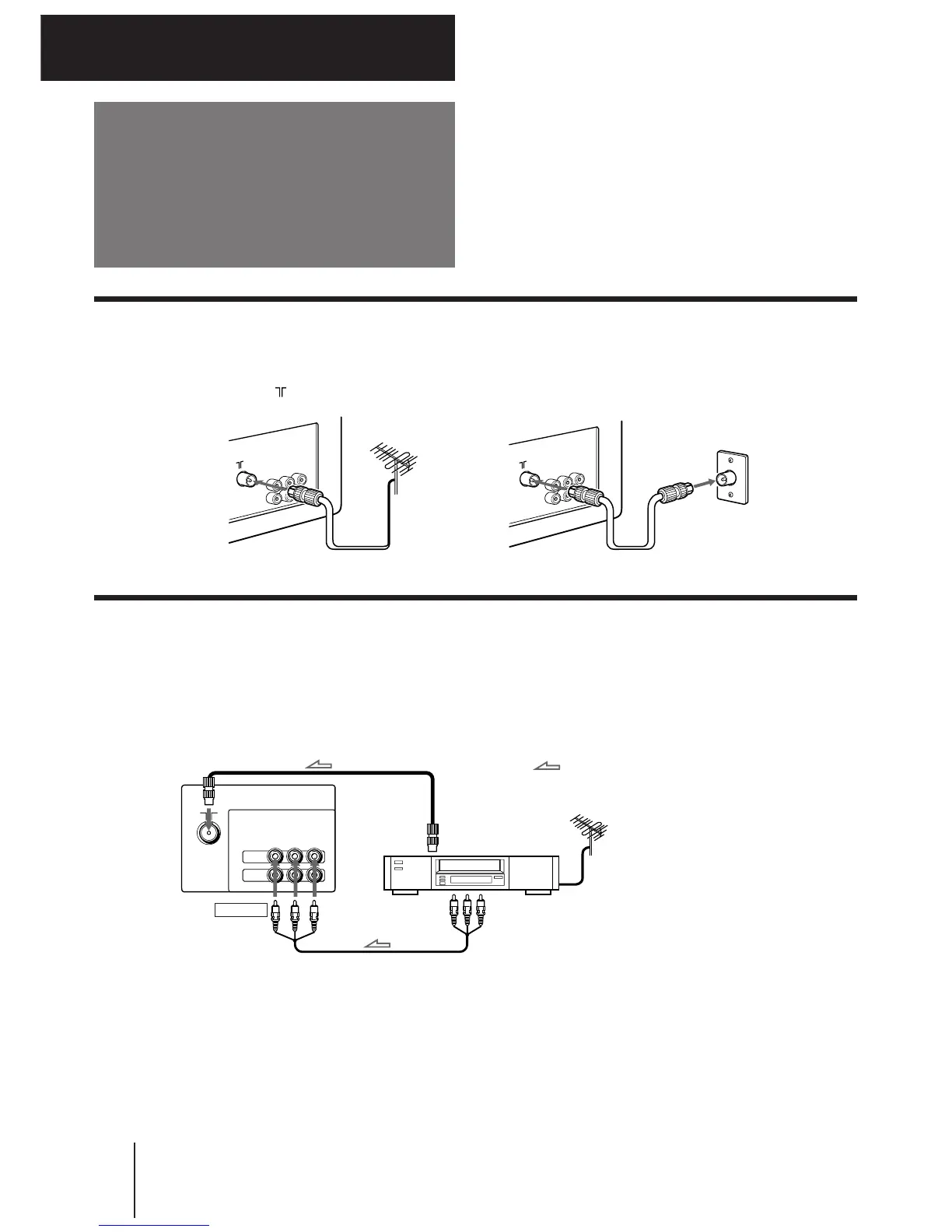
Connecting a VHF antenna or a combination VHF/UHF antenna
— 75-ohm coaxial cable (round)
Attach an optional IEC antenna connector to the 75-ohm coaxial cable.
Plug the connector into the (antenna) socket at the rear of the TV.
or
Getting Started
Rear of TV
Rear of TV
On a wall
VIDEO IN
to antenna socket
to video
and audio
outputs
Connecting optional equipment
You can connect optional audio/video equipment to your TV such as a VCR, multi disc player, camcorder, video
game or stereo system.
Connecting video equipment using video input jacks
Rear of TV
to antenna
output
VCR
: Signal flow
When connecting a monaural VCR
Connect the yellow plug to VIDEO and the black plug to
AUDIO-L (MONO).
VIDEO
IN
MONITOR
OUT
VIDEO
L
(
MONO
)
AUDIO
R



 To Next Page