EasyManua.ls Logo

Sony LBT-G2000 - Page 8

Sony LBT-G2000
23 pages
Print Icon
To Next Page IconTo Next Page
To Previous Page IconTo Previous Page
Loading...
Receiving
Broadcast
You
can
listen
to
FM
or
AM
stations.
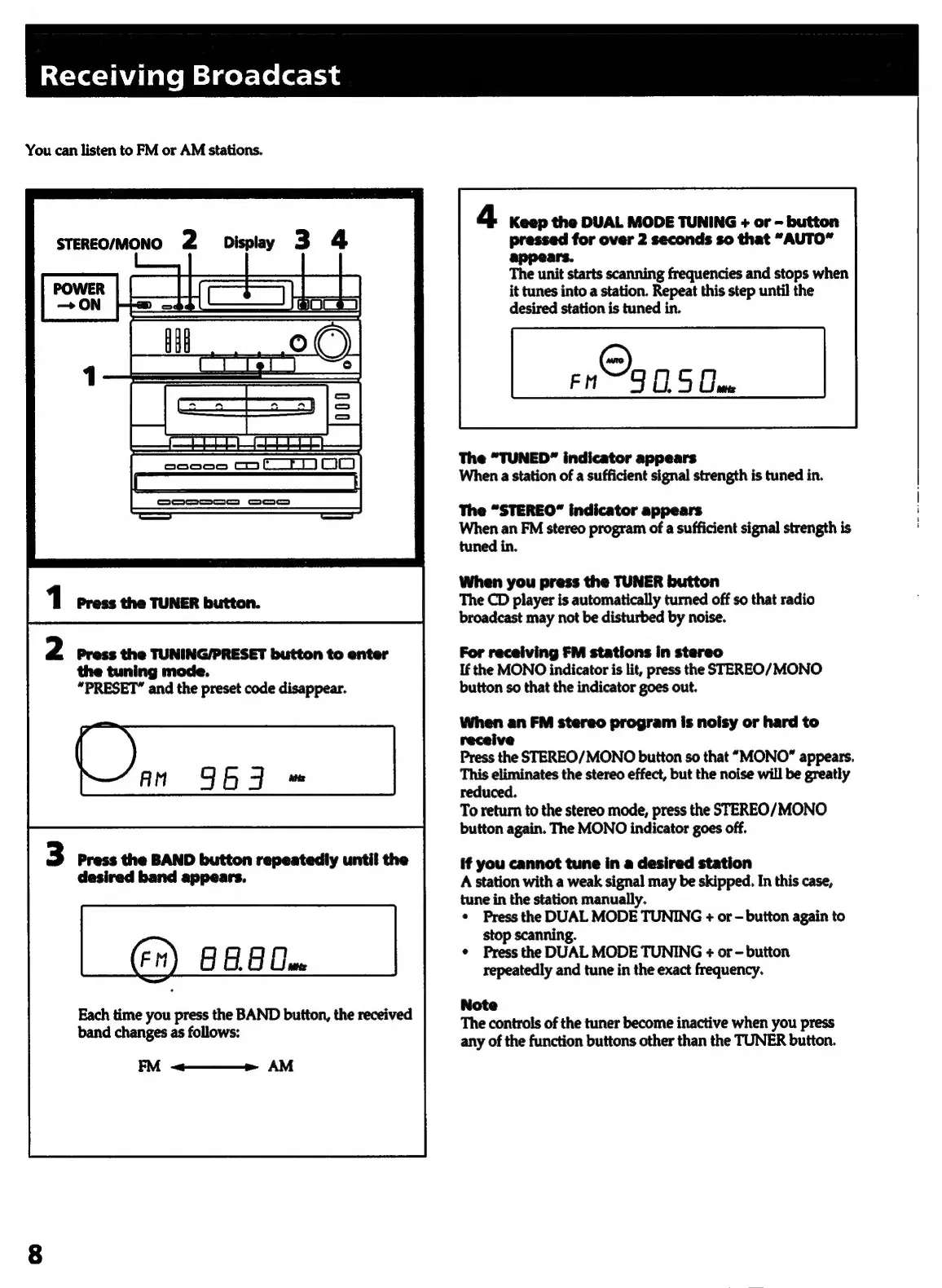
Display
3
4
STEREO/MONO
2
2
Press
the
TUNING/PRESET
button
to
enter
the
tuning
mode.
“PRESET”
and
the
preset
code
disappear.
Press
the
BAND
button
repeatedly
until
the
desired
band
appears.
(Fm)
GAB
One
Each
time
you
press
the
BAND
button,
the
received
band
changes
as
follows:
FM
<———»
AM
4
Keep
the
DUAL
MODE
TUNING
+
or
-
button
pressed
for
over
2
seconds
so
that
“AUTO”
appears.
The
unit
starts
scanning
frequencies
and
stops
when
it
tunes
into
a
station.
Repeat
this
step
until
the
desired
station
is
tuned
in.
eng
OS
Cae
The
“TUNED”
indicator
appears
When
a
station
of
a
sufficient
signal
strength
is
tuned
in.
|
The
“STEREO”
indicator
appears
When
an
FM
stereo
program
of
a
sufficient
signal
strength
is
tuned
in.
When
you
press
the
TUNER
button
The
CD
player
is
automatically
turned
off
so
that
radio
broadcast
may
not
be
disturbed
by
noise.
For
receiving
FM
stations
in
stereo
If
the
MONO
indicator
is
lit,
press
the
STEREO/
MONO
button
so
that
the
indicator
goes
out.
When
an
FM
stereo
program
is
noisy
or
hard
to
receive
Press
the
STEREO/MONO
button
so
that
“MONO”
appears.
This
eliminates
the
stereo
effect,
but
the
noise
will
be
greatly
reduced.
To
return
to
the
stereo
mode,
press
the
STEREO/MONO
button
again.
The
MONO
indicator
goes
off.
if
you
cannot
tune
in
a
desired
station
A
station
with
a
weak
signal
may
be
skipped.
In
this
case,
tune
in
the
station
manually.
¢
Press
the
DUAL
MODE
TUNING
+
or
button
again
to
stop
scanning.
¢
Press
the
DUAL
MODE
TUNING
+
or
-
button
repeatedly
and
tune
in
the
exact
frequency.
Note
The
controls
of
the
tuner
become
inactive
when
you
press
any
of
the
function
buttons
other
than
the
TUNER
button.