EasyManua.ls Logo

Sony LBT-G2000 - Page 9

Sony LBT-G2000
23 pages
Print Icon
To Next Page IconTo Next Page
To Previous Page IconTo Previous Page
Loading...
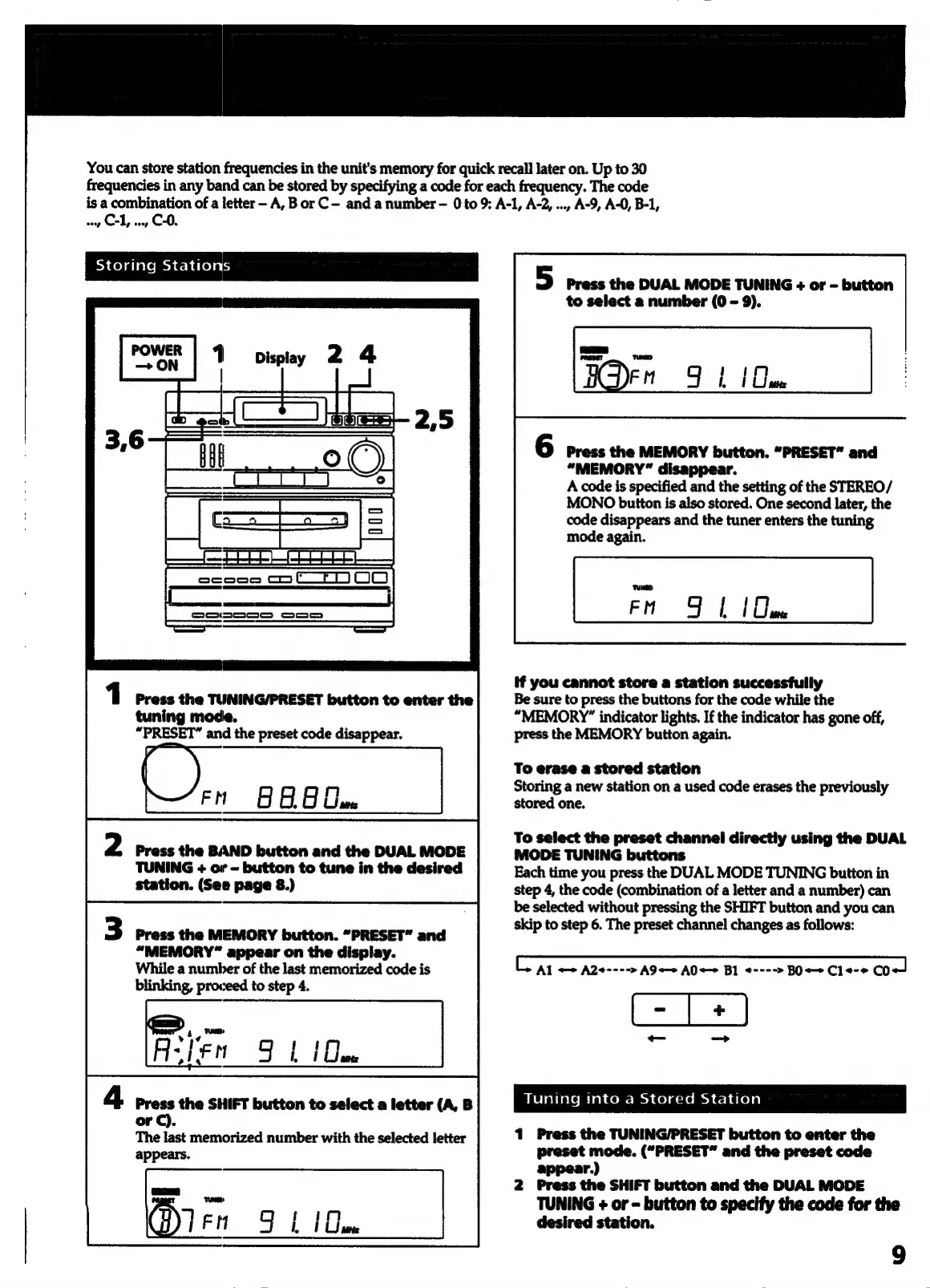
You
can
store
station
frequencies
in
the
unit's
memory
for
quick
recall
later
on.
Up
to
30
frequencies
in
any
band
can
be
stored
by
specifying
a
code
for
each
frequency.
The
code
is
a
combination
of
a
letter
—-
A,
B
or
C-
and
a
number
-
0
to
9:
A-1, A-2,
...,
A-9, A-0,
B-1,
cop
CL,
ooey
C-0.
ocoogd
Cm
C—~ET)
oOo
|
1
Press
the
TUNING/PRESET
button
to
enter
the
tuning
mode.
“PRESET”
and
the
preset
code
disappear.
O,.,
8
FG
Ue
|
2
Press
the
BAND
button
and
the
DUAL
MODE
TUNING
+
or
-
button
to
tune
in
the
desired
station.
(See
page
8.)
Press
the
MEMORY
button.
“PRESET”
and
“MEMORY”
appear
on
the
display.
While
a
number
of
the
last
memorized
code
is
blinking,
proceed
to
step
4.
Alien
FL
(Que
4
Press
the
SHIFT
button
to
select
a
letter
(A,
B
or
C).
The
last
memorized
number
with
the
selected
letter
appears.
Ten
Fb
[Que
5
Press
the
DUAL
MODE
TUNING
+
or
-
button
to
select
a
number
(0
-
9).
BODEN
9b
1
Due
Press
the
MEMORY
button.
“PRESET”
and
“MEMORY”
disappear.
A
code
is
specified
and
the
setting
of
the
STEREO/
MONO
button
is
also
stored.
One
second
later,
the
code
disappears
and
the
tuner
enters
the
tuning
mode
again.
FM
Fl
[om
if
you
cannot
store
a
station
successfully
Be
sure
to
press
the
buttons
for
the
code
while
the
“MEMORY”
indicator
lights.
If
the
indicator
has
gone
off,
press
the
MEMORY
button
again.
To
erase
a
stored
station
Storing
a
new
station
on
a
used code
erases
the
previously
stored
one.
To
select
the
preset
channel
directly
using
the
DUAL
MODE
TUNING
buttons
Each
time
you
press
the
DUAL
MODE
TUNING
button
in
step
4,
the
code
(combination
of
a
letter
and
a
number)
can
be
selected
without
pressing
the
SHIFT
button
and
you
can
skip
to
step
6.
The
preset
channel
changes
as
follows:
Al
A2<---->
A9«»
A0
+>
BI
<---->
BO
+
C1
<-*
CO
Tuning
into
a
Stored
Station
1
Press
the
TUNING/PRESET
button
to
enter
the
preset
mode.
(“PRESET”
and
the
preset
code
appear.)
2
Press
the
SHIFT
button
and
the
DUAL
MODE
TUNING
+
or
-
button
to
specify
the
code
for
the
desired
station.