EasyManua.ls Logo

Sony M-2000 - Page 3

Sony M-2000
4 pages
Print Icon
To Next Page IconTo Next Page
To Previous Page IconTo Previous Page
Loading...
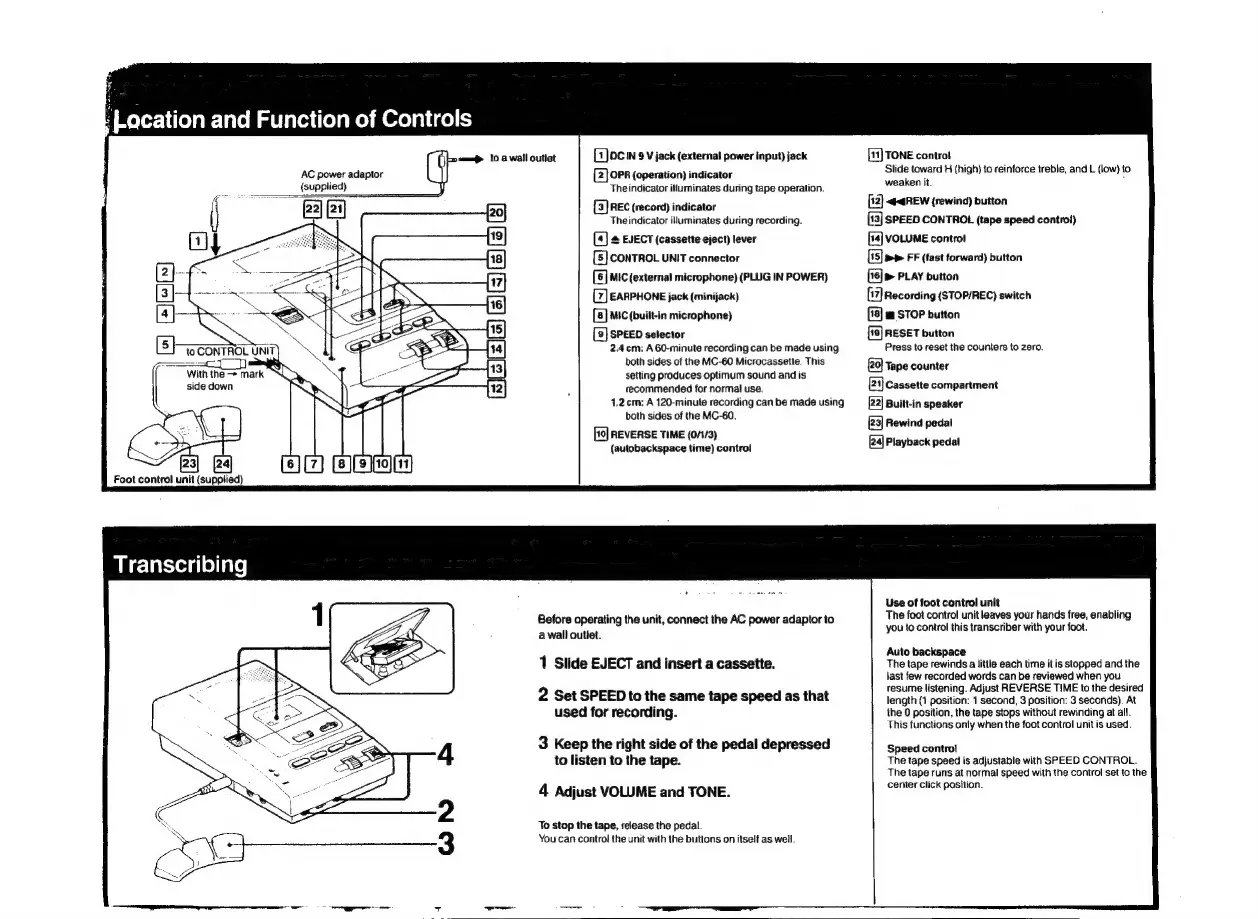
AC
power
adaptor
(supplied)
6]
to
CONTROL
UNIT
N
&
With
the
mark
NK
side
down
.
Foot
control
unit
(supplied)
aa
10
a
wall
outlet
sls]
=
|e}
(5)(S)
(3)
[s) (8)
[ocn
9
V
jack
(external
power
input)
jack
[Z]
OPR
(operation)
indicator
The
indicator
illuminates
during
tape
operation.
[8]
REC
(record)
indicator
The
indicator
illuminates
during
recording.
(9
#
EJECT
(cassette
eject)
lever
[E]
CONTROL
UNIT
connector
[E
MIC
(external
microphone)
(PLUG
IN
POWER)
EARPHONE
jack
(minijack)
[E]
MIC
(built-in
microphone)
[2]
SPEED
selector
2.4
cm:
A
60-minute
recording
can
be
made
using
both
sides
of
the
MC-60
Microcassette.
This
setting
produces
optimum
sound
and
is
recommended
for
normal
use.
1.2
cm:
A
120-minute
recording
can
be
made
using
both
sides
of
the
MC-60.
REVERSE
TIME
(0/1/3)
(autobackspace
time)
control
Before
operating
the
unit,
connect
the
AC
power
adaptor
to
a
wall
outiet.
1
Slide
EJECT
and
insert
a
cassette.
2
Set
SPEED
to
the
same
tape
speed
as
that
used
for
recording.
3
Keep
the
right
side
of
the
pedal
depressed
to
listen
to
the
tape.
4
Adjust
VOLUME
and
TONE.
To
stop
the
tape,
release
the
pedal.
You
can
control
the
unit
with
the
buttons
on
itself
as
well.
fa}
TONE
contral
Slide
toward
H
(high)
to
reinforce
treble,
and
L
(low)
to
weaken
it.
i
[2]
<#@REW
(rewind)
button
[13]
SPEED
CONTROL
(tape
speed
contro!)
[14]
VOLUME
control
(5)
>>
FF
(fast
forward)
button
>
PLAY
button
(7)
Recording
(STOP/REC)
switch
m
STOP
button
[9]
RESET
button
Press
to
reset
the
counters
to
zero.
Tape
counter
B
Cassette
compartment
2]
Built-in
speaker
[23]
Rewind
pedal
[24]
Playback
pedal
Use
of
foot
control
unit
The
foot
control
unit
leaves
your
hands
free,
enabling
you
to
control
this
transcriber
with
your
foot.
Auto
backspace
The
tape
rewinds
a
little
each
time
it
is
stopped
and
the
last
few
recorded
words
can
be
reviewed
when
you
resume
listening.
Adjust
REVERSE
TIME
to
the
desired
length
(1
position:
1
second,
3
position:
3
seconds).
At
the
0
position,
the
tape
stops
without
rewinding
at
all.
This
functions
only
when
the
foot
control
unit
is
used.
Speed
control
The
tape
speed
is
adjustable
with
SPEED
CONTROL.
The
tape
runs
at
normal
speed
with
the
control
set
to
the
center
click
position.

Related product manuals