EasyManua.ls Logo

Sony M-750V - Tape Counter; Maintenance

Sony M-750V
10 pages
Print Icon
To Next Page IconTo Next Page
To Previous Page IconTo Previous Page
Loading...
M-750V
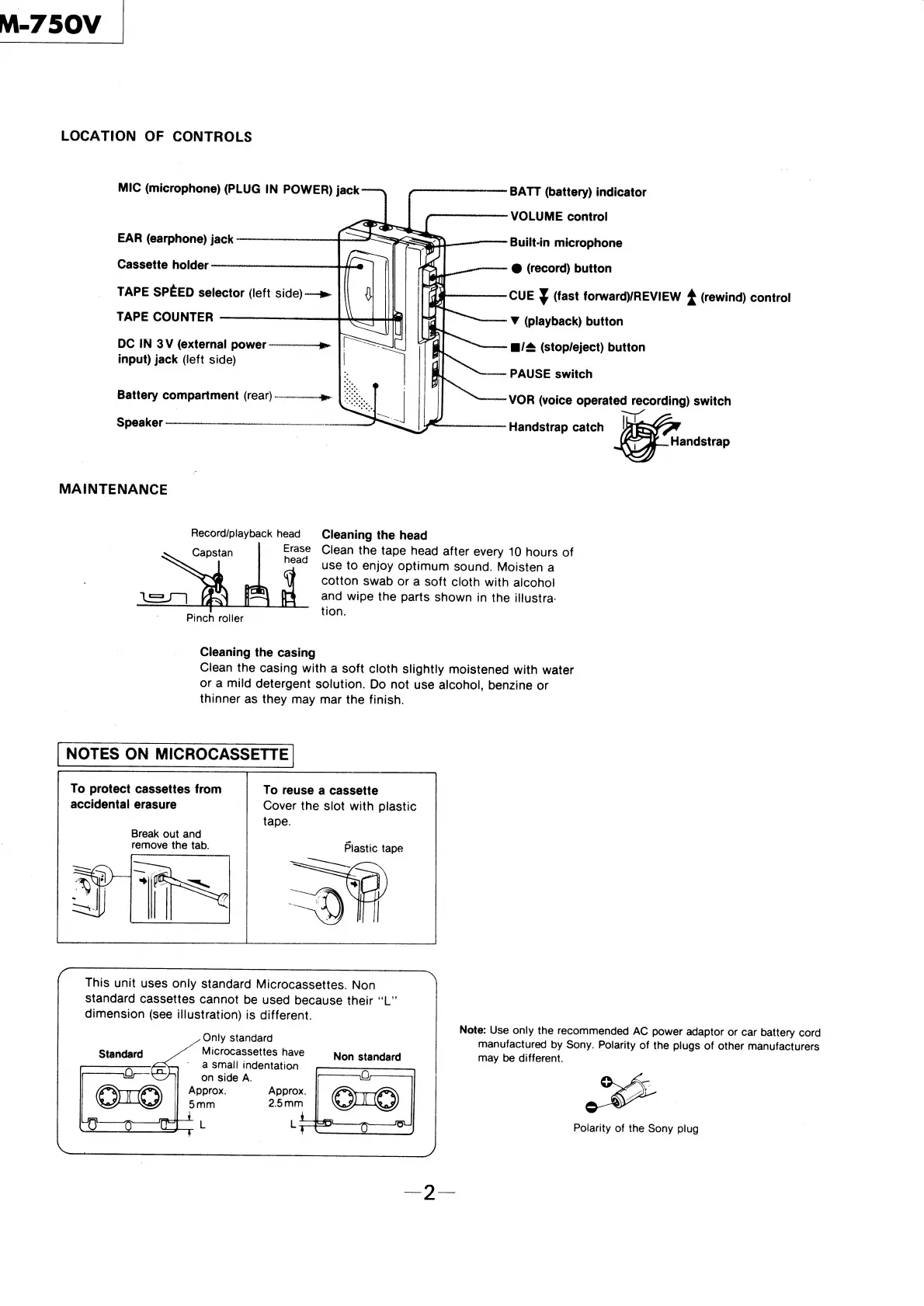
LOCATION
OF
CONTROLS
MIC
(microphone)
(PLUG
IN
POWER)
jack
BATT
(battery)
indicator
VOLUME
control
EAR
(earphone)
jack
Built-in
microphone
Cassette
holder
-@
(record)
button
TAPE
SPEED
selector
(left
side)
—»-
TAPE
COUNTER
CUE
¥
(fast
forward)REVIEW
4
(rewind)
contro!
Vv
(playback)
button
DC
IN
3V
(external
power
~-----—---—-»»-
Pre
:
input)
jack
(left
side)
m@/
(stop/eject)
button
-
PAUSE
switch
Battery
compartment
(rear)
—————ae
22...
|
“~~
VOR
(voice
operated
recording)
switch
Speaker
———————--________---------------
-~
Handstrap
catch
|
Handstrap
MAINTENANCE
Record/playback
head
Cleaning
the
head
Erase
Clean
the
tape
head
after
every
10
hours
of
head
use
to
enjoy
optimum
sound.
Moisten
a
cotton
swab
or
a
soft
cloth
with
alcohol
and
wipe
the
parts
shown
in
the
illustra-
tion.
Capstan
Pinch
roller
Cleaning
the
casing
Clean
the
casing
with
a
soft
cloth
slightly
moistened
with
water
or
a
mild
detergent
solution.
Do
not
use
alcohol,
benzine
or
thinner
as
they
may
mar
the
finish.
NOTES
ON
MICROCASSETTE
To
protect
cassettes
from
To
reuse
a
cassette
accidental
erasure
Cover
the
slot
with
plastic
tape.
Break
out
and
remove
the
tab.
Plastic
tape
This
unit
uses
only
standard
Microcassettes.
Non
Standard
cassettes
cannot
be
used
because
their
“‘L”’
dimension
(see
illustration)
is
different.
Note:
Use
only
the
recommended
AC
power
adaptor
or
car
battery
cord
manufactured
by
Sony.
Polarity
of
the
plugs
of
other
manufacturers
Non
standard
may
be
different.
Only
standard
Standard
Microcassettes
have
*
a
small
indentation
0
on
side
A.
Fr.
Approx.
Approx.
a
(REG)
5mm
2.5mm
Polarity
of
the
Sony
plug

Related product manuals