Basics
Charging
Before using your headset for the first time, it is recommended to charge it with a
Sony charger. The LED indicator turns green when the battery level is above 85%.
A drained headset needs to charge for up to 2 hours to be fully charged. Battery
life is approximately 6 hours if the temperature is 25° C (77° F).
Your headset has a capless USB port. The USB port must be completely dry before a cable
can be connected for charging.
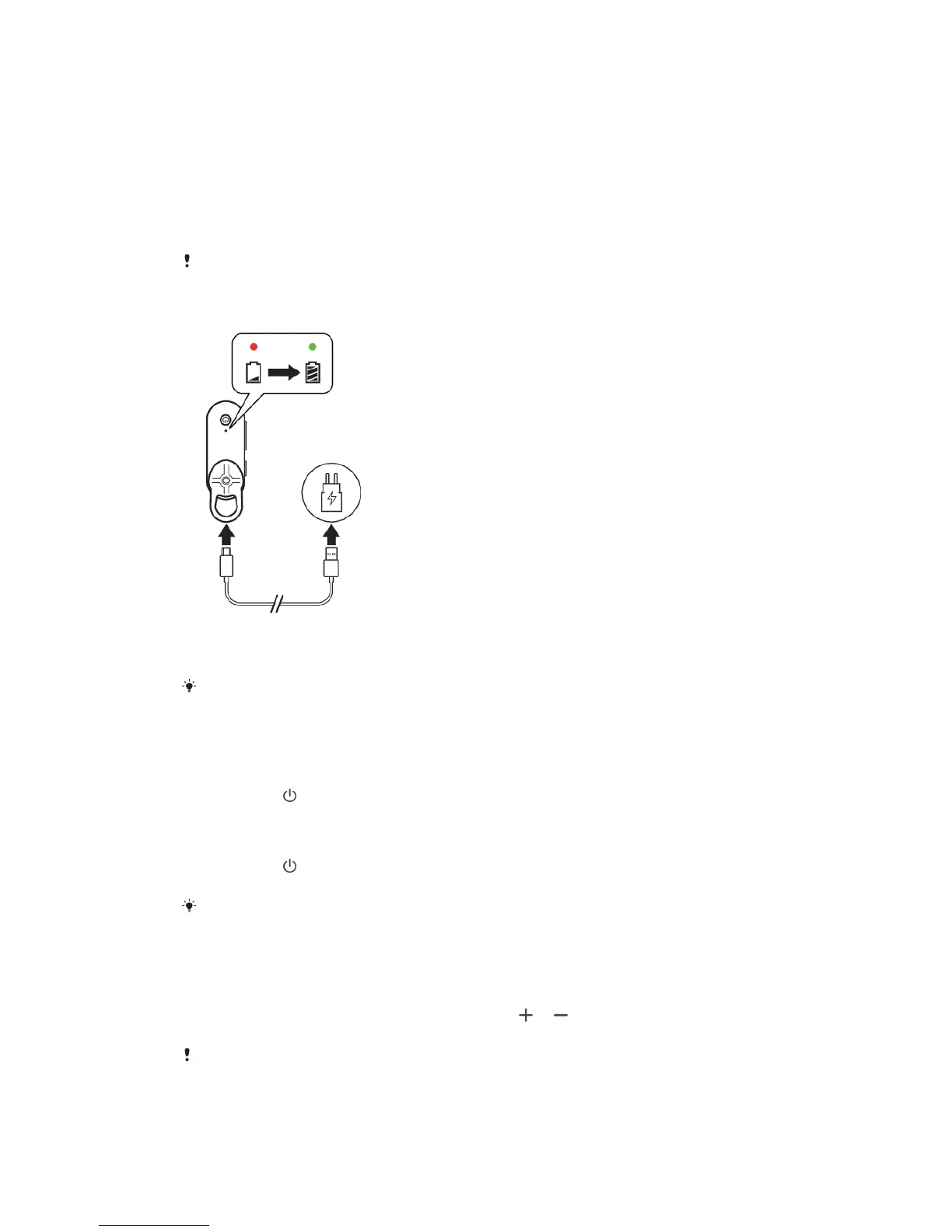
To charge your headset
1 Connect one end of the USB Type-C cable to the charger or the USB port of a
computer.
2 Connect the other end of the cable to the USB Type-C port on your headset.
For the recommended charger, see
http://www.sonymobile.com/products/accessories/
.
Turning on and o
To turn on your headset
• Long press for 1 second. The LED indicator flashes quickly in green three
times.
To turn o your headset
• Long press
for 1 second. The LED indicator flashes quickly in red three
times.
If your headset is idle for 10 minutes, it turns
o automatically.
Adjusting the volume
To change the volume
• During a call or when listening to music, press or to increase or
decrease the volume.
Avoid using your headset on high volume, as this may cause permanent hearing damage or
disturb others around you.
5
This is an internet version of this publication. © Print only for private use.



 To Next Page