000
Chapter 3: Basic Operations: Switching Videos
32
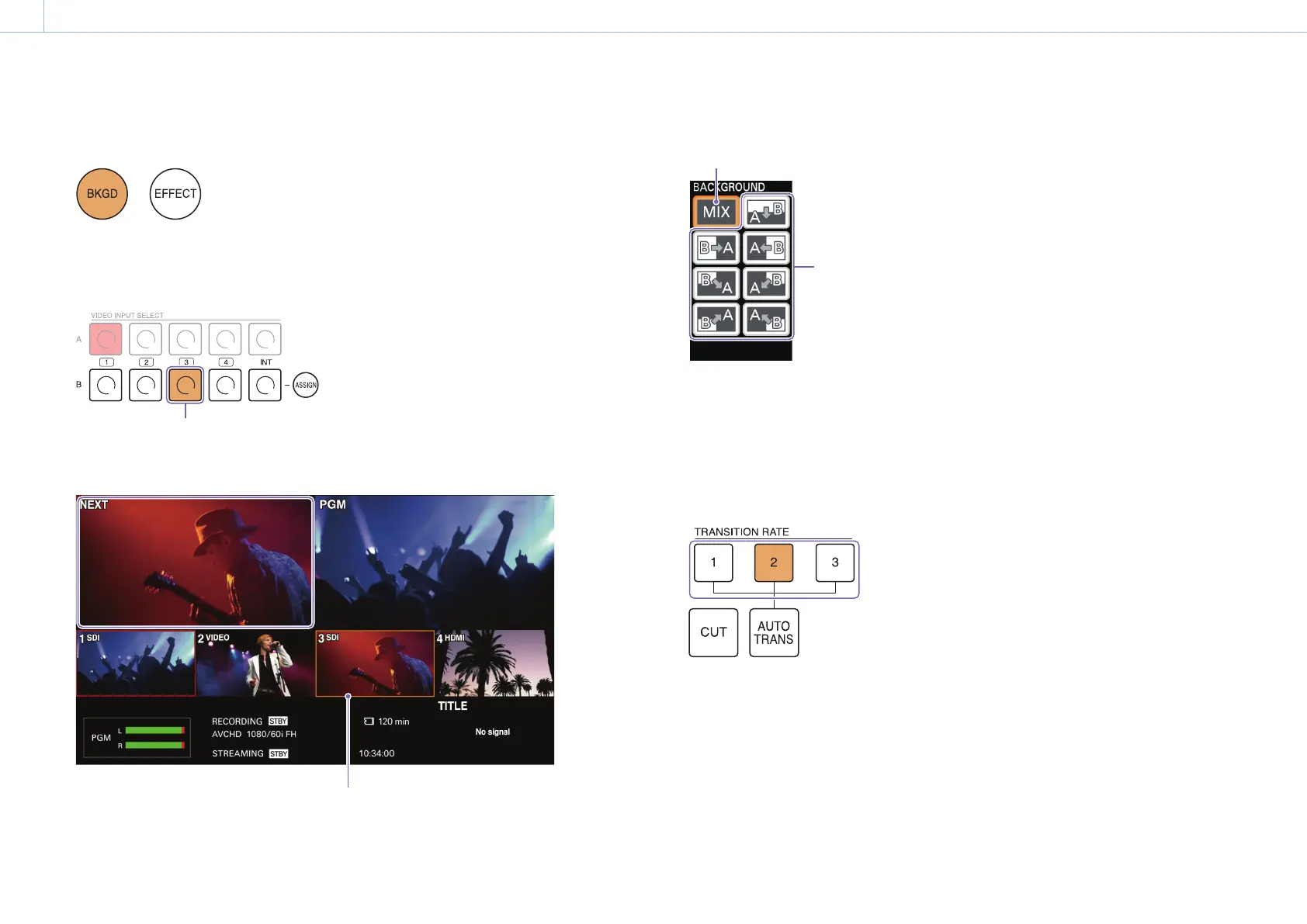
2 Press the BKGD button to enable BKGD mode.
The pattern icons selectable in BKGD mode are displayed in the menu panel.
For details on the modes, see “BKGD Mode and EFFECT Mode” (page 17).
3 Press the button for the video you want to output next as the PGM output.
Video to be output next as the PGM output
The selected video appears in the [NEXT] viewer of the multi-viewer.
A frame indicating selection as the NEXT output appears around the video selected in row B.
4 Tap and select a pattern icon.
Mix
Wipe
[Tips]
Eight wipe patterns are available on the unit.
For details on the patterns available on the unit, see “Transition and Composite Patterns List” (page 62).
5 Select a transition rate with the TRANSITION RATE buttons.
Under default conditions, transition rates of 0.5, 1.0, and 1.5 seconds are assigned to TRANSITION RATE
buttons 1 to 3.
For details on changing the transition rates assigned to each button, see “Changing the Transition Rates” (page 49).


 To Next Page