000
Chapter 4: Advanced Operations
49
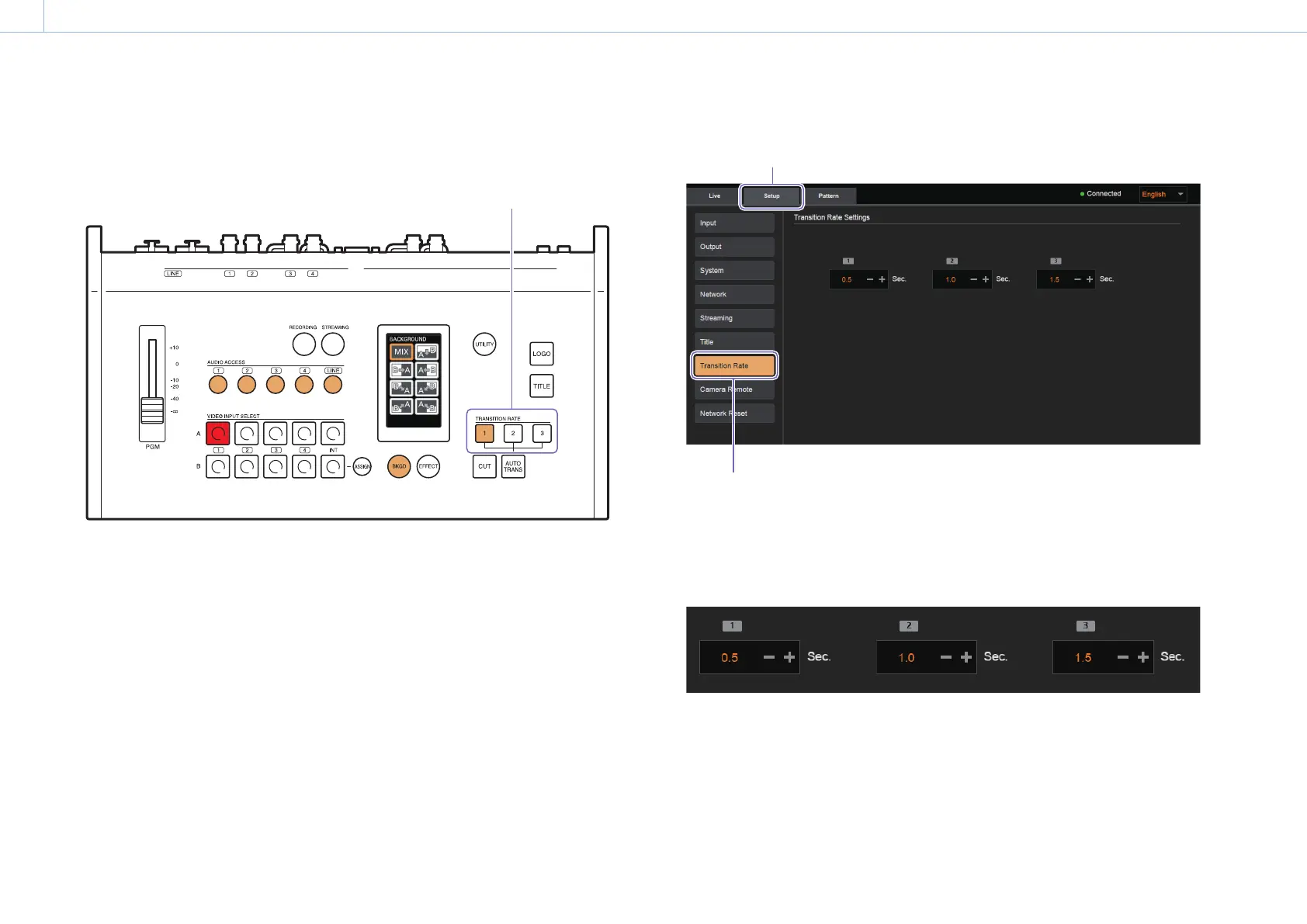
Changing the Transition Rates
Under default conditions, transition rates of 0.5, 1.0, and 1.5 seconds are assigned to TRANSITION RATE
buttons 1 to 3, but you can change the rates if necessary.
9 INPUT TERMINALS
VIDEO
SDI
VIDEO
SDI
HDMI
SDI
HDMI
SDI
TITLE
INPUT
TALLY
MULTI VIEWER
PGM LINE
OUTPUT
Change the transition rates
assigned to these buttons.
The settings are performed via the PC UI on a computer.
1 Select [Transition Rate] in the [Setup] screen of the PC UI.
[Setup] tab
[Transition Rate]
2 Change the transition rates assigned to buttons 1 to 3.
Use [+] or [–] to change the values.
You can specify a value between 0.0 to 9.9 seconds (increments of 0.1).
Long pressing will change the values continuously.


 To Next Page