000
Chapter 5: Streaming : Streaming
55
Starting and Stopping Streaming
Transmissions
Transmission controls are performed on the
control panel.
Starting transmissions
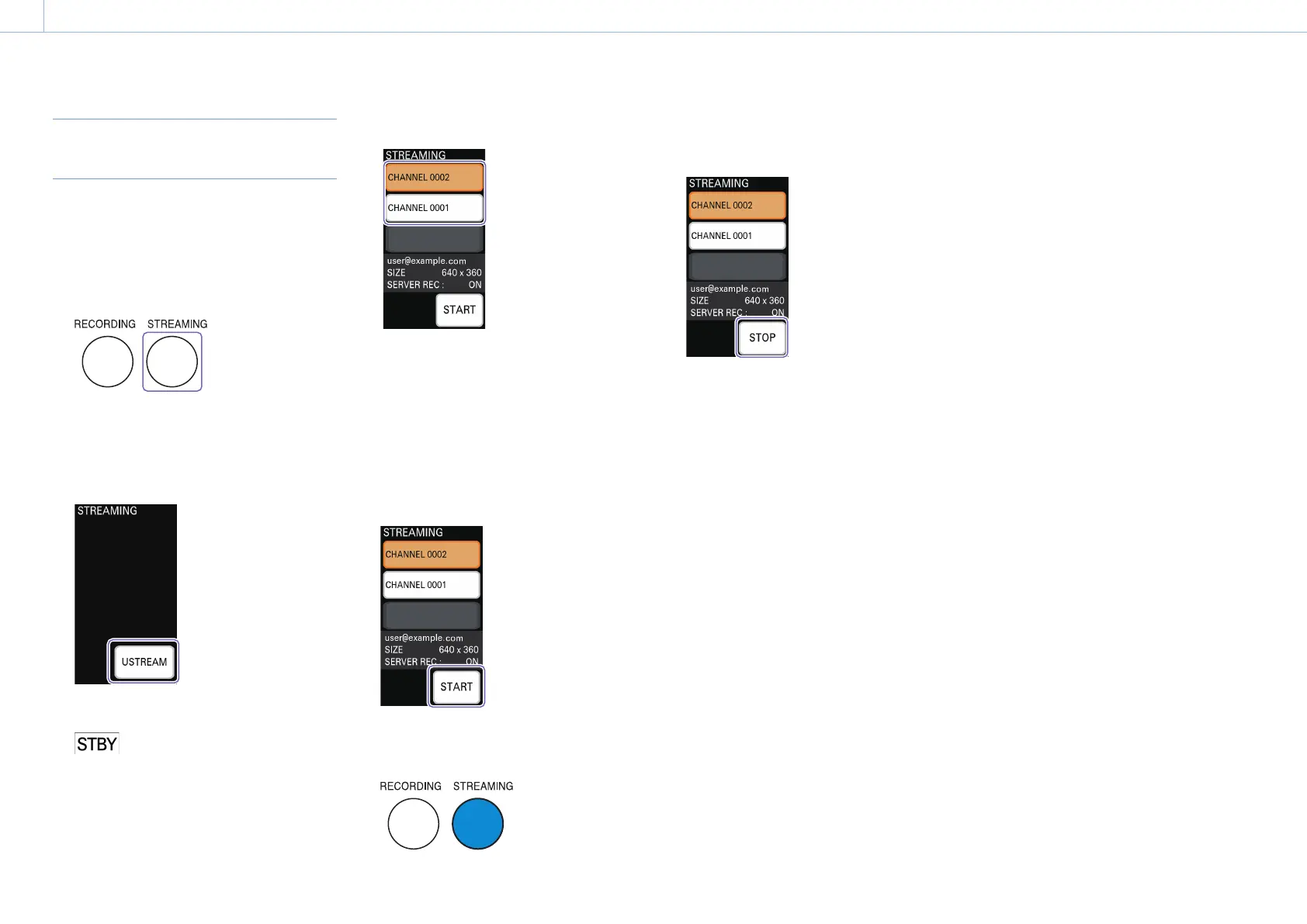
1 Press the STREAMING button.
The connection screen of the [STREAMING]
menu appears in the menu panel.
2 Tap [USTREAM] to connect to the Ustream
server.
When connection to the Ustream server is
established, standby mode is entered and
appears in the multi-viewer.
3 Check the channel to be transmitted.
The channel specified as the default will be
selected in the [STREAMING] menu.
If you want to change the channel, tap the
desired channel.
Connection to the Ustream server is
reestablished, and the screen appears.
[Tips]
Up to three channels will be displayed.
4 Tap [START].
Streaming transmission starts.
The STREAMING button lights blue while
transmission is in progress.
Stopping transmissions
Tap [STOP].
Streaming transmission stops, and the STREAMING
button unlights.
The [STREAMING] menu enters standby mode.


 To Next Page