EasyManua.ls Logo

Sony MDP-600 - Playing a Compact Disc (CD); Loading and Playing a CD

Sony MDP-600
48 pages
Print Icon
To Next Page IconTo Next Page
To Previous Page IconTo Previous Page
Loading...
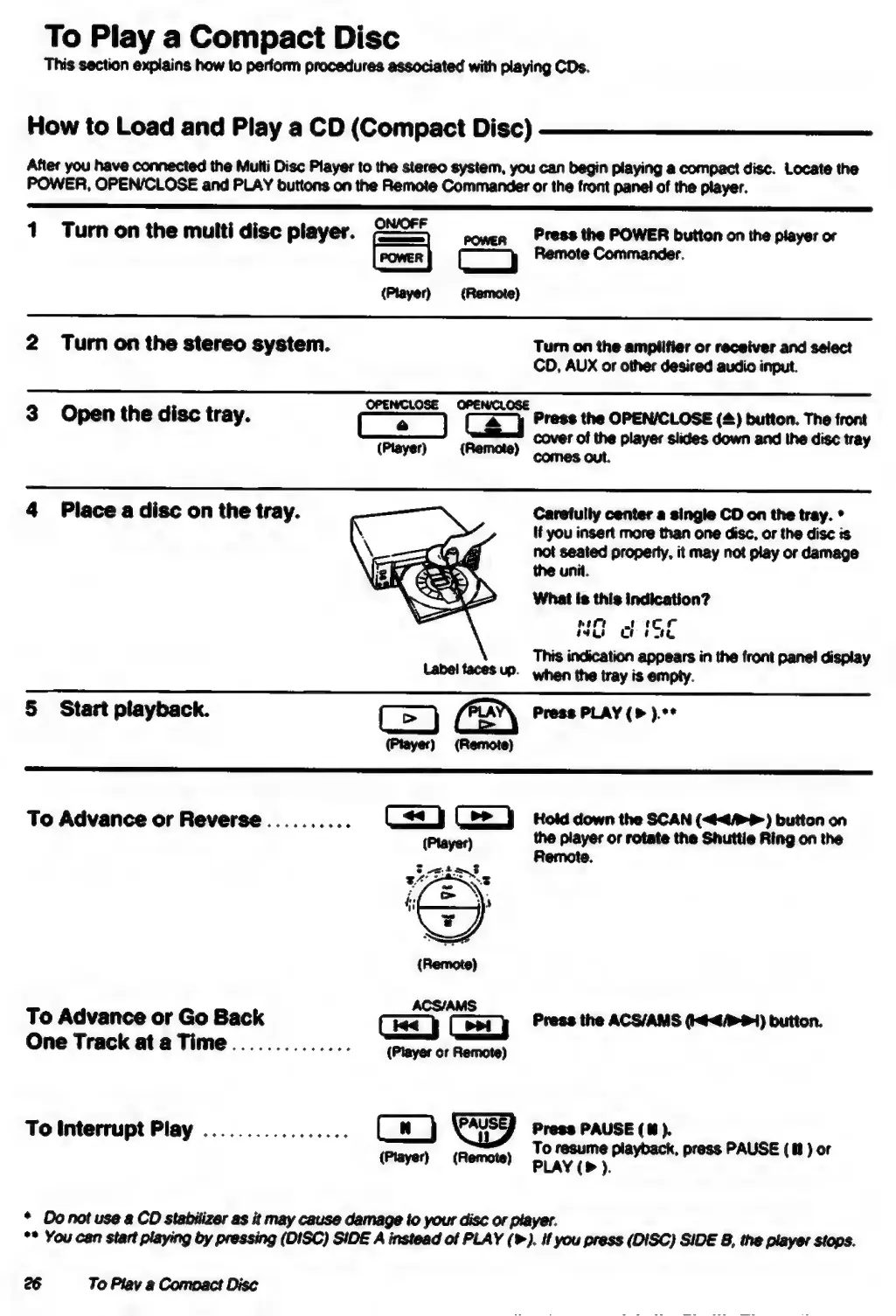
To
Play
a
Compact
Disc
This
section
explains
how
to
perform
procedures
associated
with
playing
CDs.
How
to
Load
and
Play
a
CD
(Compact
Disc)
After
you
have
connected
the
Multi
Disc
Player
to
the
stereo
system,
you
can
begin
playing
a
compact
disc.
Locate
the
POWER,
OPEN/CLOSE
and
PLAY
buttons
on
the
Remote
Commander
or
the
front
panel
of
the
player.
1
Turn
on
the
multi
disc
player.
conen
_PFeSS
the
POWER
button
on
the
player
or
a
|
Remote
Commander.
(Player)
(Remote)
2
Turn
on
the
stereo
system.
Turn
on
the
amplifier
or
receiver
and
select
CD,
AUX
or
other
desired
audio
input.
3
Open
the
disc
tray.
ee
Tey
Press
the
OPENICLOSE
(@)
button.
The
front
(Player)
(Remote)
a
la
aa
4
Place
a
disc
on
the
tray.
Caretully
center
a
single
CD
on
the
tray.
*
If
you
insert
more
than
one
disc,
or
the
disc
is
not
seated
properly,
it
may
not
play
or
damage
the
unit.
What
is
this
indication?
Ee
ee
ee
|
oe
eee
GF
ot
tk
This
indication
appears
in
the
front
panel
display
Label
faces
up.
when
the
tray
is
empty.
§
Start
playback.
=
(2)
Press
PLAY
).**
(Player)
(Remote)
To
Advance
or
Reverse
..........
=—s
Hold
down
the
SCAN
(<4?)
button
on
(Player)
the
player
or
rotate
the
Shuttie
Ring
on
the
Remote.
To
Advance
or
Go
Back
Press
the
ACS/AMS
(44/4)
button.
One
Track
ata
Time..............
ss)
(eet)
To
interrupt
Play
.................
Cw}
Press
PAUSE
(i).
{Player}
(Remote)
Ly
a
amt
press
PAUSE
(8
)
or
*
Do
not
use
a
CD
stabilizer
as it
may
cause
damage
to
your
disc
or
player.
**
You
can
start
playing
by
pressing
(DISC)
SIDE
A
instead
of
PLAY
().
if
you
press
(DISC)
SIDE
8,
the
player
stops.
26
To
Play
a
Compact
Disc

Table of Contents

Related product manuals