Back Back to Top Print
Stereo Headphones
MDR-1ADAC
Connecting to a digital output supported WALKMAN
By using the digital cable for the WALKMAN (supplied), the headphones can amplify the signal directly without the
built-in amplifier of the WALKMAN. The headphones are compatible with High-Resolution Audio format files, up to 192
kHz/24 bit PCM, DSD 2.8 MHz or DSD 5.6 MHz
*
.
*
The DSD format is converted to the linear PCM format when playing back.
Compatible WALKMAN models
NWZ-A10 Series, NWZ-ZX1, and NWZ-F880 Series (as of July 2014)*
When connecting a WALKMAN other than the compatible models mentioned above, follow the connecting method
described in “Connecting to WALKMAN models unsupported by digital-out.”
*
Availability depends on the country/region.
1. Turn on the WALKMAN.
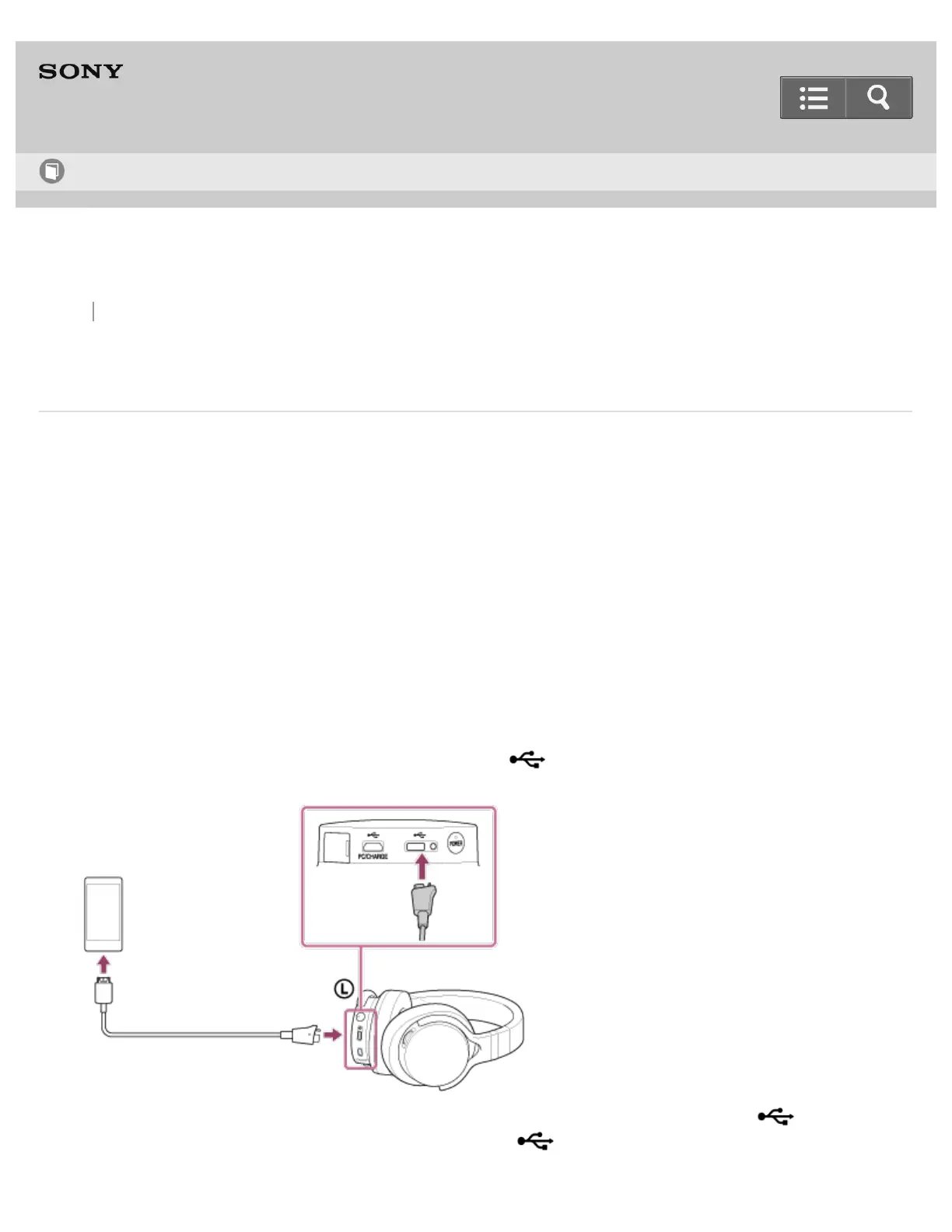
2. Connect the WALKMAN to the micro USB port (Type AB) ( ) using the digital cable for WALKMAN
(supplied).
You can listen to music on the WALKMAN by connecting it to the micro USB port (Type AB) ( ) while
charging the headphones with the micro USB port (type B) ( PC/CHARGE).
Help Guide
How to Use


 To Next Page
 Loading...