Need help?
Do you have a question about the Sony MDR-RF995RK and is the answer not in the manual?
Insert battery, connect AC adapter, and charge headphones before first use.
Connect to A/V component, wear headphones, start playback, and adjust volume.
Highlights the wireless system's range, sound, and noise reduction capabilities.
Guidance on battery charging, auto-charge, and checking battery status.
Advice on connecting the system and improving wireless reception.
Resolving issues like no sound, low sound, distortion, or background noise.
Detailed technical specifications for the transmitter and headphones.
List of all items included in the product package.
Instructions on how to replace the earpads on the headphones.
Guidance on protecting hearing and considerate listening practices.
Information on warranty period, service claims, and repair/replacement.
Covers damage limitations, implied warranties, and the arbitration process.
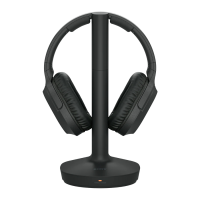
The Sony MDR-RF995RK is a wireless stereo headphone system designed to provide a high-fidelity audio experience without the constraints of cables. This system comprises a wireless stereo transmitter (TMR-RF995R) and wireless stereo headphones (MDR-RF995R), offering freedom of movement and clear sound reproduction.
The primary function of the MDR-RF995RK system is to transmit audio signals wirelessly from an A/V component to the headphones. The transmitter compresses the audio signal, converts it to an RF signal, and broadcasts it. The headphones then receive the RF signal, convert it back to an audio signal, and decompress it, effectively reducing noise picked up during transmission. This process ensures a clear sound with minimum transmission noise.
The system boasts a reception range of up to 45 meters (150 feet), allowing users to move freely within their home while enjoying their audio. It supports three transmission channels, which can be selected via a CHANNEL selector switch on the transmitter to optimize signal reception. The headphones feature an automatic tuning function to ensure optimum signal reception, simplifying the setup process.
A notable feature is the "VOICE" mode, which enhances the clarity of personal voice ranges, making it suitable for watching videos or listening to content with spoken dialogue. The headphones also include volume control and sound effect functions, allowing users to customize their listening experience directly from the headset.
Setting up the MDR-RF995RK system is straightforward. First, the supplied rechargeable nickel-metal hydride battery (BP-HP800-11) must be inserted into the left housing of the headphones, observing correct polarity. The battery is not charged upon initial purchase, so it needs to be charged before first use.
The AC adaptor is then connected to the transmitter and an AC outlet. For audio input, the transmitter can be connected to an A/V component in two ways:
Once connected, the headphones are placed on the transmitter for charging. The CHARGE/RED indicator on the transmitter lights up red during charging and turns off when complete. The system incorporates an auto-charge function: simply placing the headphones on the transmitter automatically turns them off and initiates charging, eliminating the need for manual power control.
Before listening, users should lower the headphone volume to prevent hearing damage. To start playback, the A/V component is turned on. The transmitter automatically begins sending RF signals when it detects an audio signal. If the sound is distorted or intermittent, users can try changing the radio frequency on the transmitter and then pressing the AUTO TUNING button on the headphones. Moving closer to the transmitter or changing its position can also improve reception.
The headphones offer a "VOICE" sound effect mode, which can be activated via a switch, to enhance vocal clarity. For normal playback, the switch should be set to "OFF."
The system is designed for convenience, with the transmitter automatically turning off if no signal or a low signal is input for about 4 minutes. The POWER indicator on the transmitter blinks for 4 minutes before turning off. It restarts automatically upon receiving an audio signal. If the transmitter turns off due to low signal, users should increase the A/V component's volume within the non-distorting range and then adjust the headphone volume.
The MDR-RF995RK system is designed for ease of maintenance to ensure longevity and optimal performance.
Battery Management: The supplied rechargeable nickel-metal hydride battery (BP-HP800-11) provides up to 20 hours of usage on a 7-hour charge. To check the remaining battery charge, users can turn on the headphones and observe the POWER indicator; it lights up green when the battery is serviceable. Charging is recommended if the indicator turns off, dims, flashes, or if the sound becomes distorted or noisy. The system is specifically designed to charge only the supplied rechargeable battery; dry batteries or other types of rechargeable batteries cannot be charged. If dry batteries are installed, the charge function is not activated. For optimal battery life, it's recommended to charge the battery after it is fully discharged. If the battery life significantly reduces, it may be time to replace it. The BP-HP800-11 battery is not commercially available but can be ordered from a Sony dealer.
Cleaning: If the CHARGE/RED indicator does not light up or charging is not completed, users should check that the headphones are correctly rested on the transmitter and that the contact points on both the headphones and transmitter are clean. Dust or dirt on these contact points can hinder charging. Wiping them with a cotton bud is recommended. Similarly, the + and - terminals of the rechargeable battery and the charging terminals of the transmitter/headphone should be cleaned with a dry cloth if short usage time is experienced.
Earpad Replacement: The earpads are replaceable. If they become dirty or worn out, they can be removed by pulling them out of the groove on the housing and replaced with new ones. New earpads can be ordered from a Sony dealer, as they are not commercially available. It's important to ensure the new earpad is fitted correctly in the housing's groove and set to the vertical position.
Environmental Considerations: To prevent damage, the system should not be exposed to direct sunlight, excessive heat, moisture, sand, dust, or mechanical shock. It is not waterproof. When not in use for extended periods, the AC adaptor should be disconnected from the AC outlet, and the battery should be removed from the headphones to prevent leakage and corrosion. The transmitter should not be placed on metallic tables, as this can cause noise or reduce the reception range.
Troubleshooting: A troubleshooting checklist is provided in the manual to address common issues such as no sound, low sound, distorted or intermittent sound, loud background noise, or charging problems. If issues persist after following the checklist, users are advised to consult their nearest Sony dealer, bringing both the headphones and transmitter for repair.
By adhering to these usage and maintenance guidelines, users can ensure a long-lasting and enjoyable experience with their Sony MDR-RF995RK wireless stereo headphone system.
 General
| Impedance | 32 Ω |
|---|---|
| Driver type | Dynamic |
| Driver unit | 40 mm |
| Magnet type | Neodymium |
| Ear coupling | Supraaural |
| Diaphragm material | Polyethylene terephthalate (PET) |
| Headphone frequency | 10 - 22000 Hz |
| Headphone sensitivity | 100 dB |
| Battery recharge time | 7 h |
| Continuous audio playback time | 20 h |
| Connectivity technology | Wireless |
| Product color | Black |
| Wearing style | Head-band |
| Volume control | Rotary |
 Weight and Dimensions
| Weight | 275 g |
|---|

 To Next Page