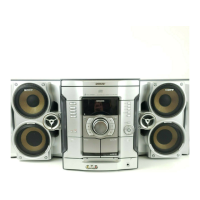
Performthelbllowingprocedures[] to[] tohookupyoursystemusingthesuppliedcordsand
accessories.
=M leSd amenna
Sub woo_rsoeaKer _
Fron speaker (righ) Fron speaker (left)
* MHC,GX45 and MIIC_RG440S only
[] Connect the speakers.
Connect the right and left speaker cords to
the SPEAKER temlinals as shown below.
insert onlythe stripped portion
[] Connect the sub woofer speaker.
(MHC-GX45 and MHC-RG440S only)
Connect the speaker cords to the SUB
WOOFER OUT jack and SUB WOOFER
CONTROL jack as shown below.
SUB WOOFER OUT jack
_=--BlacldStnpe (Q)
6GB



 To Next Page
 Loading...