14
GB
MPF88E-UA/4-679-609-21 (1)
4 Select “Search for a suitable
driver for my device
(recommended)”, and then click
[Next].
The following dialog box appears.
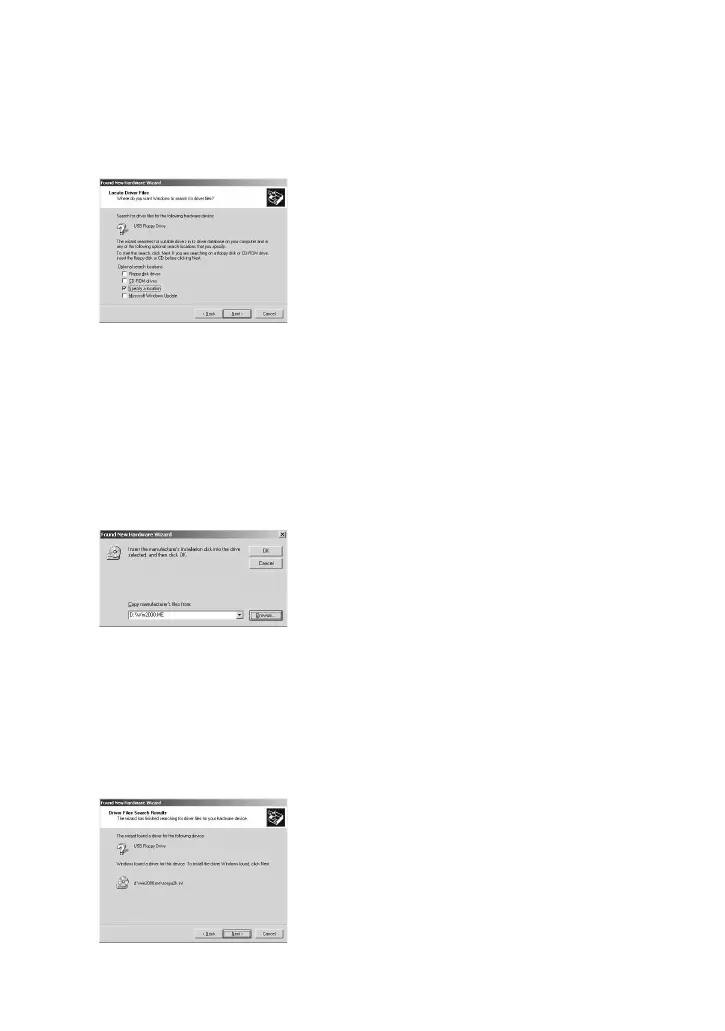
5 Select the “Specify a location”
check box.
Note
Make sure that all the other check
boxes are clear.
6 Click [Next].
The following dialog box appears.
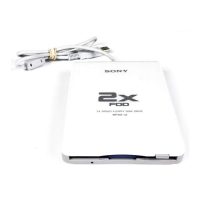
7 In the “Copy manufacturer's
files from” box, type
“X:\Win2000.ME” (where X is
your CD-ROM drive letter), and
then click [OK].
The following dialog box appears.
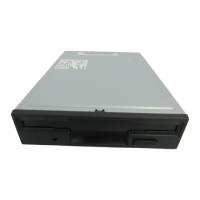
8 Confirm the location of the
device driver.
Note
If the driver location is not
“X:\win2000.me\sonyu2k.inf” (where X
is your CD-ROM drive letter), click
[Back] and return to step 4.
9 Click [Next] to install the device
driver.
10
When installation is complete,
click [Finish].



 To Next Page