6
GB
MPF88E-UA/4-679-609-21 (1)
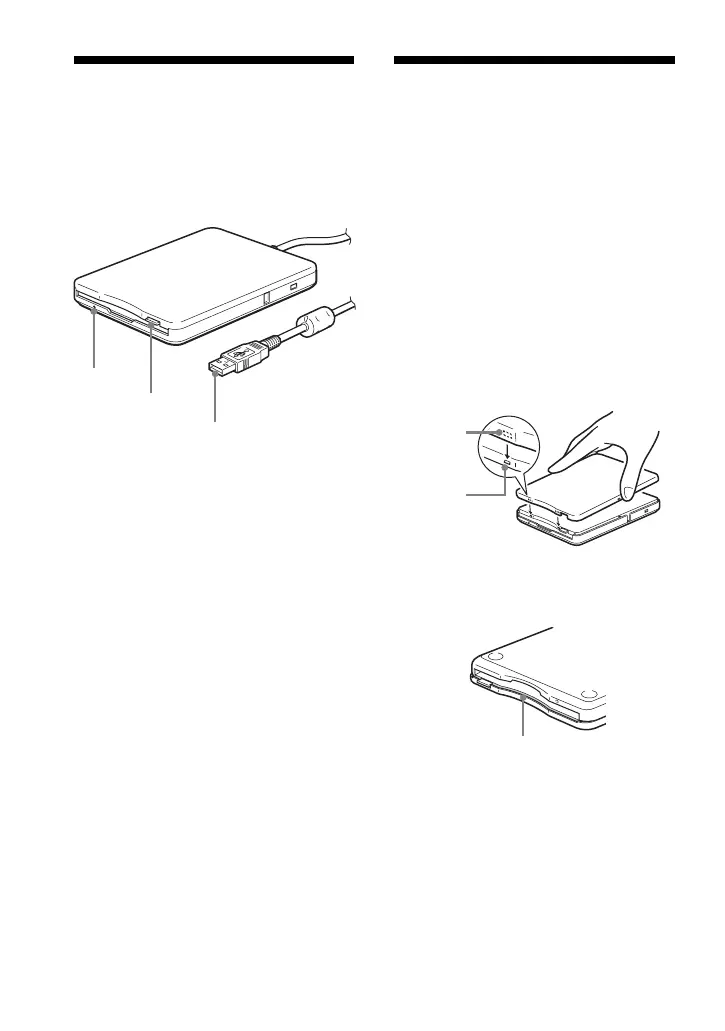
Parts and
Functions
This section describes the drive parts and
functions.
1
2
3
1Status indicator
Indicates the status of the drive. It lights
when the floppy disk in the drive is
being accessed.
2Eject button
Push this button to eject a floppy disk
from the drive.
3USB type A plug
Used to connect the drive to your
computer.
Installing and
Removing the
Color Panel
To install the color panel
1 Align the panel with the front of
the drive so that the panel
hooks mate securely with the
drive notches.
Note
Make sure the panel fits snugly on the
drive.
m
Make sure the panel fits snugly
on the drive.
Notch
Hook
Front of drive
Drive base



 To Next Page