8
GB
MPF88E-UA/4-679-609-21 (1)
Positioning the
USB Floppy Disk
Drive
The drive is designed to be used
horizontally and vertically. When you
want to use it vertically, you must install
the stand supplied with the drive. For
details, see “Installing and Removing the
Drive Stand”, page 8.
Warning
• When using the drive vertically, make sure
that you place the drive on a stable
horizontal surface. Failing to do so may
cause the drive to fall resulting in
damage, injury, and/or loss of data
on the floppy disk.
• Do not use the drive in any other position
than horizontal and vertical.
Installing and
Removing the
Drive Stand
This section describes how to install and
remove the stand of the drive when
using the drive vertically.
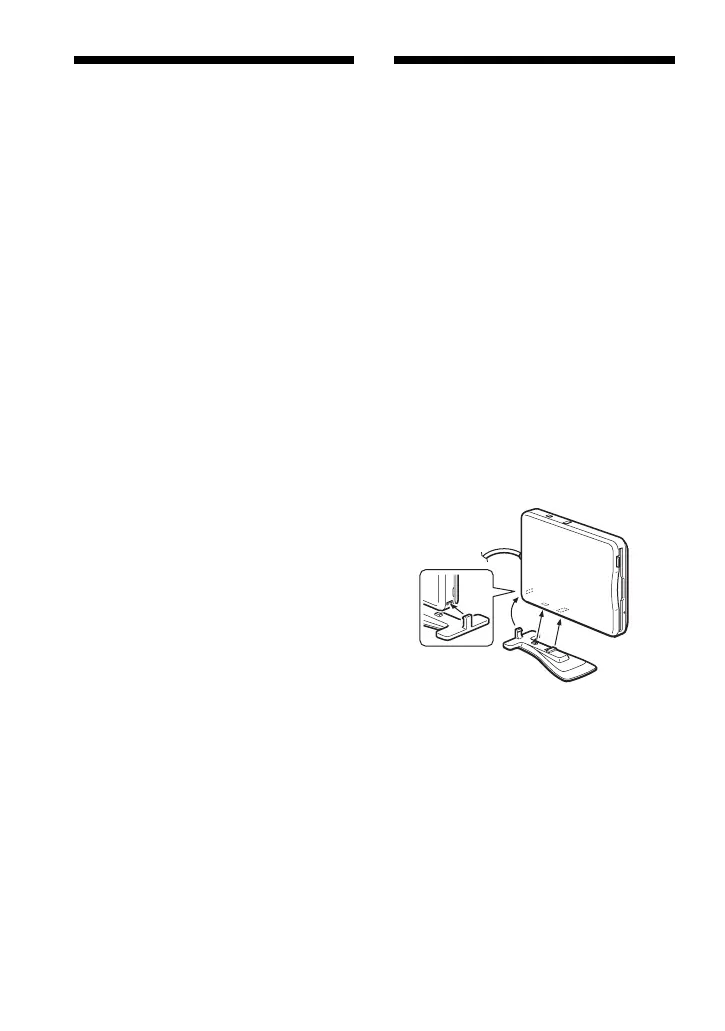
To install the stand
1 Holding the drive vertically,
insert the stand hook into the
notch at the rear of the drive.
2 Raise the stand toward the
drive until the stand pins snap
into the notches under the
drive.



 To Next Page