EasyManua.ls Logo

Sony MX-650 - Page 12

Sony MX-650
16 pages
Print Icon
To Next Page IconTo Next Page
To Previous Page IconTo Previous Page
Loading...
OPERATING
PROCEDURE
CONNECTIONS
Refer
to
connection
diagram
on
page
8.
@
When
connecting
a
stereo
source,
it
is
recommended
you
make
it
a
rule
to
connect
its
L-channel
source
to
the
odd-number
input
channel
of
the
MX-650
and
its
R-channel
source
to
the
even-
number
input
channel.
This
will
simplify
connection
problems
and
make
operation
easier.
@
Always
keep
in
mind
which
input
source
corresponds
to
which
input
channel.
CASCADE
CONNECTION
Refer
to
the
connection
diagram
on
page
10.
One
MX-650
can
mix
up
to
6
channels
of
input
through
any
com-
bination
of
mic
and
line/phono
inputs.
Adding
a
second
or
third
MX-650
enables
multiple
channels
to
be
mixed
to
L
and
R
line
outputs.
In
cascade
connections,
the
Master's
mixing
siganls
plus
the
Slave’s
mixing
signals
are
fed
to
the
Master’s
line
outputs.
(A
total
of
12
channels
of
mixing
signals
will
be
fed
to
either
the
L
or
R
output
channels.)
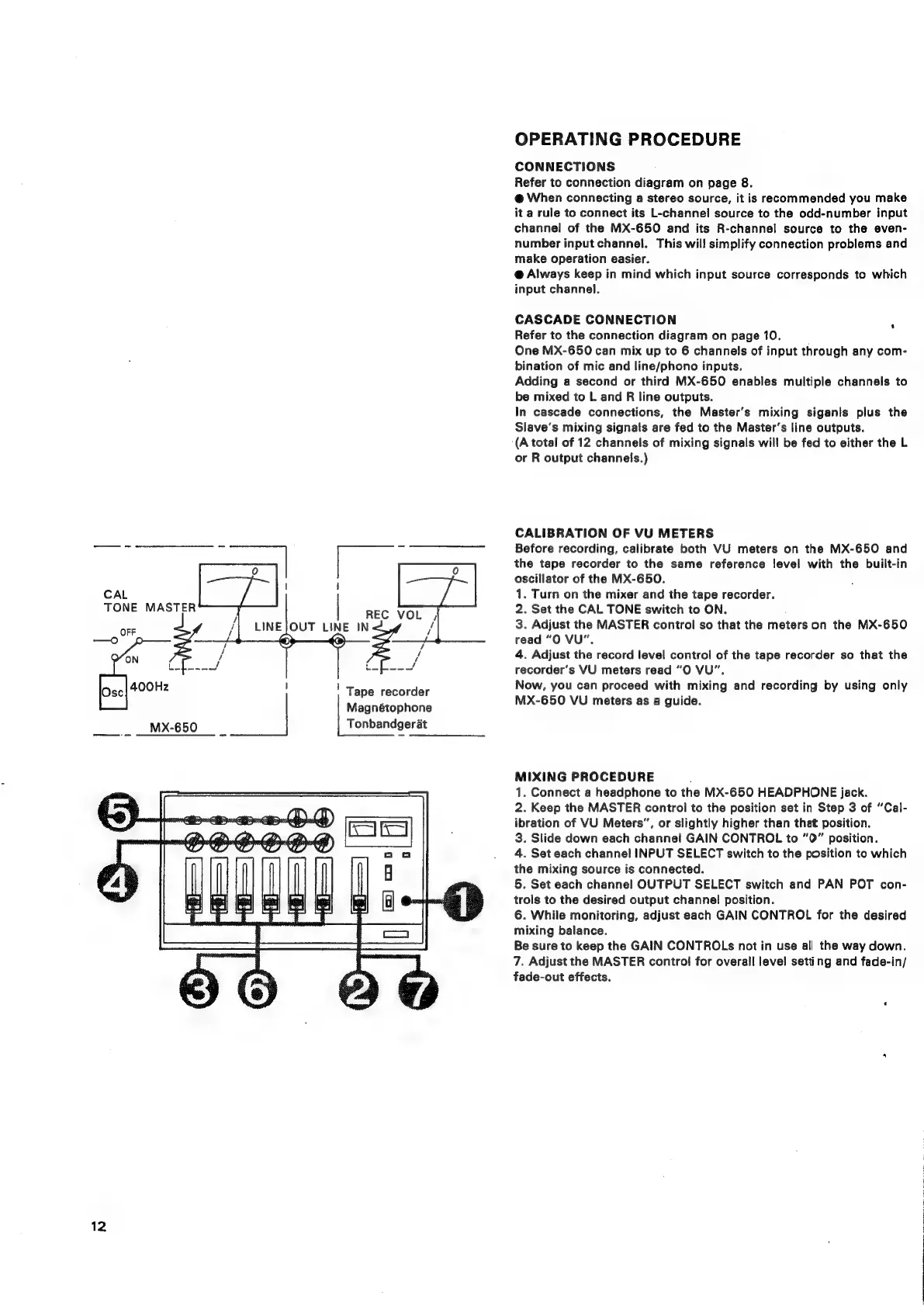
CALIBRATION
OF
VU
METERS
Before
recording,
calibrate
both
VU
meters
on
the
MX-650
and
the
tape
recorder
to
the
same
reference
level
with
the
built-in
oscillator
of
the
MX-650.
1.
Turn
on
the
mixer
and
the
tape
recorder.
2.
Set
the
CAL
TONE
switch
to
ON.
3.
Adjust
the
MASTER
control
so
that
the
meters
on
the
MX-650
read
“O
VU”.
4.
Adjust
the
record
level
control
of
the
tape
recorder
so
that
the
recorder’s
VU
meters
read
“O
VU",
|
Tape
recorder
Now,
you
can
proceed
with
mixing
and
recording
by
using
only
Magnétophone
MX-650
VU
meters
as
a
guide.
Tonbandgerat
MIXING
PROCEDURE
:
1.
Connect
a
headphone
to
the
MX-650
HEADPHONE
jack.
2.
Keep
the
MASTER
control
to
the
position
set
in
Step
3
of
“Cal-
ibration
of
VU
Meters”,
or
slightly
higher
than
that
position.
3.
Slide
down
each
channel
GAIN
CONTROL
to
”0”
position.
4.
Set
each
channel
INPUT
SELECT
switch
to
the
position
to
which
the
mixing
source
is
connected.
5.
Set
each
channel
OUTPUT
SELECT
switch
and
PAN
POT
con-
trols
to
the
desired
output
channel!
position.
6.
While
monitoring,
adjust
each
GAIN
CONTROL
for
the
desired
mixing
balance.
Be
sure
to
keep
the
GAIN
CONTROLs
not
in
use
all
the
way
down.
7.
Adjust
the
MASTER
control
for
overall
level
setting
and
fade-in/
fade-out
effects.
CAL
12

Related product manuals