EasyManua.ls Logo

Sony MX-650 - Page 8

Sony MX-650
16 pages
Print Icon
To Next Page IconTo Next Page
To Previous Page IconTo Previous Page
Loading...
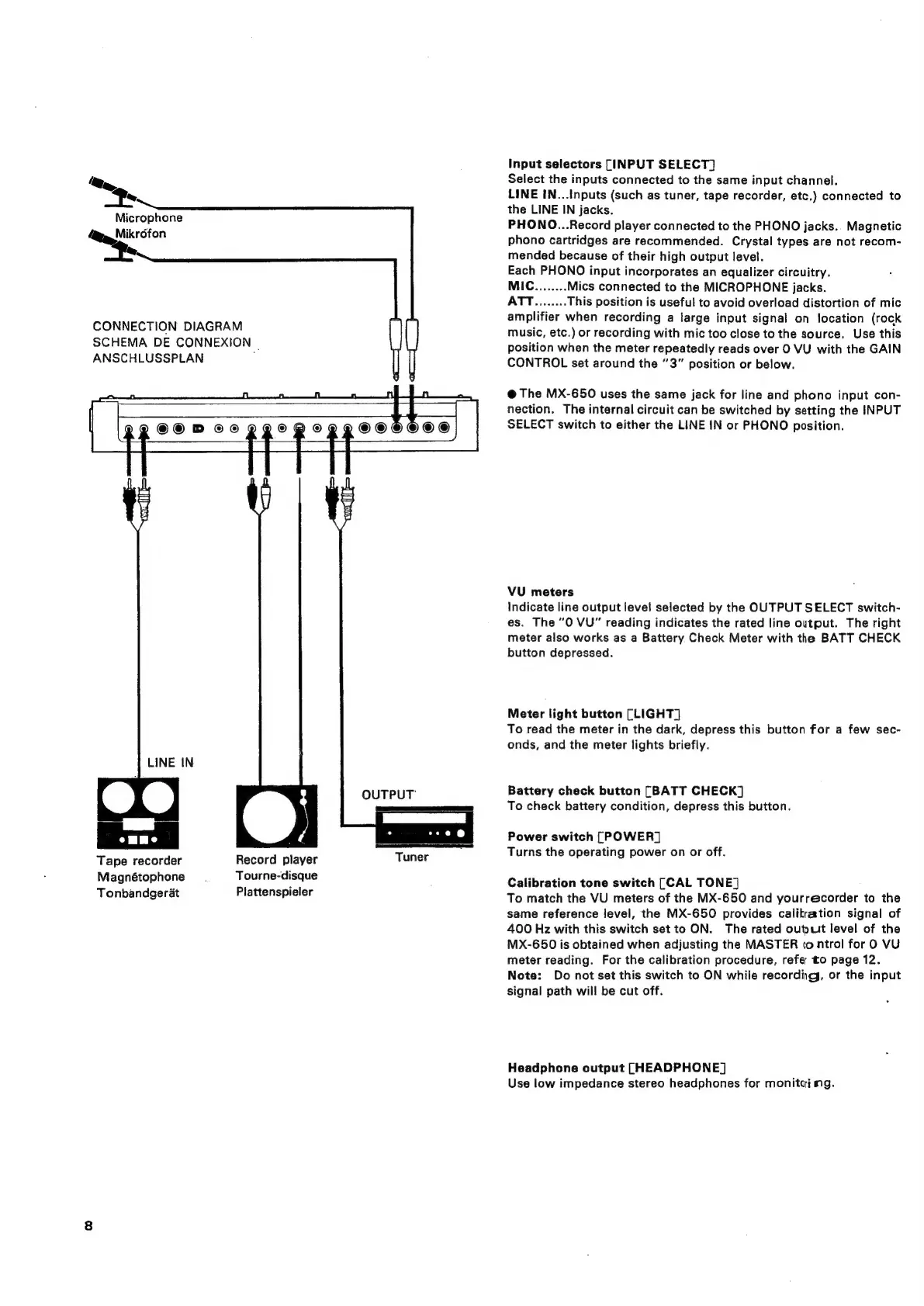
my,
Microphone
~~
CONNECTION
DIAGRAM
SCHEMA
DE
CONNEXION
|
ANSCHLUSSPLAN
LINE
IN
Tape
recorder
Magnétophone
Tonbandgerat
Record
player
Tourne-disque
Plattenspieler
2
©©
DT
©®©
PZOQ
©
|OGHOOH®
i
es
ee
ee
OUTPUT
Tuner
Input
selectors
[INPUT
SELECT]
Select
the
inputs
connected
to
the
same
input
channel.
LINE
IN...Inputs
(such
as
tuner,
tape
recorder,
etc.)
connected
to
the
LINE
IN
jacks.
PHONO...Record
player
connected
to
the
PHONO
jacks.
Magnetic
phono
cartridges
are
recommended.
Crystal
types
are
not
recom-
mended
because
of
their
high
output
level.
Each
PHONO
input
incorporates
an
equalizer
circuitry.
MIC........
Mics
connected
to
the
MICROPHONE
jacks.
ATT........
This
position
is
useful
to
avoid
overload
distortion
of
mic
amplifier
when
recording
a
large
input
signal
on
location
(rock
music,
etc.)
or
recording
with
mic
too
close
to
the
source.
Use
this
position
when
the
meter
repeatedly
reads
over
O
VU
with
the
GAIN
CONTROL
set
around
the
“3”
position
or
below.
@
The
MX-650
uses
the
same
jack
for
line
and
phono
input
con-
nection.
The
internal
circuit
can
be
switched
by
setting
the
INPUT
SELECT
switch
to
either
the
LINE
IN
or
PHONO
position.
VU
meters
Indicate
line
output
level
selected
by
the
OUTPUT
SELECT
switch-
es.
The
“0
VU”
reading
indicates
the
rated
line
output.
The
right
meter
also
works
as
a
Battery
Check
Meter
with
the
BATT
CHECK
button
depressed.
Meter
light
button
[LIGHT]
To
read
the
meter
in
the
dark,
depress
this
button
for
a
few
sec-
onds,
and
the
meter
lights
briefly.
Battery
check
button
[BATT
CHECK]
To
check
battery
condition,
depress
this
button.
Power
switch
[POWER]
Turns
the
operating
power
on
or
off.
Calibration
tone
switch
[CAL
TONE]
To
match
the
VU
meters
of
the
MX-650
and
yourrecorder
to
the
same
reference
level,
the
MX-650
provides
calitration
signal
of
400
Hz
with
this
switch
set
to
ON.
The
rated
output
level
of
the
MX-650
is
obtained
when
adjusting
the
MASTER
control
for
0
VU
meter
reading.
For
the
calibration
procedure,
refer
to
page
12.
Note:
Do
not
set
this
switch
to
ON
while
recording,
or
the
input
signal
path
will
be
cut
off.
Headphone
output
[HEADPHONE]
Use
low
impedance
stereo
headphones
for
monitai
mg.

Related product manuals