10
Setting the destination in other
ways
You can also set the destination and search for
routes by the following methods.
From the top menu, select the items in the
following order, then “Calculate Route” (if
necessary).
For details, see the supplied PDF manual.
Guidance displays
Once a route has been calculated, visual
guidance navigates you to the destination along
with audio guidance.
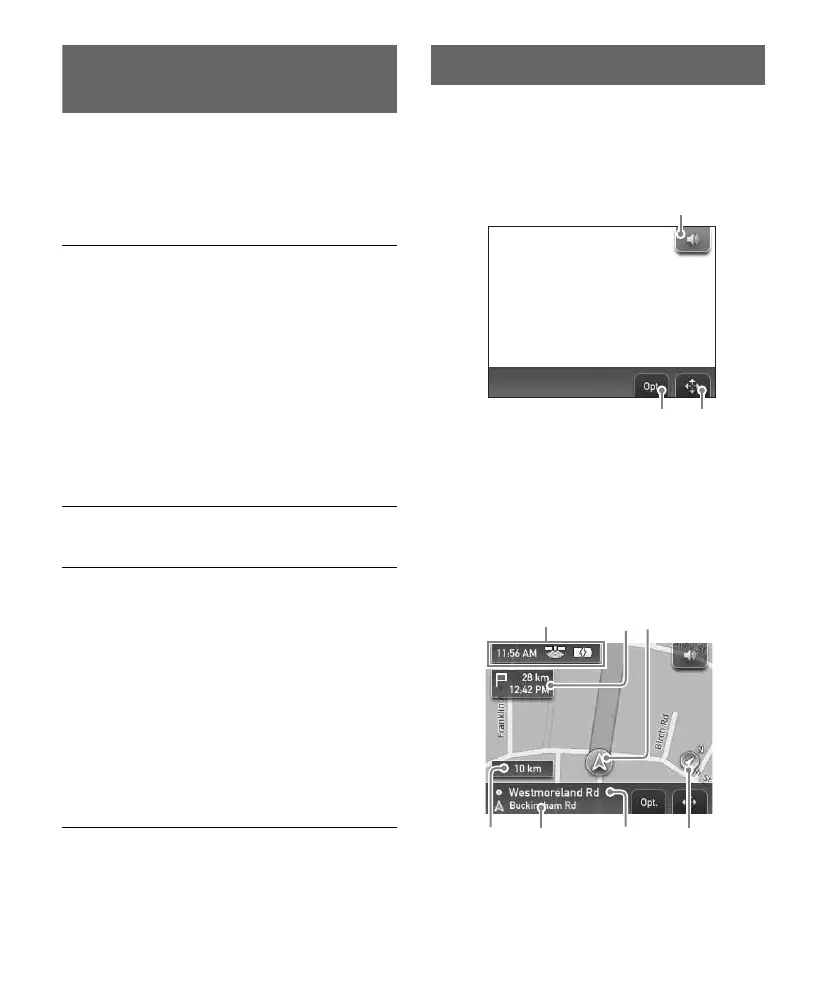
Information on map tool menu
1 To adjust the volume.*
2 To show option menu.
3 To switch to map scrolling mode.
* When the unit is powered by the built-in battery,
volume may slightly decrease.
2D Map display
Straight-ahead driving (during route guidance)
Search Nearby
Searches for routes to a POI, such as restaurant,
hotel, etc., near the current car position.
Select “Search Nearby,” then any of the
following options.
“Quick Link 1 - 3”
Searches for routes to the nearest POI of the
category stored on Quick Links. Categories on
Quick Links can be customized in the setting
menu (page 12).
“Search by Name”
Enter the name of the POI directly.
“Search by Category”
Select the desired POI category from the list.
Go Home
Searches for routes to your home when it is
registered.
Navigate
Select “Navigate,” then any of the following
options.
“POI Search Nationwide”
Searches for routes to a POI, such as airport,
etc., within the specified country.
“POI Search Town”
Searches for routes to a POI, such as restaurant,
hotel, etc., within the specified town.
“Address Book”
Searches for routes to a saved destination point.
“Recent Destinations”
Searches for routes to recently searched
destinations.
2 3
E GF
D



 To Next Page