When the battery assy (BAT1) is removed, insulate the end of wire
by a tape etc. to prevent short-circuited of the wire part of battery
assy (BAT1).
When the complete EMMC board is replaced, process it according
to the following.
The destination code corresponding to each region must be in-
stalled into the EMMC board with the destination setting tool.
EMMC board
Model Capacity
Part No. of
complete EMMC
board
Pre-installed
destination
code
NWZ-E353 4GB 9-885-147-27 CEW
NWZ-E354 8GB 9-885-147-28 CEW
NWZ-E355 16GB 9-885-147-29 CEW
Destination code
Model Area
Destination
code
Remark
NWZ-E353/
E354/E355
USA U2
Canada CA
Europe
CEW
CEV
India IN
South
Africa
IN
Please use the desti-
nation code, IN
Please use this Tool in Windows XP or later.
Please install Windows Media Player 11 or later to make the unit
recognize as MTP.
Con rm the method of obtaining the destination setting tool to the
service headquarters.
1. Unzip the destination setting tool to get “NWZE35XE45X_
Dest_Setting” folder.
2. There are the three folders if you open “NWZE35XE45X_
DEST_Setting” folder.
3. Copy the three folders in step 2 under C Drive.
Above folders in step 2 can be saved anywhere as long as the
folder path is with English (one byte character).
Described with the example that “the folders were saved under
C Drive” on this service manual.
The destination setting tool for each series is stored as below.
Folder name Folder name Updater les
NWZ-E35X
WMT_CA updating-mtp.bat etc.
WMT_CEV updating-mtp.bat etc.
WMT_CEW updating-mtp.bat etc.
WMT_IN updating-mtp.bat etc.
WMT_U2 updating-mtp.bat etc.
Please use this tool after closing other application software.
Will be described with below conditions as an example.
Model: NWZ-E353/E354/E355
Destination: CEW
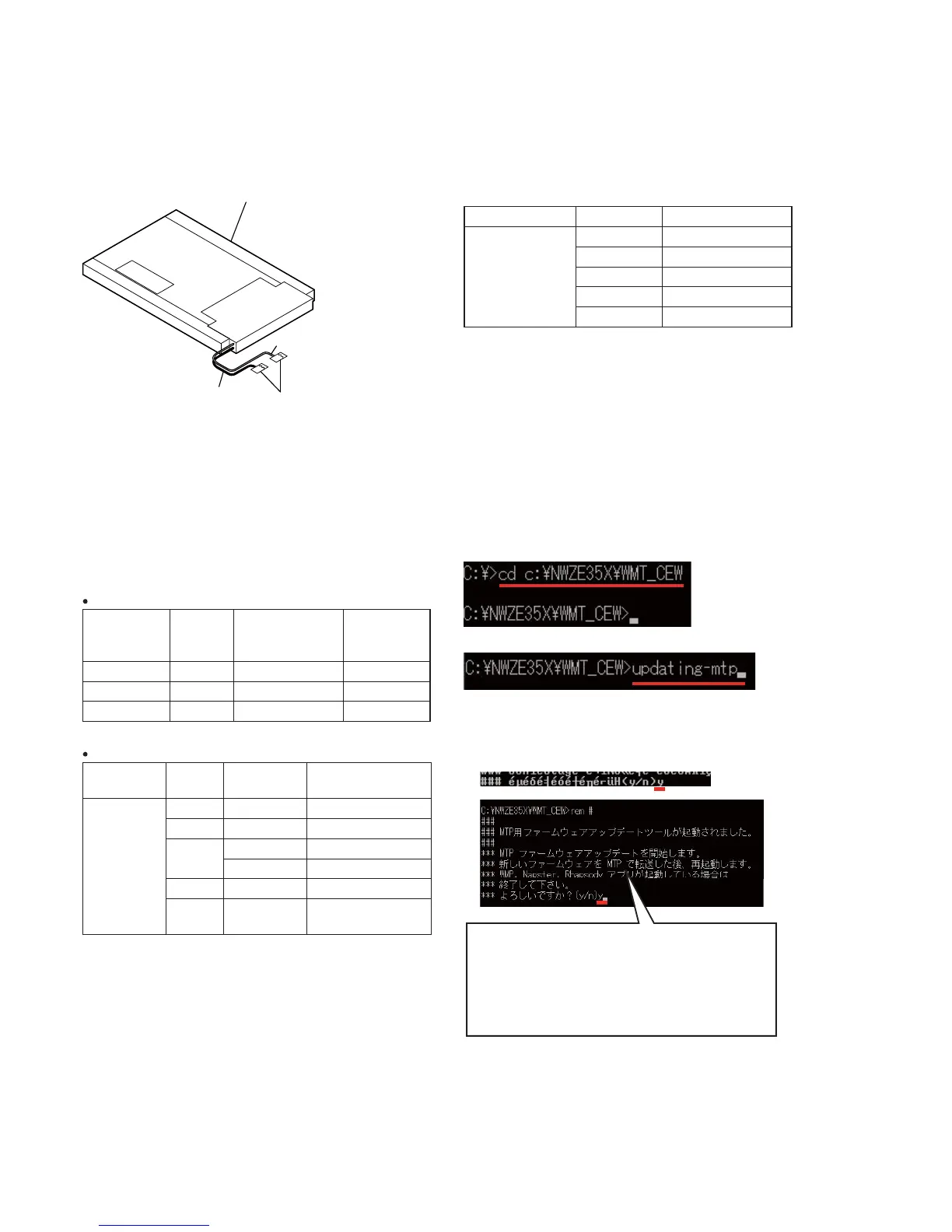
1. Turn on power of the WALKMAN, and connect it to PC.
2. Start the command prompt application software, and change
the folder pass to your desired folder (Example: c:\NWZE35X\
WMT_CEW).
3. Input “updating-mtp” and press the Enter key on PC.
4. If the following message is displayed, input “y” and press the
Enter key on PC.
When the Enter key on PC is pressed, the WALKMAN is format-
ted.


 To Next Page
 Loading...