EasyManua.ls Logo

Sony PHV-A7 - Connecting to Other Equipment; Connect to TV with Audio;Video Input; Connect to TV with S Video Input; Connect to TV without AV Input

Sony PHV-A7
18 pages
Print Icon
To Next Page IconTo Next Page
To Previous Page IconTo Previous Page
Loading...
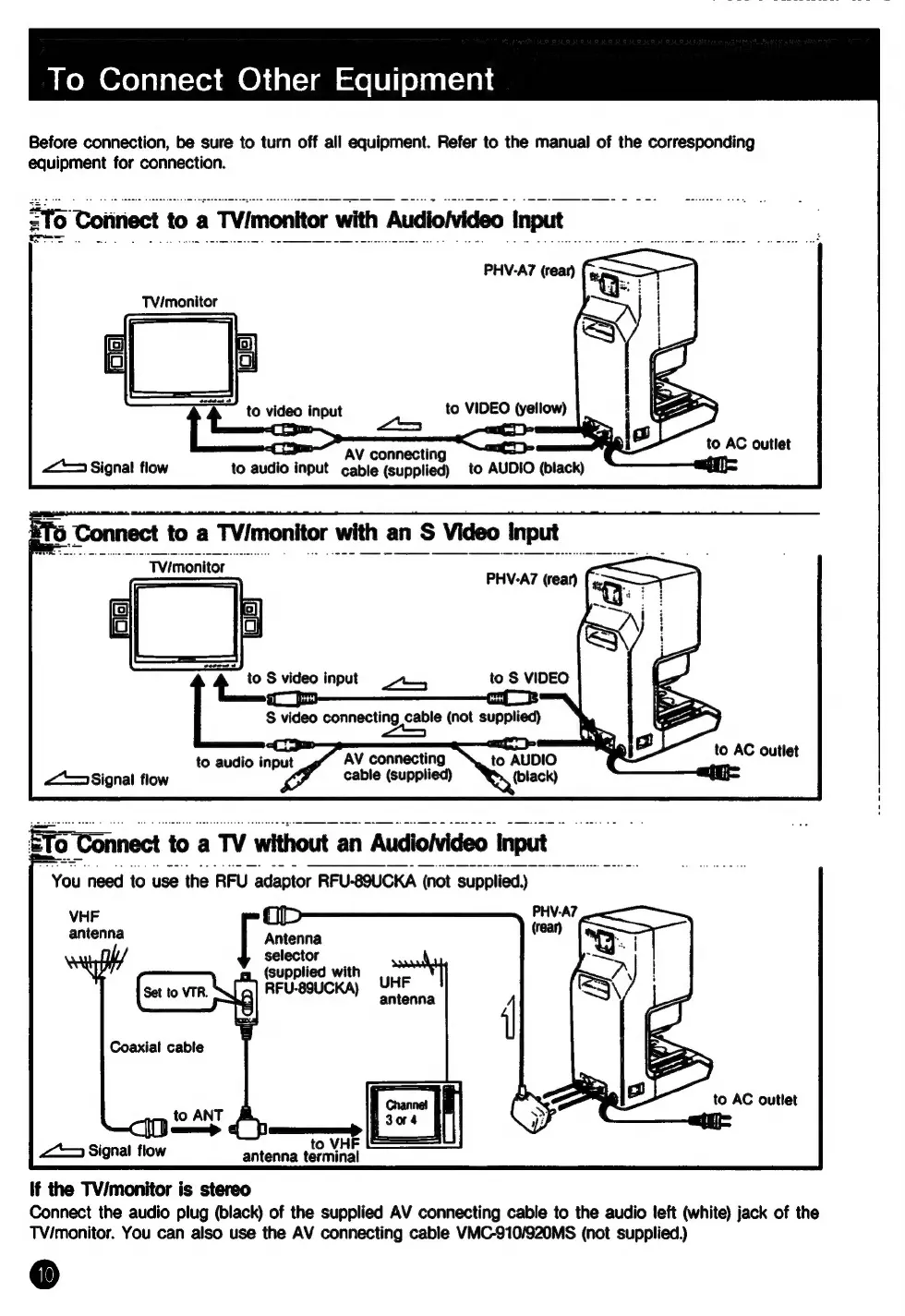
To
Connect
Other
Equipment
Before
connection,
be
sure
to
turn
off
all
equipment.
Refer
to
the
manual
of
the
corresponding
equipment
for
connection.
ZT
Toiiriect
to
a
TVimonitor
with
Audioivideo
Input
PHV-A7
(rear)
TV/monitor
SS
to
video
input
to
VIDEO
(yellow)
es
ahs
S
connecting
:
10
AC
outlet
AV
<*>
Signal
flow
to
audio
input
cable
(supplied)
to
AUDIO
(black)
eal
‘Connect
to
a
TV/monitor
with
an
S
Video
input
“Tvimonitor
~
—_
PHV-A7
(rear)
4
to
S
video
input
aso
to
S
VIDEO
8
S
video
connecting
cable
(not
supplied)
pa
to
audio
input
AV
connecting
to
AUDIO
<>
Signal
flow
cable
(supplied)
(black)
ETo
Connect
to
a
TV
without
an
Audiolvideo
Input
You
need
to
use
the RFU
adaptor
RFU-89UCKA
(not
supplied)
PHV-A7
Antenna
VHF
|
antenna
selector
:
~
(supplied
with
UHF
g]
FUSCA
terme
Coaxial
cable
to
ANT
&
i
ap
¢
SE
<>
Signal
flow
If
the
TV/monitor
is
stereo
Connect
the
audio
plug
(black)
of
the
supplied
AV
connecting
cable
to
the
audio
left
(white)
jack
of
the
TV/monitor.
You
can
also
use
the
AV
connecting
cable
VMC-910/920MS
(not
supplied.)