EasyManua.ls Logo

Sony PHV-A7 - Advanced Operation; Manual Brightness Adjustment; Holding White Balance Level

Sony PHV-A7
18 pages
Print Icon
To Next Page IconTo Next Page
To Previous Page IconTo Previous Page
Loading...
Vole
Talorclo
mm
@lolcve-hilole
oem
cremenetramttaennenetite
tin
sm
atten:
tee
ae
flow.
1.to
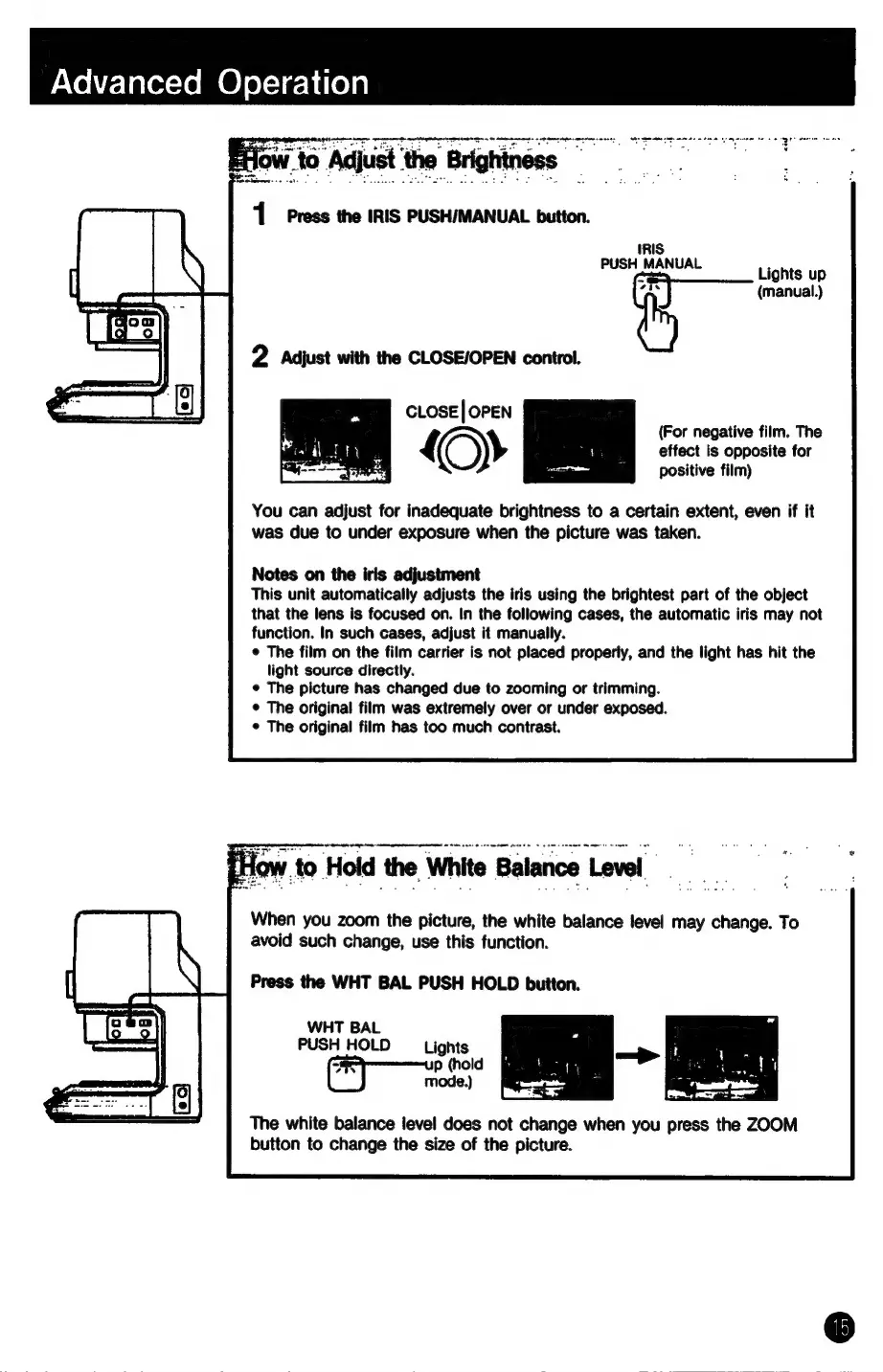
Adjust
the
Brightness:
1
Press
the
IRIS
PUSH/MANUAL
button.
IRIS
pinch
Lights
up
~
(manual.)
MEE
CLose|
OPEN
Bi
|
ae
{—»
You
can
adjust
for
inadequate
brightness
to
a
certain
extent,
even
if
it
was
due
to
under
exposure
when
the
picture
was
taken.
(For
negative
film.
The
effect
is
opposite
for
positive
film)
Notes
on
the
iris
adjustment
This
unit
automatically
adjusts
the
iris
using
the
brightest
part
of
the
object
that
the
lens
is
focused
on.
In
the
following
cases,
the
automatic
iris
may
not
function.
In
such
cases,
adjust
it
manually.
¢
The
film
on
the
film
carrier
is
not
placed
properly,
and
the
light
has
hit
the
light
source
directly.
¢
The
picture
has
changed
due
to
zooming
or
trimming.
¢
The
original
film
was
extremely
over
or
under
exposed.
¢
The
original
film
has
too
much
contrast.
When
you
zoom
the
picture,
the
white
balance
level
may
change.
To
avoid
such
change,
use
this
function.
Press
the
WHT
BAL
PUSH
HOLD
button.
WHT
BAL
PUSH
HOLD
Lights
p
(hold
mode.)
The
white
balance
level
does
not
change
when
you
press
the
ZOOM
button
to
change
the
size
of
the
picture.