EasyManua.ls Logo

Sony PHV-A7 - Advanced Operation - Audio and Display; Adjusting Color Saturation; Microphone Input and Volume; Displaying Small Objects or Photos

Sony PHV-A7
18 pages
Print Icon
To Next Page IconTo Next Page
To Previous Page IconTo Previous Page
Loading...
pAXo\F-laler-romm@)el-1e-1
dela
Bee
et
ewe
emt
eres
a
errr
rt
cee
ee
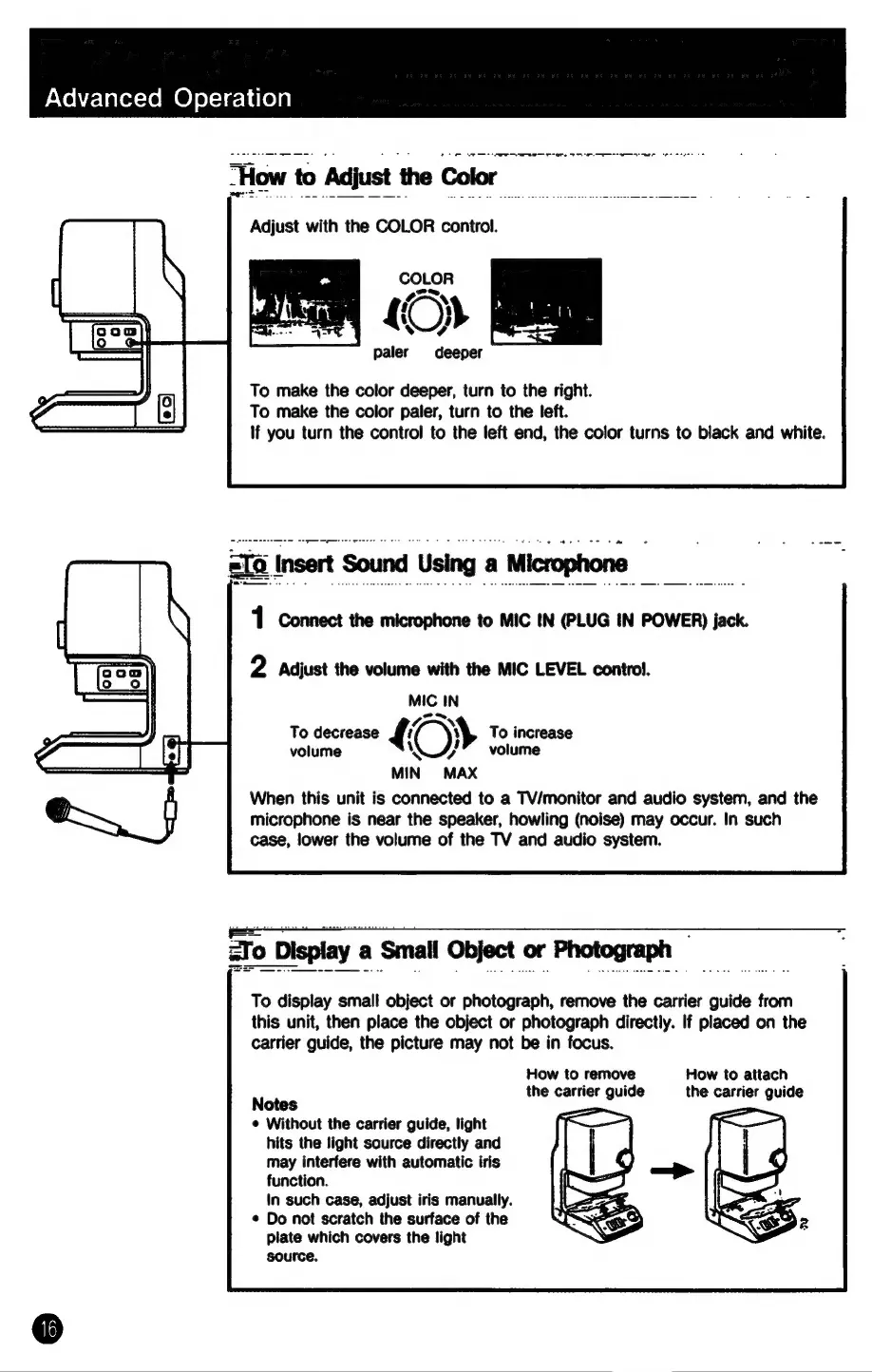
“How
to
Adjust
the
Color
Adjust
with
the
COLOR
control.
paler
deeper
To
make
the
color
deeper,
turn
to
the
right.
To
make
the
color
paler,
turn
to
the
left.
If
you
turn
the
control
to
the
left
end,
the
color
turns
to
black
and
white.
pedal
dodanie
pei
tctge
ate
|
Insert
Sound
Using
«
a
|
Microphone
_
1
Connect
the
microphone
to
MIC
IN
(PLUG
IN
POWER)
jack.
2
Adjust
the
volume
with
the
MIC
LEVEL
control.
MIC
IN
tN
;
To
decrease
LO}
To
increase
volume
WA”
volume
MIN
MAX
When
this unit
is
connected
to
a
TV/monitor
and
audio
system,
and
the
microphone
is
near
the
speaker,
howling
(noise)
may
occur.
In
such
case,
lower
the
volume
of
the
TV
and
audio
system.
ZTo
Display
a
Small
Object
or
Photograph
To
display
small
object
or
photograph,
remove
the
carrier
guide
from
this
unit,
then
place
the
object
or
photograph
directly.
If
placed
on
the
carrier
guide,
the
picture
may
not
be
in
focus.
How
to
remove
How
to
attach
the
carrier
guide
the
carrier
guide
Notes
: :
©
Without
the
carrier
guide,
light
hits
the
light
source
directly
and
may
interfere
with
automatic
iris
function.
In
such
case,
adjust
iris
manually.
¢
Do
not
scratch
the
surface
of
the
plate
which
covers
the
light
source.