EasyManua.ls Logo

Sony PS-11 - Section 3: Mechanical Adjustments; Automatic Return Operation Adjustment; Manual Return Operation Adjustment

Sony PS-11
23 pages
Print Icon
To Next Page IconTo Next Page
To Previous Page IconTo Previous Page
Loading...
SECTION
3
ADJUSTMENTS
3-1.
MECHANICAL
ADJUSTMENTS
Tonearm
Height
Adjustment
Automatic
Return
Position
Adjustment
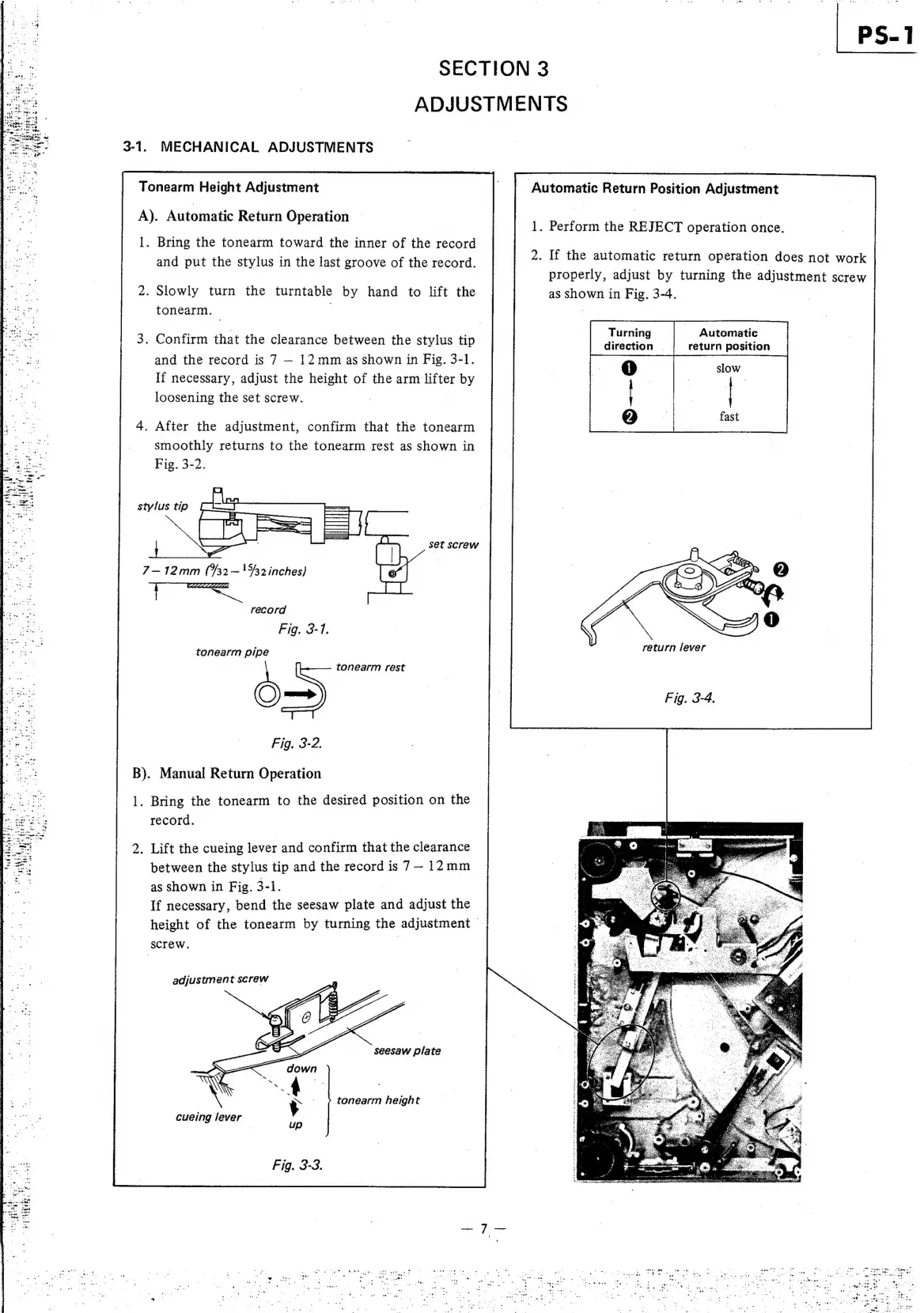
A).
Automatic
Return
Operation
1.
Perform
the
REJECT
operation
once.
1.
Bring
the
tonearm
toward
the
inner
of
the
record
and
put
the
stylus
in
the
last
groove
of
the
record.
2.
If
the
automatic
return
operation
does
not
work
properly,
adjust
by
turning
the
adjustment
screw
as
shown
in
Fig.
3-4.
Turning
Automatic
direction
|
return
position
2.
Slowly
turn
the
turntable
by
hand
to
lift
the
tonearm.
| .
3.
Confirm
that
the
clearance
between
the
stylus
tip
and
the
record
is
7
12mm
as
shown
in
Fig.
3-1.
If
necessary,
adjust
the
height
of
the
arm
lifter
by
loosening
the
set
screw.
4.
After
the
adjustment,
confirm
that
the
tonearm
eee
smoothly
returns
to
the
tonearm
rest
as
shown
in
eee
Fig.
3-2.
stylus
tip
set
screw
7—12mm
(732
~
15/3
inches)
|
as
record
Fig.
3-7.
:
eturn
lever
tonearm
pipe
ret
tonearm
rest
>
Fig.
3-4.
ee
te
be.
Fig,
3-2.
B).
Manual
Return
Operation
1.
Bring
the
tonearm
to
the
desired
position
on
the
record.
2.
Lift
the
cueing
lever
and
confirm
that
the
clearance
between
the
stylus
tip
and
the
record
is
7—
12mm
as
shown
in
Fig.
3-1.
if
necessary,
bend
the
seesaw
plate
and
adjust
the
height
of
the
tonearm
by
turning
the
adjustment
screw.
|
adjustment
screw
seesaw
plate
y
tonearm
height
é
é
wae
ae
,
a0
er
ee
ony
[Se
!
aa
i
-
.
Brenig
eT
aa
as,
ie
-:
.-
es
i
oe
ee
74a
-
.
ae
seas
.
eee

Other manuals for Sony PS-11

Related product manuals