EasyManua.ls Logo

Sony PS-4750 - TURNTABLE ASSEMBLY

Sony PS-4750
24 pages
Print Icon
To Next Page IconTo Next Page
To Previous Page IconTo Previous Page
Loading...
TURNTABLE
ASSEMBLY
\
|
NS
|
AS
A
Sn
ail
ƏL
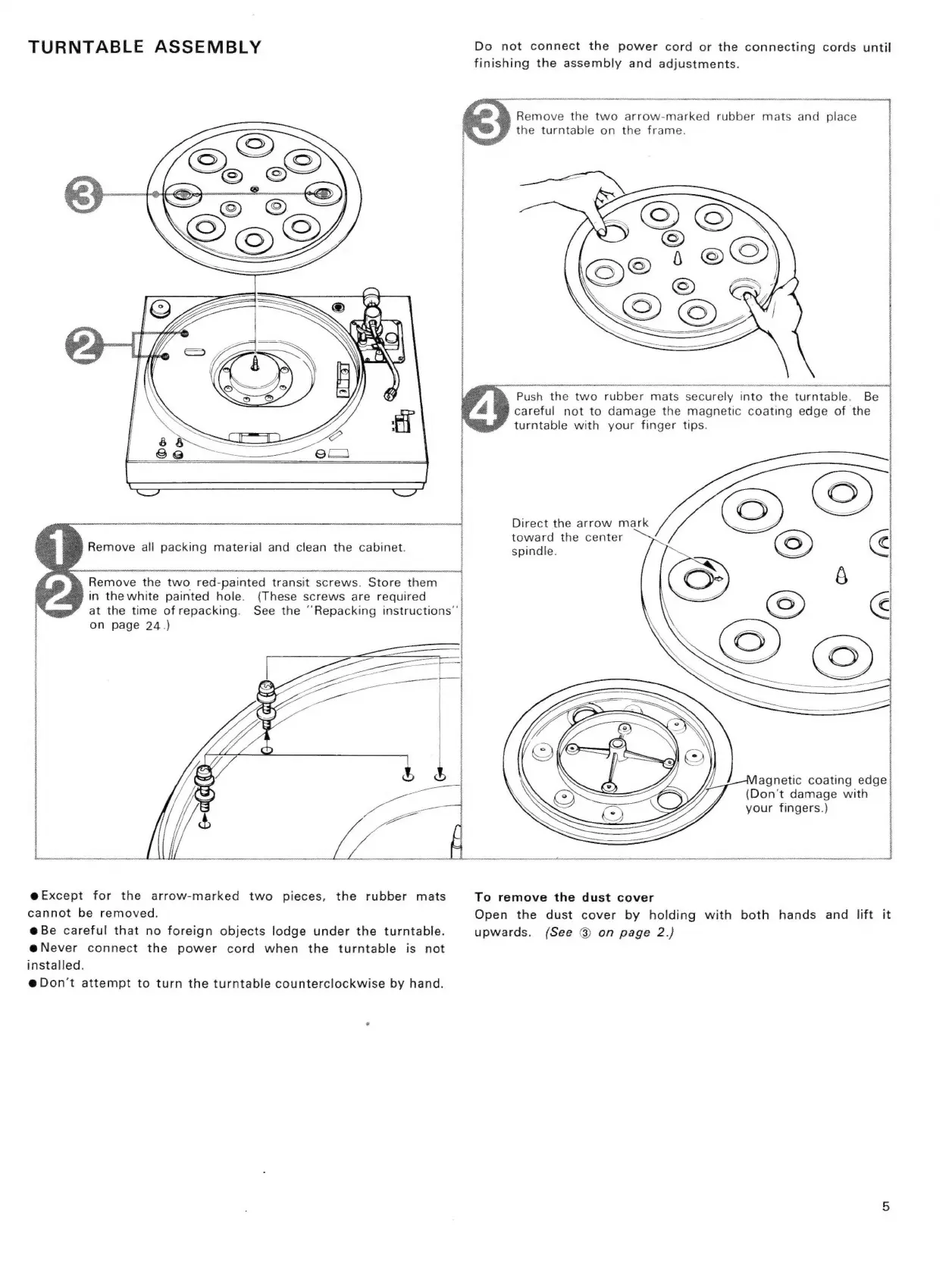
Remove
all
packing
material
and
clean
the
cabinet.
à
Remove
the
two
red-painted
transit
screws.
Store
them
‘in
thewhite
painted
hole.
(These
screws
are
required
at
the
time
of
repacking.
See
the
‘’Repacking
instructions”
on
page
24.)
i
i
|
=
eExcept
for
the
arrow-marked
two
pieces,
the
rubber
mats
cannot
be
removed.
ebe
careful
that
no
foreign
objects
lodge
under
the
turntable.
eNever
connect
the
power
cord
when
the
turntable
is
not
installed.
@
Don't
attempt
to
turn
the
turntable
counterclockwise
by
hand.
|
|
|
H
H
Do
not
connect
the
power
cord
or
the
connecting
cords
until
finishing
the
assembly
and
adjustments.
à
Remove
the
two
arrow-marked
rubber
mats
and
place
‘the
turntable
on
the
frame.
Push
the
two
rubber
mats
securely
into
the
turntable.
Be
careful
not
to
damage
the
magnetic
coating
edge
of
the
turntable
with
your
finger
tips.
Direct
the
arrow
mark
toward
the
center
spindle.
agnetic coating
edge
(Don't
damage
with
your
fingers.)
To
remove
the
dust
cover
Open
the
dust
cover
by
holding
with
both
hands
and
lift
it
upwards.
(See
®
on
page
2.)

Related product manuals