EasyManua.ls Logo

Sony PS-X500 - Page 3

Sony PS-X500
32 pages
Print Icon
To Next Page IconTo Next Page
To Previous Page IconTo Previous Page
Loading...
@
The
turntable
has
resilient
feet
that
isolate
the
mechanism
from
external
shock
and
vibration.
If
the
unit
has
not
been
placed
ona
level
surface,
turn
the
feet
to
level
the
unit.
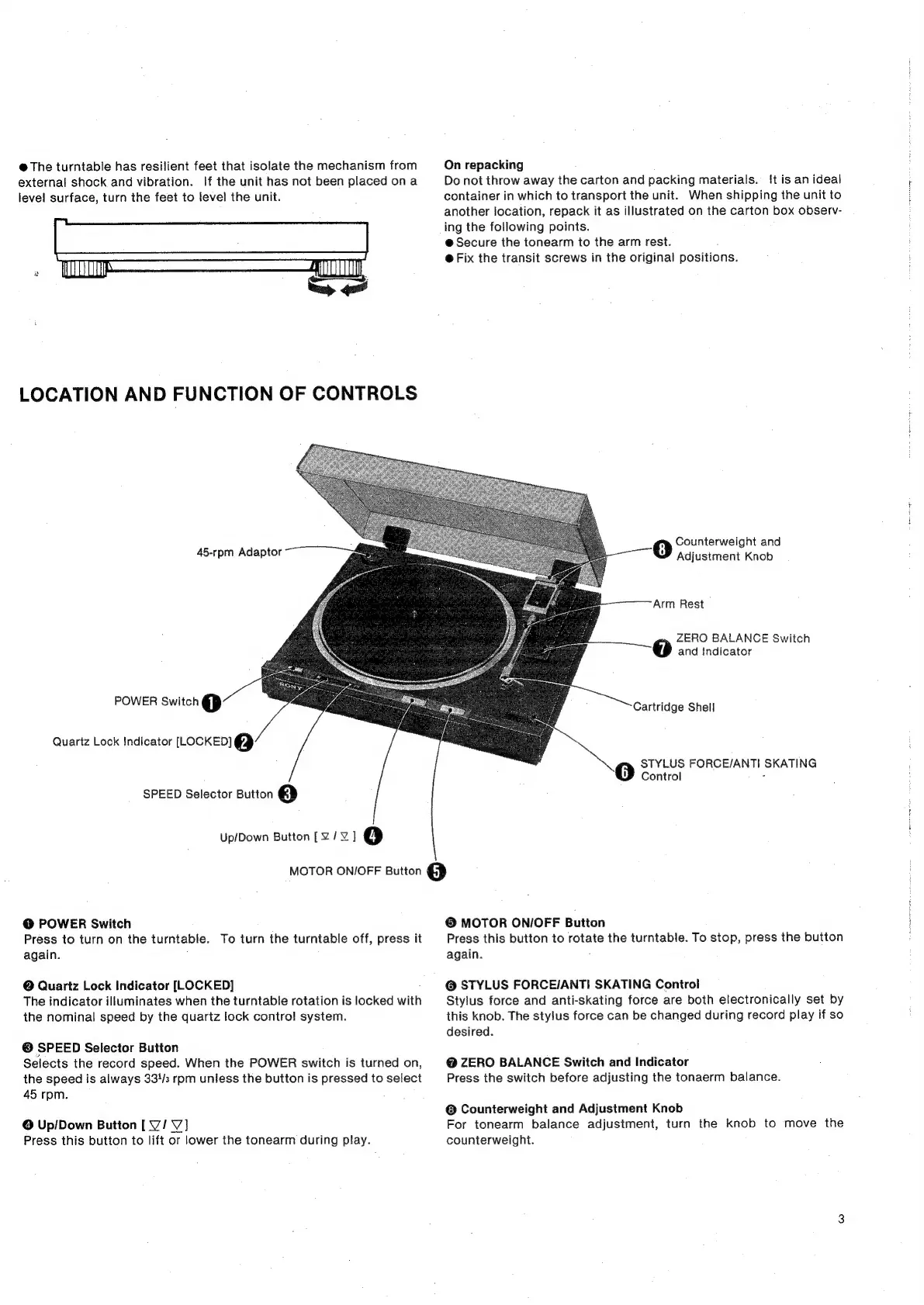
LOCATION
AND
FUNCTION
OF
CONTROLS
45-rpm
Adaptor
~~
POWER
Switch
@
Quartz
Lock
Indicator
[LOCKED]
@
SPEED
Selector
Button
@
Up/Down
Button
[¥Z/¥
]
4)
On
repacking
Do
not
throw
away
the
carton
and
packing
materials.
{tis
an
ideal
container
in
which
to
transport
the
unit.
When
shipping
the
unit
to
another
location,
repack
it
as
illustrated
on
the
carton
box
observ-
ing
the
following
points.
@
Secure
the
tonearm
to
the
arm
rest.
@
Fix
the
transit
screws
in
the
original
positions.
Counterweight
and
Adjustment
Knob
Arm
Rest
ZERO
BALANCE
Switch
and
Indicator
Cartridge
Shell
STYLUS
FORCE/ANTI
SKATING
Control
MOTOR
ON/OFF
Button
@
@
POWER
Switch
Press
to
turn
on
the
turntable.
To
turn
the
turntable
off,
press
it
again.
@
Quartz
Lock
Indicator
[LOCKED]
The
indicator
illuminates
when
the
turntable
rotation
is
locked
with
the
nominal
speed
by
the
quartz
lock
control
system.
@
SPEED
Selector
Button
Selects
the
record
speed.
When
the
POWER
switch
is
turned
on,
the
speed
is
always
334/3
rpm
unless
the
button
is
pressed
to
select
45
rpm.
©
Up/Down
Button
[
V/V]
Press
this
button
to
lift
or
lower
the
tonearm
during
play.
©
MOTOR
ON/OFF
Button
Press
this
button
to
rotate
the
turntable.
To
stop,
press
the
button
again.
@
STYLUS
FORCE/ANTI
SKATING
Control
Stylus
force
and
anti-skating
force
are
both
electronically
set
by
this
knob.
The
stylus
force
can
be
changed
during
record
play
if
so
desired.
@
ZERO
BALANCE
Switch
and
Indicator
Press
the
switch
before
adjusting
the
tonaerm
balance.
©
Counterweight
and
Adjustment
Knob
For
tonearm
balance
adjustment,
turn
the
knob
to
move
the
counterweight.

Related product manuals