26
Playing games
Game compatibility
PlayStation
®
3 format software
Can be played on this system
PlayStation
®
format software
Can be played, but may not always
perform correctly
PlayStation
®
2 format software
Cannot be played on this system
Playing games
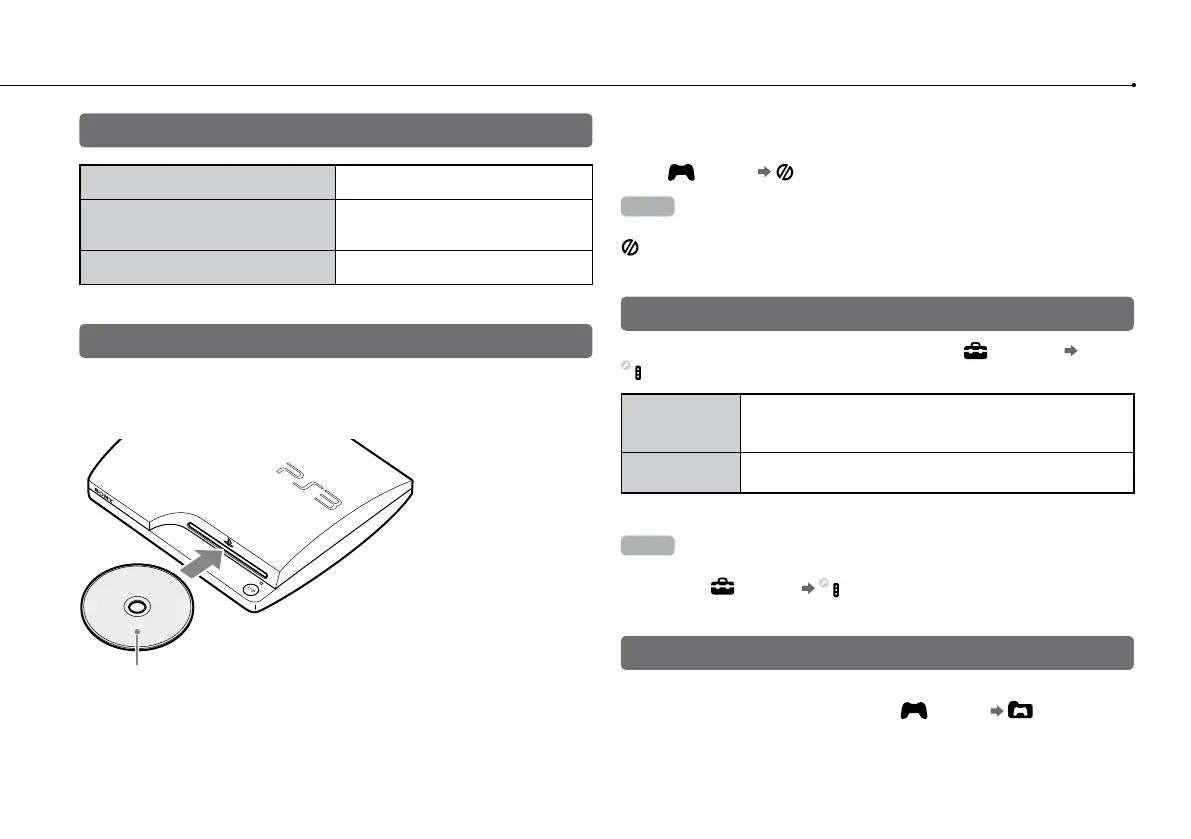
Starting a game
When you insert the disc, the game starts
automatically.
Insert the disc with the
label side facing up.
Quitting a game
During gameplay, press the PS button on the Wireless Controller. Then
select (Game) (Quit Game) to quit the game.
Hint
Depending on the type of software, such as PlayStation
®
format software,
(Quit Game) may not be displayed when the PS button is pressed. In this
case, select [Quit Game] from the screen that is displayed.
Controller settings
You can change controller settings by selecting (Settings)
(Accessory Settings).
Reassign
Controllers
If a controller port or number is specified by the software,
you can use this setting to assign the appropriate controller
port or number.*
Controller
Vibration Function
You can set the vibration function to on or off. It is set to [On]
by default.
* You cannot assign contr
oller port 2-D using this system.
Hint
You can change settings for the controller during gameplay by pressing the PS
button. Select
(Settings) (Accessory Settings) in the XMB
™
screen, or
select [Controller Settings] from the screen that is displayed.
Saved data for PlayStation
®
3 format software
Saved data for PlayStation
®
3 format software is saved on the system’s
hard disk. The data is displayed under (Game) (Saved Data
Utility).






 To Next Page