11
Category
Item
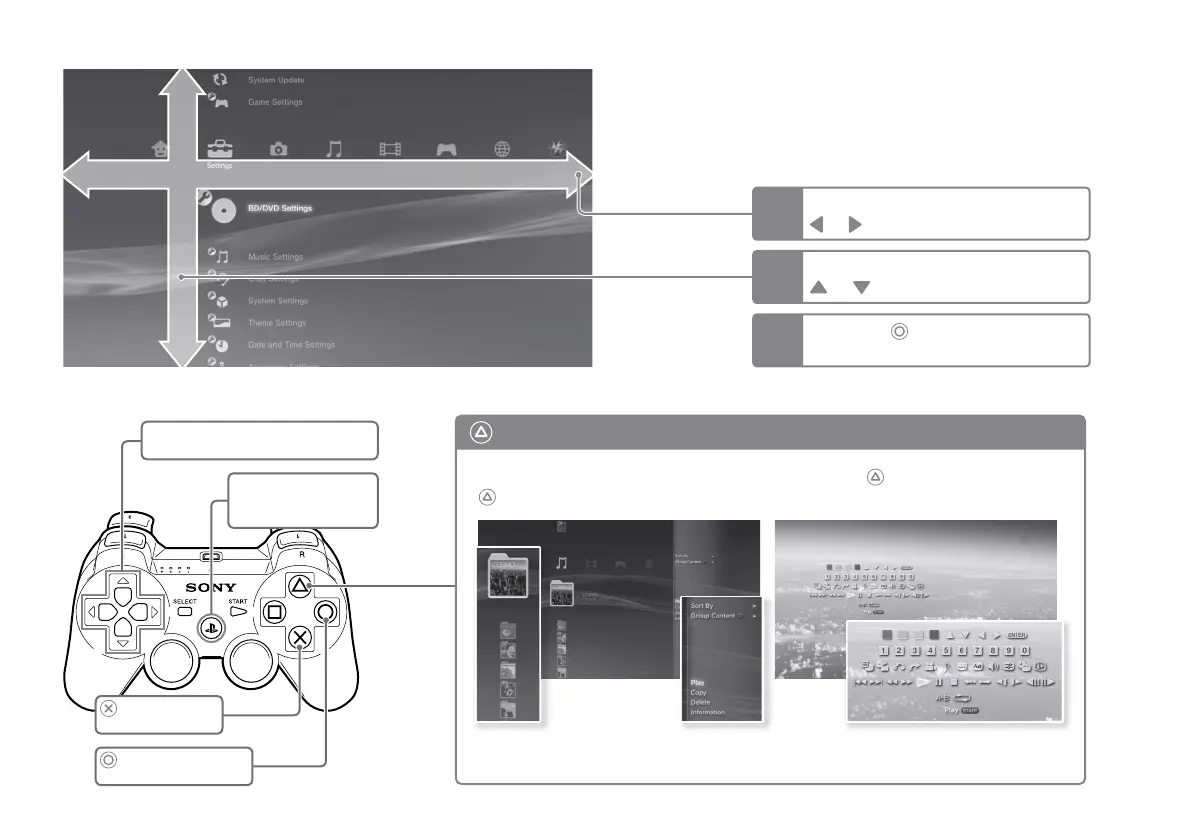
XMB
™
(XrossMediaBar) menu
The PS3™ system includes a user interface called XMB
™
(XrossMediaBar).
1
2
3
Select a category using the
or button.
Select an item using the
or
button.
Press the
button to confirm the
selected item.
button: Displays the options menu/control panel
Icons Options menu
Selecting an icon and pressing the
button will display the options menu.
Pressing the button during content
playback will display the control panel.
Control panel
Directional buttons:
Used to select on-screen categories/items
PS button:
Displays the XMB
™
menu
Turns the system on/off
button:
Confirms the selected item
button:
Cancels an operation






 To Next Page