14
Getting started
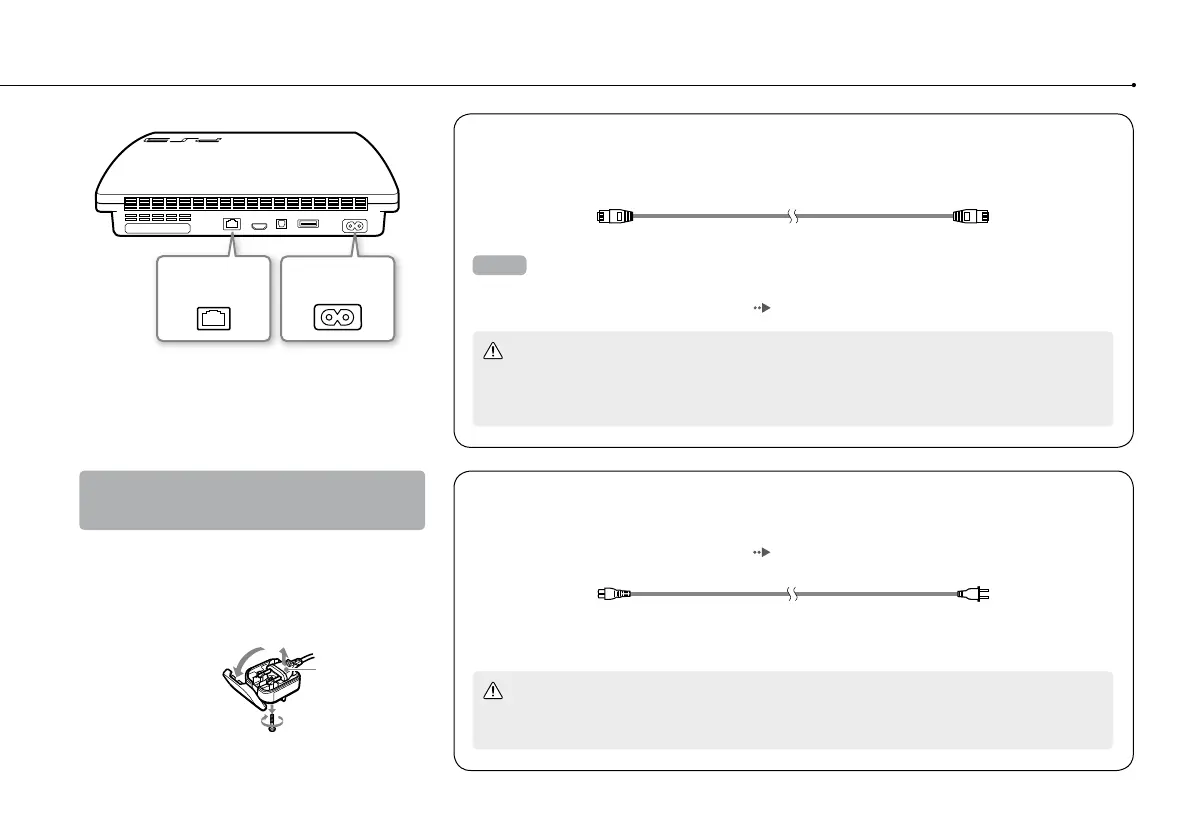
LAN connector AC IN connector
Connect an Ethernet cable (sold separately)
Use an Ethernet cable to connect the system to the Internet.
Hint
You can use a wireless network connection to connect to the Internet without using an Ethernet cable.
For details, see "Adjusting network settings" (
page 28).
Caution
Do not connect a standard telephone line or other types of cords or cables that are not compatible
with the system directly to the LAN connector on the system, as this may cause heat build-up, fire
or malfunction.
Connect the AC power cord
After plugging the AC power cord into the electrical outlet, the power indicator on the
PS3™ system will light up in solid red ( page 21).
Caution
Do not plug the AC power cord for the system into an electrical outlet until you have made all other
connections.
Some regions and countries may use a
different electrical outlet plug from the
one illustrated.
Removing the 3-pin converting adaptor
(CECH-2106A/CECH-2106B only)
Electrical outlet configuration may vary
depending on the region of use. If the plug on
the supplied AC power cord does not match the
electrical outlet, loosen the screw and remove
the converting adaptor.
3-pin converting
adaptor
Mains power
plug






 To Next Page