EasyManua.ls Logo

Sony PT-D3 - Page 11

Sony PT-D3
13 pages
Print Icon
To Next Page IconTo Next Page
To Previous Page IconTo Previous Page
Loading...
A
cassette
deck
to
be
used
for
timer-activated
operation
should
be
equipped
with
a
timer-standby
function.
Be
sure
to
read
the
instruction
manual
of
the
cassette
deck
before
proceeding
with
a
timer-activated
operation.
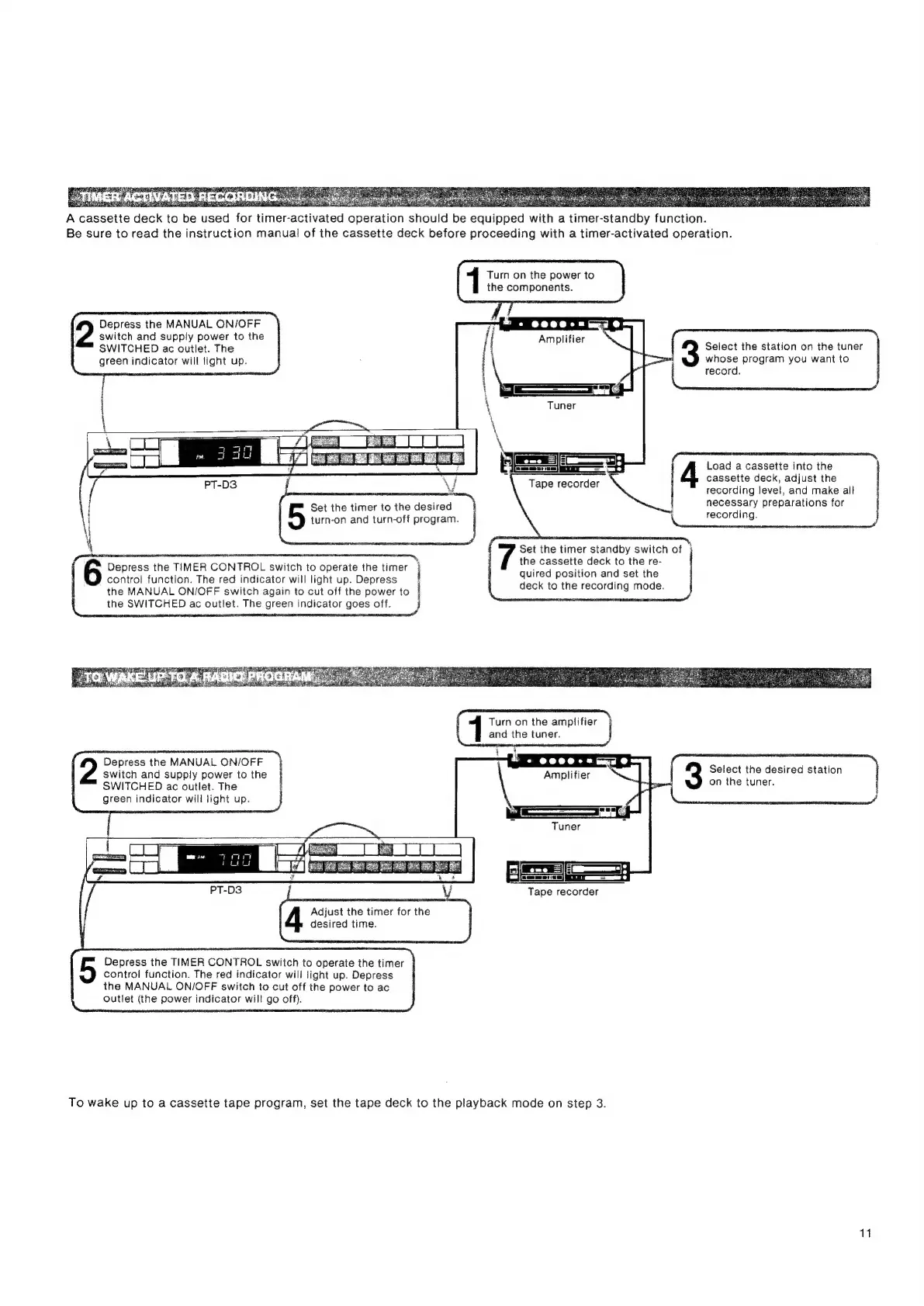
1
Turn
on
the
power
to
the
components.
Depress
the
MANUAL
ON/OFF
2
switch
and
supply
power
to
the
SWITCHED
ac
outlet.
The
green
indicator
will
lignt
up.
Select
the
station
on
the
tuner
whose
program
you
want
to
record.
Load
a
cassette
into
the
cassette
deck,
adjust
the
recording
level,
and
make
all
necessary
preparations
for
j
recording.
j
Set
the
timer
standby
switch
of
the
cassette
deck
to
the
re-
quired
position
and
set
the
deck
to
the
recording
mode.
Tape
recorder
Set
the
timer
to
the
desired
turn-on
and
turn-off
program.
Se
6
Depress
the
TIMER
CONTROL
switch
to
operate
the
timer
j
control
function.
The
red
indicator
will
light
up.
Depress
the
MANUAL
ON/OFF
switch
again
to
cut
off
the
power
to
the
SWITCHED
ac
outlet.
The
green
indicator
goes
off.
Depress
the
MANUAL
ON/OFF
2
switch
and
supply
power
to
the
SWITCHED
ac
outlet.
The
green
indicator
will
light
up.
Select
the
desired
station
on
the
tuner.
Tape
recorder
Adjust
the
timer
for
the
i
desired
time.
Depress
the
TIMER
CONTROL
switch
to
operate
the
timer
control
function.
The
red
indicator
will
light
up.
Depress
the
MANUAL
ON/OFF
switch
to
cut
off
the
power
to
ac
outlet
(the
power
indicator
will
go
off).
To
wake
up
to
a
cassette
tape
program,
set
the
tape
deck
to
the
playback
mode
on
step
3.
11