EasyManua.ls Logo

Sony PT-D3 - Power Source Connection

Sony PT-D3
13 pages
Print Icon
To Next Page IconTo Next Page
To Previous Page IconTo Previous Page
Loading...
EXAMPLES
OF
TIMER
USE
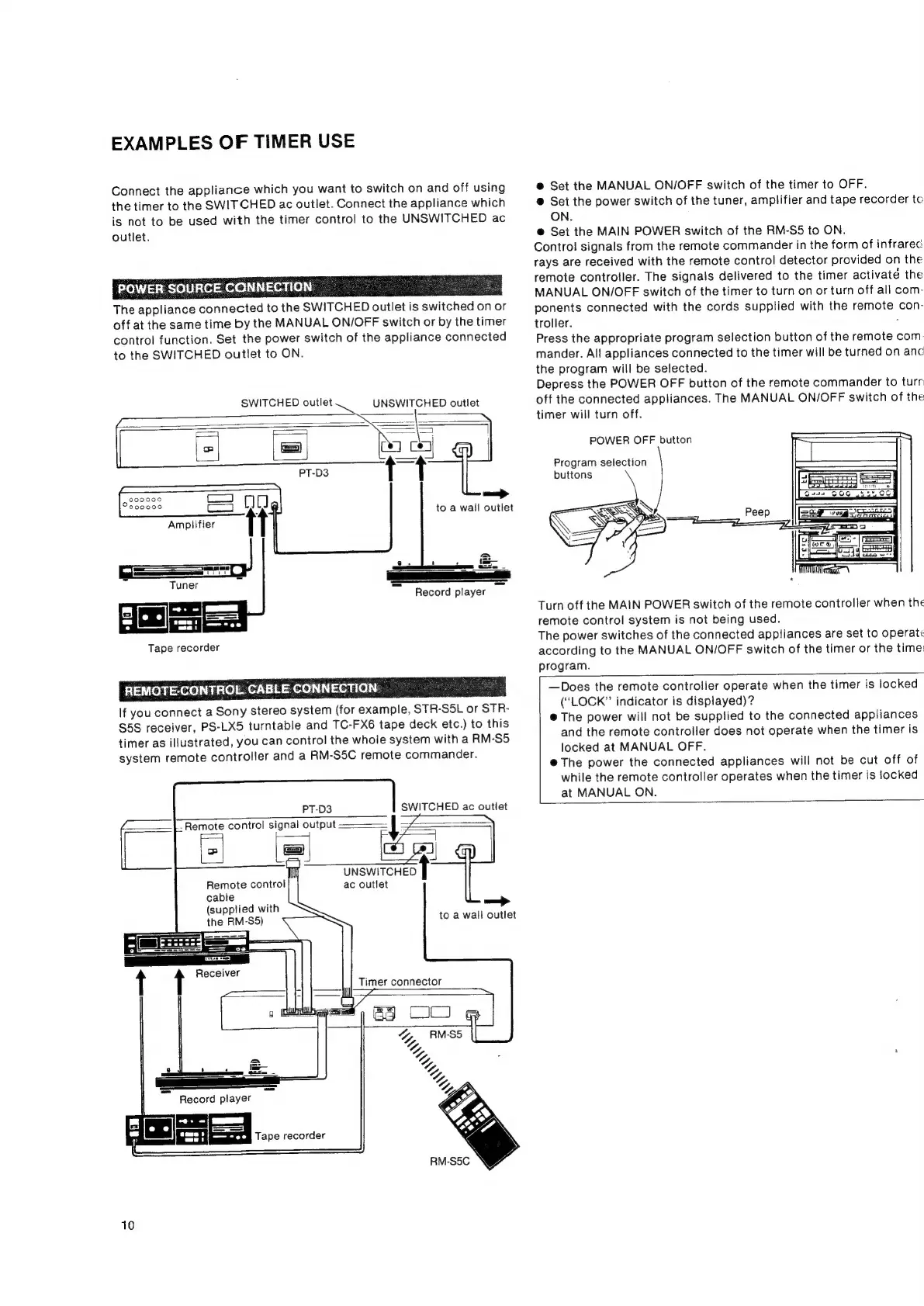
Connect
the
appliance
which
you
want
to
switch
on
and
off
using
the
timer
to
the
SWITCHED
ac
outlet.
Connect
the
appliance
which
is
not
to
be
used
with
the
timer
control
to
the
UNSWITCHED
ac
outlet.
POWER
SOURCE
CONNECTION
The
appliance
connected
to
the
SWITCHED
outlet
is
switched
0
onor
off
at
the
same
time
by
the
MANUAL
ON/OFF
switch
or
by
the
timer
control
function.
Set
the
power
switch
of
the
appliance
connected
to
the
SWITCHED
outlet
to
ON.
SWITCHED
outlet
UNSWITCHED
outlet
9299000
200000
2S
ee
©
Tuner
Record
player
[|
fl
Tape
recorder
REMOTE-CONTROL
CABLE
CONNECTION
If
you
connect
a
Sony
stereo
system
(for
example,
STR-
SL
or
STR-
$5S
receiver,
PS-LX5
turntable
and
TC-FX6
tape
deck
etc.)
to
this
timer
as
illustrated,
you
can
control
the
whole
system
with
a
RM-S5
system
remote
controller
and
a
RM-SSC
remote
commander.
SWITCHED
ac
outlet
af
Z
3
aewneneet
ac
outlet
PT-D3
-
Remote
control
signal
output
Remote
control
cable
(supplied
with
the
RM-S5)
to
a
wall
outlet
Timer
connector
Tape
recorder
10
e@
Set
the
MANUAL
ON/OFF
switch
of
the
timer
to
OFF.
@
Set the
power
switch
of
the
tuner,
amplifier
and
tape
recorder
to
ON.
@
Set the
MAIN
POWER
switch
of
the
RM-S5
to
ON.
Control
signals
from
the
remote
commander
in
the
form
of
infrarec
rays
are
received
with
the
remote
control
detector
provided
on
the
remote
controller.
The
signals
delivered
to
the
timer
activate
the
MANUAL
ON/OFF
switch
of
the
timer
to
turn
on
or
turn
off
all
com-
ponents
connected
with
the
cords
supplied
with
the
Pine
con-
troller.
Press
the
appropriate
program
selection
button
of
the
remote
com
mander.
All
appliances
connected
to
the
timer
will
be
turned
on
anc
the
program
will
be
selected.
Depress
the
POWER
OFF
button
of
the
remote
commander
to
turr
off
the
connected
appliances.
The
MANUAL
ON/OFF
switch
of
the
timer
will
turn
off.
POWER
OFF
button
Program
selection
buttons
Turn
off
the
MAIN
POWER
switch
of
the
remote
controller
when
the
remote
control
system
is
not
being
used.
The
power
switches
of
the
connected
appliances
are
set
to
operate
according
to
the
MANUAL
ON/OFF
switch
of
the
timer
or
the
time
program.
AO
—Does
the
remote
controller
operate
when
the
timer
is
locked
(“LOCK”
indicator
is
displayed)?
@
The
power
will
not
be
supplied
to
the
connected
appliances
and
the
remote
controller
does
not
operate
when
the
timer
is
locked
at
MANUAL
OFF.
@
The
power
the
connected
appliances
will
not
be
cut
off
of
while
the
remote
controller
operates
when
the
timer
is
locked
at
MANUAL
ON.