EasyManua.ls Logo

Sony PT-D3 - Page 13

Sony PT-D3
13 pages
Print Icon
To Previous Page IconTo Previous Page
Loading...
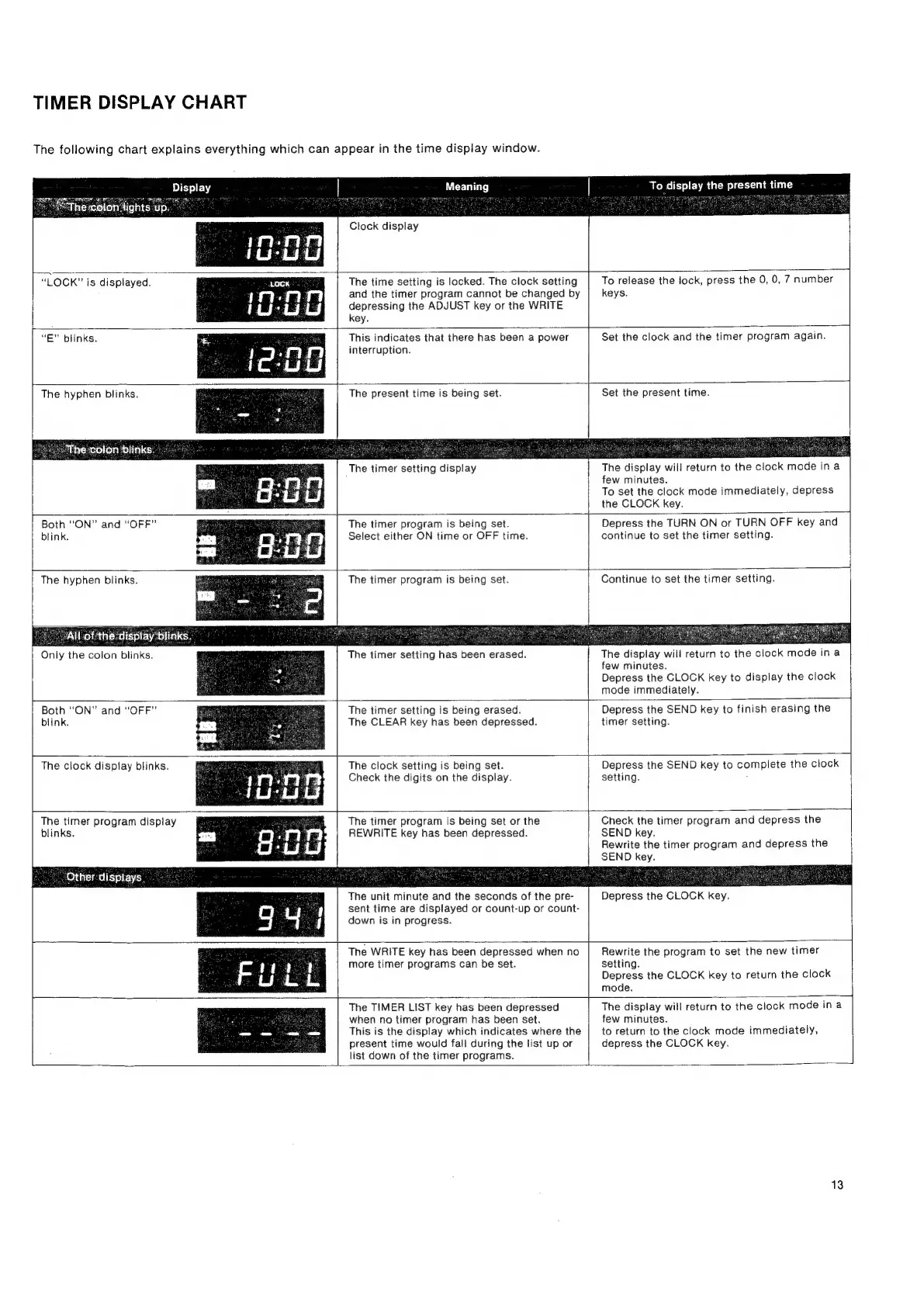
TIMER
DISPLAY
CHART
The
following
chart
explains
everything
which
can
appear
in
the
time
display
window.
Meaning
Clock
display
To
display
the
present
time
}——.
“LOCK”
is
displayed.
The
time
setting
is
locked.
The
clock
setting
and
the
timer
program
cannot
be
changed
by
depressing
the
ADJUST
key
or
the
WRITE
key.
To
release
the
lock,
press
the
0, 0,
7
number
keys.
“E”
blinks.
This
indicates
that
there
has
been
a
power
interruption.
Set
the
clock
and
the
timer
program
again.
The
hyphen
blinks.
fhe
colon
blinks.
us
The
present
time
is
being
set.
The
timer
setting
display
Set
the
present
time.
The
display
will
return
to
the
clock
mode
in
a
few
minutes.
To
set
the
clock
mode
immediately,
depress
the
CLOCK
key.
Both
“ON”
and
“OFF”
blink.
The
timer
program
is
being
set.
Select
either
ON
time
or
OFF
time.
Depress
the
TURN
ON
or
TURN
OFF
key
and
continue
to
set
the
timer
setting.
The
hyphen
blinks.
aM
Allottherd
Only
the
colon
blinks.
The
timer
program
is
being
set.
Continue
to
set
the
timer
setting.
The
timer
setting
has
been
erased.
The
display
will
return
to
the
clock
mode
ina
few
minutes.
Depress
the
CLOCK
key
to
display
the
clock
mode
immediately.
|
Both
“ON”
and
“OFF”
blink.
The
timer
setting
is
being
erased.
The
CLEAR
key
has
been
depressed.
Depress
the
SEND
key
to
finish
erasing
the
timer
setting.
The
clock
display
blinks.
The
clock
setting
is
being
set.
Check
the
digits
on
the
display.
Depress
the
SEND
key
to
complete
the
clock
setting.
.
The
timer
program
display
blinks.
ae
“Other
displays.
The
timer
program
is
being
set
or
the
REWRITE
key
has
been
depressed.
The
unit
minute
and
the
seconds
of
the
pre-
sent
time
are
displayed
or
count-up
or
count-
down
is
in
progress.
Check
the
timer
program
and
depress
the
SEND
key.
Rewrite
the
timer
program
and
depress
the
SEND
key.
Depress
the
CLOCK
key.
The
WRITE
key
has
been
depressed
when
no
more
timer
programs
can
be
set.
Rewrite
the
program
to
set
the
new
timer
setting.
Depress
the
CLOCK
key
to
return
the
clock
mode.
The
TIMER
LIST
key
has
been
depressed
when
no
timer
program
has
been
set.
This
is
the
display
which
indicates
where
the
present
time
would
fall
during
the
list
up
or
list
down
of
the
timer
programs.
The
display
will
return
to
the
clock
mode
ina
few
minutes.
to
return
to
the
clock
mode
immediately,
depress
the
CLOCK
key.
13